Configuration Method of Server's System Environment Settings
The System Environment Settings that are required for the operation of HULFT-HUB Server are categorized by function. On the screen of HULFT-HUB Manager, check that you can view and update the System Environment Settings for HULFT-HUB Server and the settings that you have registered in HULFT-HUB Manager.
For details on each field, refer to System Environment Settings (HULFT-HUB Server).
<Table> Categories of System Environment Settings
| Category Name | Description |
|---|---|
| Environment Settings | Information that is specified during new registration, character code, and directory settings. |
| Operation Settings | Upper limit values for data processing and operation settings that are used if an error occurs. |
| Communication Settings | Settings that are related to communication. |
| Route Settings | Route Information settings that are required to configure a connection between servers. For details, refer to Connection between Networks. |
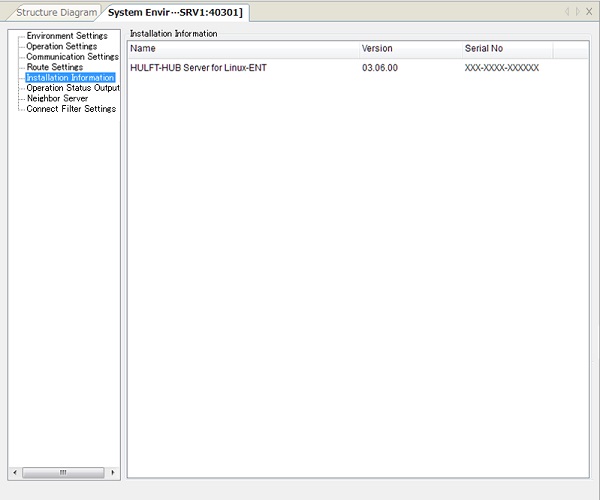
| Installation Information | Version information that is related to HULFT-HUB Server and the information of installed products. |
| Operation Status Output | Settings that are related to troubleshooting HULFT-HUB Server, such as the trace function and the dump function. |
| Neighboring Server | Settings that are related to the Neighboring Server. |
| Connection Filter Settings | Settings for whether to allow login from HULFT-HUB Manager. |
| [Note] | |
| - | The Alternative Settings panel appears only when you specify an alternative server in the Alternative Server Settings, which are explained later. For details, refer to Choice and Setting of Alternative Server. |
| - | The Route Settings panel appears only when you configure a connection between servers. |
| - | The Neighbor Server panel appears only when the Neighboring Server exists. |
The procedure for updating the server's System Environment Settings is as follows:
- In the Structure List or on the Structure Diagram, double-click the server for which you want to update registered information (marked as 1 on the screen below).
- Click the category name to switch the screen. Enter settings for the fields that you want to modify (marked as 2 on the screen below).
- After you complete the modification, click
 on the toolbar (marked as 3 on the screen below).

| [Note] |
If you do not click , the settings of the fields are not saved. Before you complete the modification, if you double-click the server in the Structure List or on the Structure Diagram, the settings before the modification are restored on the screen. |
| [Remarks] | For details on the Route Settings panel, refer to Connection between Networks. |
Environment Settings
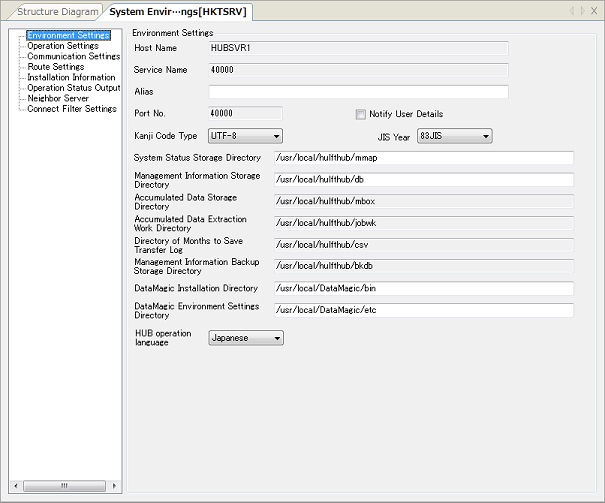
| Field Name | Description | Type | Restriction | Specification |
|---|---|---|---|---|
| Host Name | This field shows the host name of the server. | Alphanumeric characters | Cannot be modified *1 | Mandatory |
| Service Name (ServiceName) | This field shows the service name of the server. | Alphanumeric characters | Cannot be modified *1 | Optional |
| Alias (DispName) | This field specifies the alias of the server that appears on the screen of HULFT-HUB Manager. | Alphanumeric characters | Within 256 bytes | Optional |
| Port No. (HubPortNo) | This field shows the port number that the server uses to communicate with other systems. | Numeric value | Cannot be modified *1 | Mandatory |
| Notify User Details |
Select this checkbox to specify notifying the account information of HULFT-HUB Manager to HULFT-HUB Server. *2 For the operation log of HULFT-HUB Server, the login account for HULFT-HUB Server is stored on User ID (Management screen), and the user ID on the operating system on which HULFT-HUB Manager is operating is stored on User ID (OS). |
- | - | Mandatory |
| Kanji Code Type | This field specifies the Kanji code type of the system on which the server is operating. | - | SHIFT-JIS, ETC, UTF_8 | Mandatory |
| JIS Year (JISType) | This field specifies the JIS year of the Kanji code type of the system on which the server is operating. | - | 78JIS, 83JIS | Mandatory |
| System Status Storage Directory (MMapDir) | This field specifies the directory that stores temporary storage files for transfer statuses, the operating status of the server, and so on. | Alphanumeric characters | Within 128 bytes | Mandatory |
| Management Information Storage Directory (CurrentDBDir) | This field specifies the directory that stores the management information of the server and clients. | Alphanumeric characters | Within 128 bytes | Mandatory |
| Accumulated Data Storage Directory (AccumulateRootDir) | This field shows the directory in which HULFT-HUB Server stores accumulated data. | Alphanumeric characters | Cannot be modified | Mandatory |
| Accumulated Data Extraction Work Directory (AccumulateWorkDir) | This field shows the directory that is used to extract accumulated data in the Job Flow function. *3 | Alphanumeric characters | Cannot be modified | Mandatory |
| Transfer Log File CSV Save Directory | This field shows the directory that stores the records of the Transfer Log in CSV format. *4 | Alphanumeric characters | Cannot be modified | Mandatory |
| Management Information Backup Storage Directory (BackupDBDir) | This field shows the directory that stores backup data of the management information. *4 | Alphanumeric characters | Cannot be modified | Mandatory |
| DataMagic Installation Directory (DataMagicBinDir) | This field specifies the directory that is used to start HULFT-DataMagic in the Job Flow function. *3 | Alphanumeric characters | Within 128 bytes | Optional |
| DataMagic Environment Settings Directory (DataMagicEtcDir) | This field specifies the directory that is used to start HULFT-DataMagic in the Job Flow function. *3 | Alphanumeric characters | Within 128 bytes | Optional |
| HUB Operation Language | This field specifies the language that HULFT-HUB Server uses for outputting a message. *5 | - | Japanese, English | Mandatory |
*1: If you want to modify these fields, remove the server and register it again.
*2: This field appears only when the server is HULFT-HUB Server Ver.2.2.0 or higher.
*3: The settings of these fields are valid only when the server is HULFT-HUB Server-ENT Ver.3.0.0 or higher.
*4: These fields appear only when the server is HULFT-HUB Server Ver.3.0.0 or higher.
*5: This field appears only when the server is HULFT-HUB Server Ver.3.6.0 or higher.
Operation Settings
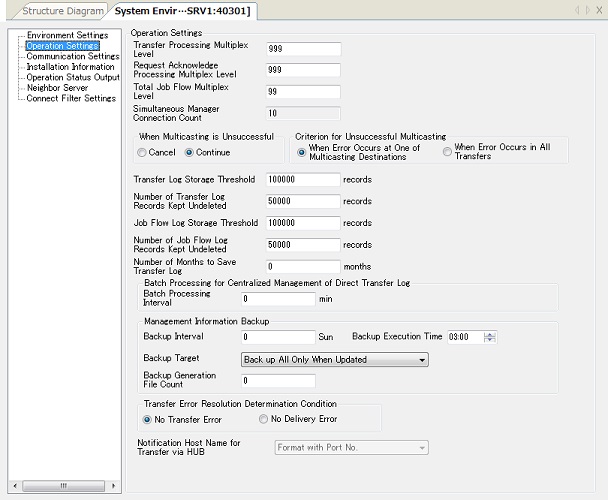
| Field Name | Description | Type | Restriction | Specification |
|---|---|---|---|---|
| Transfer Processing Multiplex Level (TransRlyMax) | This field specifies the maximum number of transfer processing that the server can carry out at the same time. | Numeric value | From 1 to 99999 | Mandatory |
| Request Acknowledge Processing Multiplex Level (ReqRlyMax) | This field specifies the maximum number of the Request Acknowledge service that the server can relay at the same time. | Numeric value | From 1 to 99999 | Mandatory |
| Total Job Flow Multiplex Level (JFProcMax) | This field specifies the maximum number of Job Flows that the server can execute at the same time. *2 | Numeric value | From 1 to 99 | Mandatory |
| Simultaneous Manager Connection Count (MgrConnMax) | This field shows the number of HULFT-HUB Manager users who can connect to the server at the same time. | Numeric value | Cannot be modified *1 | Mandatory |
| When Multicasting is Unsuccessful (MulticastError) | This field specifies how the server behaves if a transfer error occurs. | - | Stop, Continue | Mandatory |
| Criterion for Unsuccessful Multicasting (MulticastErrorCondition) | This field specifies the criterion for sending error notification to the host on the sending side. | - | When Error Occurs at One of Multicasting Destinations, When Error Occurs in All Transfers | Mandatory |
| Transfer Log Storage Threshold (TrnlogThreshold) | This field specifies the maximum number of Transfer Log records that the server can store. Specify '0' to store records of the Transfer Log without any limit on the number of records. | Numeric value | 0, 1 to 999999 (records) | Mandatory |
| Number of Transfer Log Records Kept Undeleted (TrnlogHoldCount) | This field specifies the number of records of the Transfer Log that are kept undeleted when the automatic deletion of records of the Transfer Log is executed. | Numeric value | Value lower than the Transfer Log Storage Threshold | Mandatory |
| Job Flow Log Storage Threshold (JFlogHold) | This field specifies the maximum number of Job Flow log records that the server can store. Specify '0' to store log records of Job Flow without any limit on the number of records. *2 | Numeric value | 0, 1 to 999999 (records) | Mandatory |
| Number of Job Flow Log Records Kept Undeleted (JFlogHoldCount) | This field specifies the number of log records of Job Flow that are kept undeleted when the automatic deletion of log records of the Job Flow is executed. *2 | Numeric value | Value lower than the Job Flow Log Storage Threshold | Mandatory |
| Number of Months to Save Transfer Log as CSV Files (TrnlogCSVHoldCount) | This field specifies the number of months for which the server saves the Transfer Log as CSV files. *3 | Numeric value | From 0 to 99 (months) | Mandatory |
| Batch Processing Interval | This field specifies the time interval for starting batch processing of the Direct Transfer Log. *3 This field corresponds to the Direct Transfer Log Batch Processing Interval in the System Environment Settings (HULFT-HUB Server). |
Numeric value | 0, 5 to 1440 (min.) | Mandatory |
| Backup Interval | This field specifies the time interval for regularly creating backup of the management information. *3 This field corresponds to the Management Information Backup Interval in the System Environment Settings (HULFT-HUB Server). |
Numeric value | From 0 to 99 (days) | Mandatory |
| Backup Execution Time | This field specifies the time when the regular backup of the management information is created. *3 This field corresponds to the Management Information Backup Start Time in the System Environment Settings (HULFT-HUB Server). |
hh:mm | From 00:00 to 23:59 | Mandatory |
| Backup Target | This field specifies the management information that is backed up and the backup conditions. *5 This field corresponds to the Management Information Backup Target in the System Environment Settings (HULFT-HUB Server). |
- | Back up All Only When Updated, Always Back up All, Back up Partially Only When Updated, Always Back up Partially | Mandatory |
| Backup Generation File Count | This field specifies the maximum number of generations of the management information backup files that the server stores. *3 This field corresponds to the Management Information Backup Generation File Count in the System Environment Settings (HULFT-HUB Server). |
Numeric value | From 0 to 99 | Mandatory |
| Transfer Error Resolution Determination Condition (TrnErrorRecoveryCheckType) | This field allows you to select the mode for transfer error correction, where icons of servers on the Structure Diagram are automatically changed to normal icons. *2 | - | No Transfer Error, No Delivery Error | Mandatory |
| Notification Host Name for Transfer via HUB (HostNameNotice) | This field specifies the host name format that is used both for the remote host name in the Host Information that you specify when you define transfer via HULFT-HUB, and for the host name that the server sends to clients during transfer via HULFT-HUB. *4 | - | Cannot be modified *1 | Mandatory |
*1: You can modify these fields on the server. For details, refer to HULFT-HUB Server Manual.
*2: The settings of these fields are effective only when the server is HULFT-HUB Server-ENT Ver.3.0.0 or higher.
*3: These fields appear only when the server is HULFT-HUB Server Ver.3.0.0 or higher.
*4: This field appears only when the server is HULFT-HUB Server-ENT Ver.3.3.0 or higher.
*5: This field appears only when the server is HULFT-HUB Server Ver.3.5.0 or higher.
Communication Settings

| Field Name | Description | Type | Restriction | Specification |
|---|---|---|---|---|
| Client Activity Monitoring Interval (HealthCheckInterval) | This field specifies the time interval for monitoring the operating statuses of Registered Clients. If you specify '0,' the server does not carry out regular polling to monitor the operating statuses. *1 | Numeric value | 0, 10 to 86400 (sec) | Mandatory |
| HUB Manager Communication Encryption Type | This field allows you to select whether or not to encrypt the control information. *2 | - | No Encryption, Use HULFT Encryption Scheme | Mandatory |
| Inter-HUB Server Encryption Type (CipherTypeNeighbor) | This field specifies whether or not to encrypt framed messages that are sent to Neighboring Servers. *3 | - | No Encryption, HULFT Encryption Scheme, C4S Priority, AES Priority | Mandatory |
| Socket Timeout (SocketTimer) | This field specifies the time-out value that the server uses to monitor for the occurrence of a state of no communication after a connection is established. Specify '0' to wait for a response without any time limit. | Numeric value | 0,10 to 259200 (sec) | Mandatory |
| Connect Retry Count (SocketRetryMax) | This field specifies the number of times the server tries to reconnect. If you specify '0,' the server does not try to reconnect. | Numeric value | 0, 1 to 9999 (times) | Mandatory |
| Connect Retry Interval (SocketRetryInterval) | This field specifies the wait time before the server tries to reconnect. | Numeric value | From 0 to 9999 (sec) | Mandatory |
| Server Alive Interval | This field specifies the time interval for monitoring the operating statuses of the Neighboring Server. *4 | Numeric value | 0, 180 to 86400 (sec) | Mandatory |
| *1: | The targets of this monitoring function are HULFT Ver.6 or higher clients. |
| *2: | This field appears only when the server is lower than HULFT-HUB Server Ver.3.9.0. |
| The control information is always encrypted when the server is HULFT-HUB Server Ver.3.9.0 or higher. | |
| *3: | This field appears only when the server is HULFT-HUB Server-ENT Ver.3.0.0 or higher. |
| *4: | This field appears only when the server is HULFT-HUB Server-ENT Ver.3.7.0 or higher. |
Route Settings
| [Note] | The Route Settings screen does not appear when the server is HULFT-HUB Server-L Ver.3. |
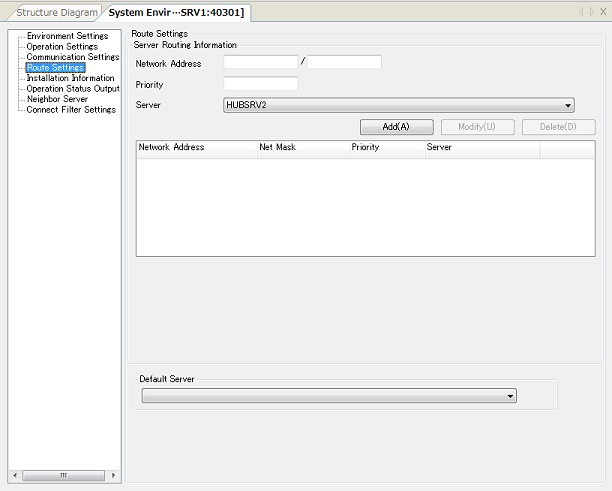
| Field Name | Description | Type | Restriction | Specification | |
|---|---|---|---|---|---|
| Server Routing Information | This section defines the routing table that the server uses to determine other servers that relay the packets that are received from another server or client in a communication between HULFT-HUB Server or between HULFT-HUB Server and a client. | ||||
| Network Address | This field specifies the network address and the net mask of the network in which the neighboring HULFT-HUB Server is installed. | Numeric value *1 | - | Mandatory | |
| Priority | This field specifies the priority for the route. | Numeric value | From 1 to 256 | Mandatory | |
| Server | This field specifies the host name of the neighboring server. | *2 | - | Mandatory | |
| Default Server | This field specifies the host name of the server that is used as a transfer destination if the route that is specified in the Server Routing Information cannot be found. | *2 | - | Optional | |
*1: Specify both the network address and the net mask.
*2: Select an option from each pulldown list on the screen.
Installation Information
Operation Status Output
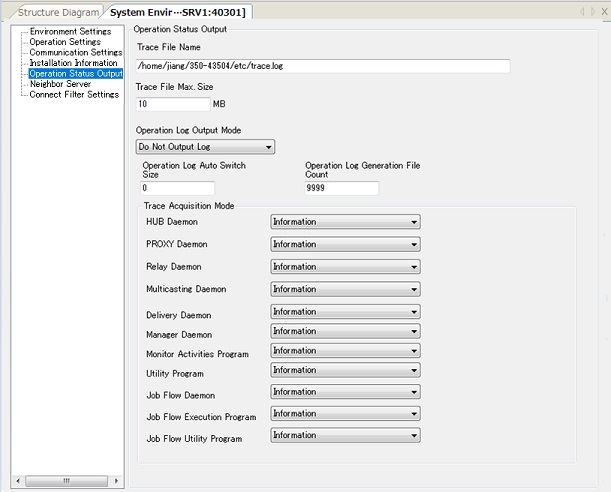
| Field Name | Description | Type | Restriction | Specification | |
|---|---|---|---|---|---|
| Trace File Name (TraceFile) | This field specifies the trace file name in full path. *1 | Alphanumeric characters and symbols | Within 255 bytes | Optional | |
| Trace File Max. Size (TraceMaxSize) | This field specifies the maximum size of the trace file. Specify '0' to accumulate log records in the trace file without any size limit. | Numeric value | 0, 1 to 1024 (MB) | Mandatory | |
| Operation Log Output Mode (OplSelectMode) | This field specifies the output mode of the operation log. *2 | - | Do Not Output Log, Output File Access Log, Output Command Execution Log, Output All | Mandatory | |
| Operation Log Auto Switch Size | This field specifies the size threshold for automatic switching of operation log files. *2 | Numeric value | From 0 to 9999 | Mandatory | |
| Operation Log Generation File Count (OplCycleCount) | This field specifies the generation file count of the operation log. *2 | Numeric value | From 2 to 9999 | Mandatory | |
| Trace Acquisition Mode (TraceMode) | This section provides the pulldown lists for selecting the level of messages that are output. Select a level for each daemon and program. | ||||
| HUB Daemon | This field specifies the trace acquisition mode for the HUB daemon (hubmaind). | - | Do Not Acquire, Fatal Error, Error, Warning, Information | Mandatory | |
| PROXY Daemon | This field specifies the trace acquisition mode for the PROXY daemon (hubpxyd). | ||||
| Relay Daemon | This field specifies the trace acquisition mode for the Relay daemon (hubrlyd). | ||||
| Multicasting Daemon | This field specifies the trace acquisition mode for the Multicasting daemon (hubmctd). | ||||
| Delivery Daemon | This field specifies the trace acquisition mode for the Delivery daemon (hubsndd). | ||||
| Manager Daemon | This field specifies the trace acquisition mode for the Manager daemon (hubmgrd). | ||||
| Monitor Activities Program | This field specifies the trace acquisition mode for the Monitor Activities program. | ||||
| Utility Program | This field specifies the trace acquisition mode for the utility programs. | ||||
| Job Flow Daemon | This field specifies the trace acquisition mode for the Job Flow daemon (jfexecd). *3 | ||||
| Job Flow Execution Program | This field specifies the trace acquisition mode for the Job Flow execution program. *3 | ||||
| Job Flow Utility Program | This field specifies the trace acquisition mode for the Job Flow utility programs. *3 | ||||
*1: If you specify 'Do Not Acquire' for all the fields in the Trace Acquisition Mode, HULFT-HUB Server does not create the trace file.
*2: These fields appear only when the server is HULFT-HUB Server Ver.2.2.0 or higher.
*3: These fields appear only when the server is HULFT-HUB Server-ENT Ver.3.0.0 or higher.
Neighbor Server
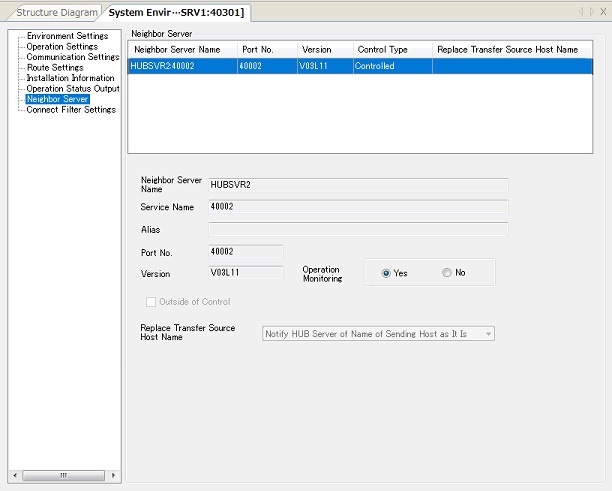
| Field Name | Description | Type | Restriction | Specification |
|---|---|---|---|---|
| Neighbor Server Name | This field shows the host name of the Neighboring Server. | Alphanumeric characters | Cannot be modified | - |
| Service Name | This field shows the service name of the Neighboring Server. | Alphanumeric characters | Cannot be modified | - |
| Alias | This field shows the alias of the Neighboring Server. | Alphanumeric characters |
Can be modified only on a server outside of control Within 256 bytes |
Optional |
| Port No. | This field shows the port number of the Neighboring Server. | Numeric value | Cannot be modified | - |
| Version | This field shows the version of the protocol for communication with the Neighboring Server. | Alphanumeric characters | Cannot be modified | - |
| Operation Monitoring | This field specifies whether to monitor the operating statuses of the Neighboring Server. *1 | - | Yes, No | Mandatory |
| Outside of Control | This check box is selected when the Neighboring Server is a server outside of control. | - | Cannot be modified | - |
| Replace Transfer Source Host Name | Select the host name to be notified as the transfer source when relaying a file transfer from the local server to the Neighboring Server. | *2 |
Can be modified only on a server outside of control Notify HUB Server of Transfer Host Name, Notify HUB Server of Name of Sending Host as It Is |
Mandatory |
*1: This field appears when the server is HULFT-HUB Server Ver.3.8.0 or higher.
*2: Select an option from the pulldown list on the screen.
Connection Filter Settings
| [Note] | The Connection Filter Settings panel appears when the server is HULFT-HUB Server Ver.3.9 or higher. |
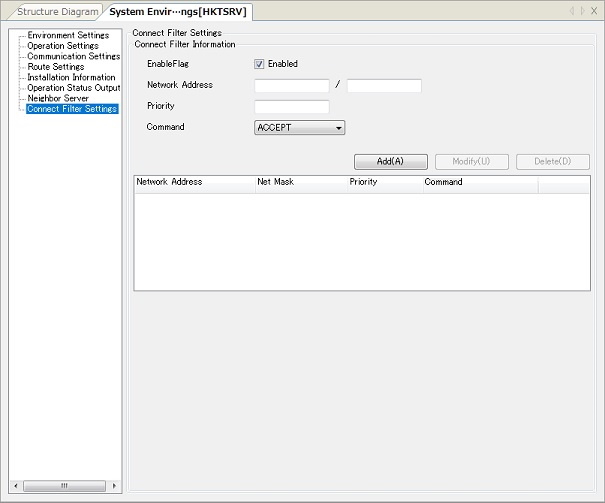
| Field Name | Description | Type | Restriction | Specification |
|---|---|---|---|---|
| EnableFlag | Select this check box to enable the Network Connection Filter Settings for the specified network address. | - | - | Mandatory |
| Network Address | This field specifies both the network address and the net mask for HULFT-HUB Manager from which connections are to be allowed or denied. *1 | Numeric value | - | Mandatory |
| Priority | This field specifies the priority for settings. | Numeric value | From 1 to 99 | Mandatory |
| Command | This field specifies whether to allow or deny a connection if the connection source network address matches the specified network address. | *2 | ACCEPT, REJECT | Mandatory |
*1: If you specify '0.0.0.0/0', either allow or deny is set for all hosts.
*2: Select an option from the pulldown list on the screen.
Example: When you configure the following settings, only a connection from HULFT-HUB Manager with the network address '192.168.10.11/32' is allowed, and connections from any HULFT-HUB Manager with a different network address are denied.
| Network Address | Net Mask | Priority | Command |
|---|---|---|---|
| 192.168.10.11 | 32 | 1 | ACCEPT |
| 0.0.0.0 | 0 | 99 | REJECT |