On the Email page, you can configure whether to send a notification by email in the cases shown below. For notifications regarding applications, you can configure email notifications per profile, in order to receive only the notifications relevant to you.
If you specify to send a notification by email, an email is sent in the following cases:
-
When executing a job fails
-
When a service stops
-
When execution of an application fails (*1)
-
When a native application module (NAM) stops or starts
-
When the threshold configured in Billing in General is exceeded (*2)
*1
:
To receive notification when execution of applications other than native application modules (NAM) fails, you must select General for Jobs - Applications.
*2
:
A notification is sent only once when the threshold is exceeded.
You can also configure whether to send a notification by email when values that are set on the General page are exceeded.
If you specify to send a notification by email, an email is sent once a day when one of the threshold values that are set for fees on the notification page is exceeded.
For more details on what you can send notifications about, refer to Types of notifications and notification destinations.
You can configure the following notification types for each recipient:
-
Jobs
-
Services
-
Billing
-
Japanese and English are supported in email. Emails are sent in the language that was specified at completion of the contract for the organization.
-
Configure your settings to receive emails from "info@hsq.saison-technology.com".
-
When you receive an email, refer to the relevant page for details.
To open the Email page, select  > Notifications > Email in the navigation menu.
For the names and functions of basic UI elements and other items of HULFT Square, refer to the following topic:
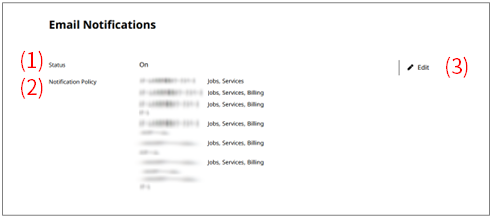
- (1) Status
-
The setting value (On or Off) for notification by email is displayed.
- (2) Notification policy
-
Email recipients and the notification types that you selected are displayed.
- (3) Edit
-
You can edit the settings for notification by email.
-
- Jobs - exc. Applications
-
This setting allows you to receive a notification when a job completes unsuccessfully. Applications are excepted.
- Billing
-
This setting allows you to receive a notification when the threshold for billing is exceeded.
- Services
-
This setting allows you to receive a notification when the services that you select stop.
- Application events (Jobs - Applications)
-
This setting allows you to receive a notification when the applications that you select stop or start.
Select applications and profiles to apply. To receive notifications regarding applications other than NAM applications, select General.