Management Information Batch Registration utility
Reads a parameter file, and updates the management information on HULFT and HULFT-HUB Server.
Usage
utlhubiupdt -f filename [-t] [-c {e | s | 8}]
Explanation of parameters
- -f filename
-
Parameter file name (Mandatory)
Specify the parameter file name in alphanumeric characters of no more than 256 bytes. Specify this field in an absolute path.
- -t
-
Test (Optional)
Performs an integrity check to confirm that the specified file can be loaded without any errors. Therefore, the management information is not updated.
- -c {e | s | 8}
-
Character code (Optional)
Specifies the character code of the parameter file.
If omitted, Kanji Code Type (KnjCode) of the System Environment Settings of HULFT-HUB Server is assumed.
NoteYou can use only '-c 8' (UTF-8) in HULFT-HUB Server for Windows.
If you omit the -c parameter, the code set is automatically determined according to the Windows system locale.
Status code
- 0:
-
The utility was executed successfully.
- 10:
-
The specified options are incorrect.
- 12:
-
Failed to allocate memory.
- 13:
-
A system error occurred.
- 20:
-
There is an invalid value in the management information.
- 30:
-
An error occurred during the Distribution processing.
- 101 or above:
-
An SQL error occurred.
Notes on using the utilities
For details about the operation environment for using the utilities, see Notes on execution of utilities (commands).
Sharing a parameter file with HULFT-HUB Manager
Management information on the client and Transfer Information on the server
If HULFT-HUB Server and HULFT-HUB Manager have the same revision, a parameter file used by the Management Information Batch Registration utility on HULFT-HUB Server and the export file generated by the Collecting and Distributing System Management Information functionality on HULFT-HUB Manager have the same format, and can be shared. However, note the following:
-
Blank line
A blank line is ignored.
-
Comment
A line starting with '#' is regarded as a comment.
Server Management Information
Because you cannot use the Collecting and Distributing System Management Information function of HULFT-HUB Manager to update the management information of the following servers, you cannot use the Collecting and Distributing System Management Information screen to import the following management information included in the parameter files.
-
User Information
-
Business Group Information
-
Business Permission Information
-
Accumulation Environment Settings
Limitation on the administrator user
You cannot delete the administrator user (administrator).
You cannot change the settings of the administrator user (administrator).
Output example
   IMPORT
          ######################################################################### 1)
   DIST
2) 0001/0002 HOST01:v72(New York Branch Office) 3)
   4) 200 ######################################################################### 5)
   0002/0002 HOST02:v72(San Francisco Branch Office)
      200 #########################################################################
   RESULT
   HOST01:v72(New York Branch Office) 3)
   SEND 0000:0000 2015/12/11 11:13:21 Update TEST0001
   SEND 0000:0000 2015/12/11 11:13:21 Update TEST0002
   SEND 0000:0000 2015/12/11 11:13:22 Update TEST0003
   SEND 0000:0000 2015/12/11 11:13:22 Update TEST0004
   SEND 0000:0000 2015/12/11 11:13:22 Update TEST0005
   SEND 0000:0000 2015/12/11 11:13:22 Update TEST0006
   SEND 0000:0000 2015/12/11 11:13:22 Delete SAMPLE
    6) :    7)              8)         9)    10)
Figure 3.40 Output example of the Management Information Batch Registration utility
IMPORT
       #######                                                                   11)
The specified value is invalid.,Row Number: 571,Host Name: HOST01,Service Name: v7,
Management Information Type: SEND,ID:AC,Field Name: TransferType,Field 12)
Value: C
ERROR: The specified value is invalid.,Row Number: 572,Host Name: HOST01,Service
Name: v7,Management Information Type: SEND,ID:AD,Field Name: TransferType,Field
Value: D
Figure 3.41 Output example of the Management Information Batch Registration utility (when parameter file is invalid)
Displayed fields
The following table lists and describes the fields shown in the output example.
|
No. |
Description |
|---|---|
|
1 |
Read status of the parameter file The number of '#' increases as the processing proceeds. 73 characters represent 100%. |
|
2 |
Host number of the distribution destination/Total number of hosts |
|
3 |
Distribution destination host The host is displayed in the format 'host-name:service-name(alias)'. |
|
4 |
Number of pieces of management information |
|
5 |
Distribution status The number of '#' increases as the processing proceeds. 73 characters represent 100%. |
|
6 |
Type of distributed management information (See Table 3.41 ) |
|
7 |
Status code: Detail code (See Table 3.42 ) |
|
8 |
Date and time when the update or deletion completed |
|
9 |
Update type 'Update' or 'Delete' |
|
10 |
ID or host name of the updated or deleted management information |
Table 3.41 Management information type of the distribution status
|
SEND |
Send Management Information |
|
RECV |
Receive Management Information |
|
TGRP |
Transfer Group Information |
|
HOST |
Host Information |
|
JOB |
Job Management Information |
|
FMT |
Format Information |
|
MFMT |
Multi Format Information |
|
|
Mail linkage information |
|
SCH |
Schedule information |
|
TRG |
File Trigger Information |
|
TRAN |
Transfer Information |
|
USER |
User information |
|
BGRP |
Business Group |
|
AUTH |
Business Permission Information |
|
THST |
Transfer Destination Host Information |
|
HMB |
Accumulation Environment Settings |
|
CFIL |
Network Connection Filter Information |
|
Status code |
Detail code |
Cause of the error |
Measure |
|---|---|---|---|
|
0001 |
XXXX |
An error occurred while processing on HULFT. |
Take measures according to Status codes and detail codes of hubmgrd in Various codes. |
|
0005 |
|||
|
0006 |
|||
|
0011 |
|||
|
0012 |
|||
|
0013 |
|||
|
0014 |
|||
|
0015 |
|||
|
0016 |
XXXX |
An error occurred while processing on HULFT. |
Take measures according to Status codes and detail codes of hubmgrd in Various codes. |
|
0017 |
|||
|
0018 |
|||
|
0022 |
|||
|
0023 |
|||
|
8000 |
|||
|
8001 |
|||
|
8003 |
|||
|
9998 |
|||
|
9999 |
XXXX |
A system error occurred on HULFT-HUB Server. The Detail code indicates the processing in which a system error was detected. |
The system is unstable. Restart HULFT-HUB Server. |
|
No. |
Description |
|
|---|---|---|
|
11 |
Read status of the parameter file The number of '#' increases as the processing proceeds. 73 characters represent 100%. |
|
|
12 |
Error messages (See Table 3.48 ) |
|
|
Row Number |
The Row Number of the management information that encountered an error |
|
|
Host Name |
The distribution destination host name of the management information for which an error was found. |
|
|
Service Name |
The service name of the distribution destination host of the management information for which an error was found. |
|
|
Management Information Type |
The management information type of the management information that encountered an error (See Table 3.49 ) |
|
|
ID |
ID or host name of the management information that encountered an error |
|
|
Field Name |
Field name of the management information that encountered an error |
|
|
Field Value |
Field value of the management information that encountered an error |
|
|
No. |
Description |
|
|---|---|---|
|
11 |
Read status of the parameter file The number of '#' increases as the processing proceeds. 73 characters represent 100%. |
|
|
12 |
Error messages (See Table 3.48 ) |
|
|
Row Number |
The Row Number of the management information that encountered an error |
|
|
Host Name |
The distribution destination host name of the management information for which an error was found. |
|
|
Service Name |
The service name of the distribution destination host of the management information for which an error was found. |
|
|
Management Information Type |
The management information type of the management information that encountered an error (See Table 3.49 ) |
|
|
ID |
ID or host name of the management information that encountered an error |
|
|
Field name |
Field name of the management information that encountered an error |
|
|
Field Value |
Field value of the management information that encountered an error |
|
|
Key Information |
Key information of the management information that encountered an error |
|
Table 3.45 Displayed fields of the Management Information Batch Registration utility (when the management information type is in error)
|
No. |
Description |
|
|---|---|---|
|
11 |
Read status of the parameter file The number of '#' increases as the processing proceeds. 73 characters represent 100%. |
|
|
12 |
Error messages (See Table 3.48 ) |
|
|
Row Number |
The Row Number of the management information that encountered an error |
|
|
Field Name |
Field name of the management information that encountered an error |
|
|
No. |
Description |
|
|---|---|---|
|
11 |
Read status of the parameter file The number of '#' increases as the processing proceeds. 73 characters represent 100%. |
|
|
12 |
Error messages (See Table 3.48 ) |
|
|
Row Number |
The Row Number of the management information that encountered an error |
|
|
Management Information Type |
The management information type of the management information that encountered an error (See Table 3.49 ) |
|
|
No. |
Description |
|
|---|---|---|
|
11 |
Read status of the parameter file The number of '#' increases as the processing proceeds. 73 characters represent 100%. |
|
|
12 |
Error messages (See Table 3.48 ) |
|
|
Row Number |
The Row Number of the management information that encountered an error |
|
|
Host Name |
The distribution destination host name of the management information for which an error was found. |
|
|
Service Name |
The service name of the distribution destination host of the management information for which an error was found. |
|
|
Management Information Type |
The management information type of the management information that encountered an error (See Table 3.49 ) |
|
|
ID |
ID or host name of the management information that encountered an error |
|
|
Status |
Message(*1) |
|---|---|
|
When the fields are in error |
ERROR: An invalid client for distribution has been specified. |
|
ERROR: The specified value length is invalid. |
|
|
ERROR: The specified value is invalid. |
|
|
ERROR: Multiple identical Management Information IDs are specified. |
|
|
ERROR: A new entry cannot be registered, because the management information already exists. |
|
|
WARNING: Deletion is not possible, because the management information does not exist. |
|
|
ERROR: The specified Business Group does not exist. |
|
|
ERROR: The values in columns 2 to 4 of the master and slave records are not identical. |
|
|
When the integrity is in error |
ERROR: Slave has not been specified. |
|
When the management information type is in error |
ERROR: The management information type is invalid. |
|
When the number of fields is in error |
ERROR: The number of fields in the CSV file is insufficient. |
|
ERROR: Registration of the entry is not possible, because the Slave Max. Number has been reached. |
|
|
ERROR: The format of the CSV file is invalid. |
|
|
In other errors |
ERROR: The entry cannot be registered due to a system error. |
|
ERROR: The entry cannot be registered due to a database access error. |
|
*1 |
: |
A message that starts with 'ERROR' represents an error. A message that starts with 'WARNING' is a warning. A warning does not influence the Status code. |
Table 3.49 Management information type when the parameter file is in error
|
SEND |
Send Management Information |
|
RECV |
Receive Management Information |
|
TGRP |
Transfer Group Information Master |
|
TGRP(S) |
Transfer Group Information Slave |
|
HOST |
Host Information |
|
JOB |
Job Management Information Master |
|
JOB(S) |
Job Information Slave |
|
FMT |
Format Information Master |
|
FMT(S) |
Format Information Slave |
|
MFMT |
Multi Format Information Master |
|
MFMT(S) |
Multi Format Information Slave |
|
|
Mail linkage information |
|
SCH |
Schedule Information |
|
TRG |
File Trigger Information |
|
TRAN |
Transfer Information |
|
TCON |
Transfer Conditions |
|
USER |
User information |
|
BGRP |
Business Group |
|
AUTH |
Business Permission Information |
|
THST |
Transfer Destination Host Information |
|
HMB |
Accumulation Environment Settings |
|
CFIL |
Network Connection Filter Information |
Re-distribution when distribution error occurs
If an error occurs during the Distribute processing, a parameter file for Re-distribution is created in the same directory as the parameter file.
After you removed the cause of the error, specify the parameter file for Re-distribution as a parameter file for the Management Information Batch Registration utility, to execute Re-distribution.
Note that this file will not be created when the error occurs during the integrity check of the field values.
If Accumulation Environment Settings are included in the parameter file for redistribution, you cannot use the parameter file as the parameters of the Management Information Batch Registration utility as is. Separately process Accumulation Environment Settings and other management information as shown in the following cases.
-
When redistributing Accumulation Environment Settings
Based on the parameter file you specified first, create a file in which only the Accumulation Environment Settings included in the parameter file for redistribution are described. Then, specify that file to execute the Management Information Batch Registration utility.
-
When redistributing Management Information that is not Accumulation Environment Settings
Create a file that is based on the parameter file for redistribution from which the Accumulation Environment Settings were deleted. Then, specify that file to execute the Management Information Batch Registration utility.
Naming conventions of a parameter file for Re-distribution
parameter-file-name-sequence-number.csv
The sequence number uses the following series of number and starts from 0.
0, 1, 2, ......, 9, a, b, ......, z
The following shows an operation example when performing Re-distribution on Linux.
>utlhubiupdt -f test.csv
IMPORT
      ##########################################################################
DIST
0001/0001 SMPLHOST:SMPLSVNAME
 000001 ########################################################################
RESULT
0001 SMPLHOST:SMPLSVNAME
 SEND 0000:0000 2011/01/17 18:36:06 Update SMPLSND1
 SEND 8001:8999 2011/01/17 18:36:06 Update SMPLSND2
0082E, command (utlhubiupdt) terminated unsuccessfully. Termination code: 30

>ls
test-0.csv

>utlhubiupdt -f test-0.csv
IMPORT
      ##########################################################################
DIST
0001/0001 SMPLHOST:SMPLSVNAME
 000001 ########################################################################
RESULT
0001 S00387:V7
 SEND 0000:0000 2011/01/17 18:52:08 Update SMPLSND2

>
Screen 3.1 Operation when performing Re-distribution (Linux)
Description Format of Parameter Files
The parameter file is in a CSV format. Double quotation marks (") are used as Enclosed Characters and commas (,) are used as Separators.
-
Double quotation marks (") can be omitted as text enclosures.
However, if the data includes any double quotation marks or commas (,), they cannot be omitted. Furthermore, to ensure that double quotation marks are displayed in the data as is, enter two contiguous double quotation marks ("") for each double quotation character that is to be displayed in the data.
-
The leading spaces and middle spaces of items are read as is, but trailing spaces are truncated.
The following header is output in the first line:
"BATCH DISTRIBUTION FILE: HULFT-HUB SERVER VER.3.6"
The second line and onward contains parameters for each host and for each management information type. In each Management Information Block, the management information is output in a one-item-per-line basis with a title line at the top.
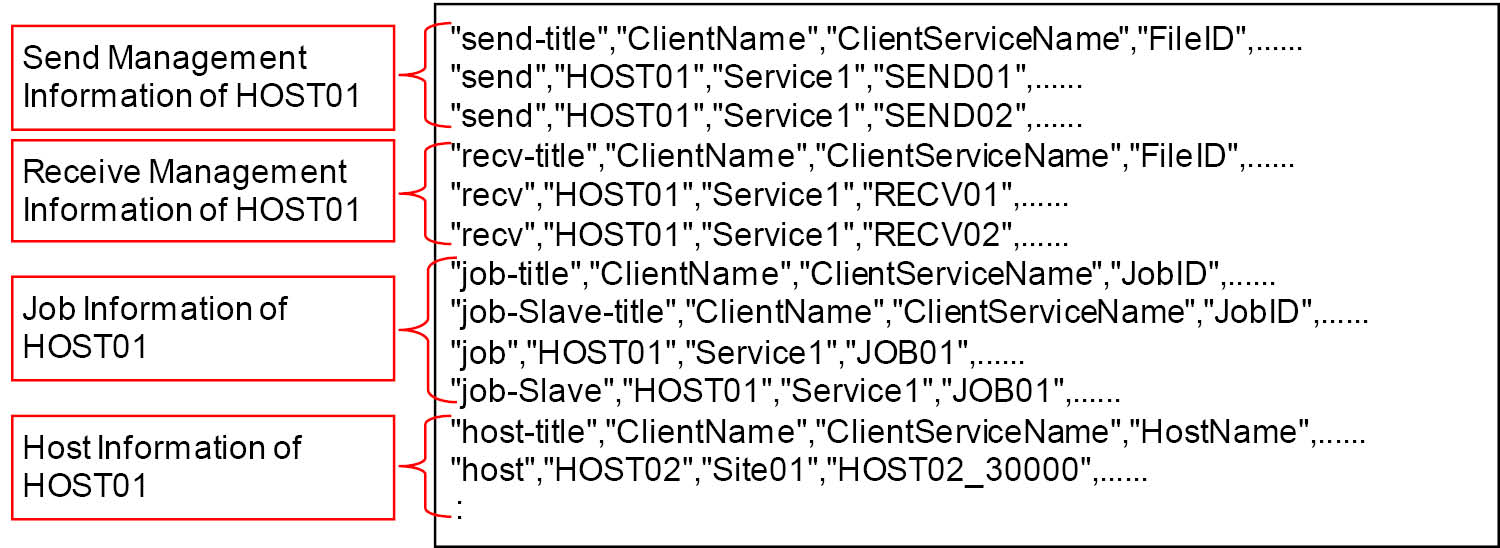
Figure 3.42 Output format of the parameters
For details about the setting values for each fields of management information on the client and Transfer Information on the server, see the online help provided by HULFT-HUB Manager.
For the setting values for User Information, Business Group Information, Business Permission Information, and Accumulation Environment Settings, see User Information, Business Group Information, Business Permission Information, and Accumulation Environment Settings.
-
When the parameter file is described in the format for HULFT-HUB Server Ver.3.1 or higher, you can use the parameter file described in the format of any version. If you use a lower-level parameter file, do not change the first line header. The header must remain as it was when the parameter file was generated.
-
A parameter file without title lines for each type of the management information is still usable.
Processing Mode
Processing Mode included in each output field of management information described in 2) and beyond represents an operation on the management information. There are four Processing Modes: 'U', 'A', 'D', and 'X'.
- U:
-
Update
If there is management information with the same ID as the specified ID, the management information is updated.
- A:
-
New creation
If there is management information with the same ID as the specified ID, a warning message is displayed and the information is not registered.
- D:
-
Delete
No message is displayed even when the specified ID does not exist.
- X:
-
Confirmation delete
Displays a warning message when the specified ID does not exist.
Send Management Information
Send Management Information consists of 50 columns. The first line is the title line.
The setting values for the following information are output in the second line and onward. Also, "send" is always output as the value in the first column.
|
Column |
Title (English) |
|---|---|
|
1 |
send-title |
|
2 |
ClientName |
|
3 |
ClientServiceName |
|
4 |
FileID |
|
5 |
DispName |
|
6 |
SendFileNameUX |
|
7 |
SendFileNameNT |
|
8 |
SendFileNameAS |
|
9 |
DataSetName |
|
10 |
Volume |
|
11 |
TransferType |
|
12 |
Comment |
|
13 |
Priority |
|
14 |
Interval |
|
15 |
TransferBlockCount |
|
16 |
TransferBlockLength |
|
17 |
CompressionPreference |
|
18 |
DatabaseID |
|
19 |
NormalJobID |
|
20 |
CodeType |
|
21 |
Capacity |
|
22 |
FirstExtent |
|
23 |
Secondary |
|
24 |
TransferGroupID |
|
25 |
MultiFormatID |
|
26 |
AbnormalJobID |
|
27 |
CodeChange |
|
28 |
WorkVolume |
|
29 |
FileClear |
|
30 |
CodeKey |
|
31 |
Exchanger |
|
32 |
TransferMethod |
|
33 |
UnitQuantity |
|
34 |
EBCDICSet |
|
35 |
CompressLevelUX |
|
36 |
CompressLevelNT |
|
37 |
ShiftCodeTypeMF |
|
38 |
ShiftCodeTypeUX |
|
39 |
ShiftCodeTypeNT |
|
40 |
ShiftCodeTypeAS |
|
41 |
FrontJob |
|
42 |
MailID |
|
43 |
EndCharCutMF |
|
44 |
EndCharCutAS |
|
45 |
Unit |
|
46 |
OrderNumber |
|
47 |
SndRdw |
|
48 |
DEFLATELevel |
|
49 |
BusinessGroupID |
|
50 |
ProcessMode |
Receive Management Information
Receive Management Information consists of 55 columns. The first line is the title line.
The setting values for the following information are output in the second line and onward. Also, "recv" is always output as the value in the first column.
|
Column |
Title (English) |
|---|---|
|
1 |
recv-title |
|
2 |
ClientName |
|
3 |
ClientServiceName |
|
4 |
FileID |
|
5 |
DispName |
|
6 |
ReceiveFileNameUX |
|
7 |
ReceiveFileNameNT |
|
8 |
ReceiveFileNameAS |
|
9 |
DataSetName |
|
10 |
Volume |
|
11 |
Capacity |
|
12 |
FirstExtent |
|
13 |
Secondary |
|
14 |
EntryMode |
|
15 |
AbnormalProcess |
|
16 |
Permission |
|
17 |
RecordType |
|
18 |
RecordLengthMF |
|
19 |
RecordLengthAS |
|
20 |
TransferType |
|
21 |
BlockLength |
|
22 |
NormalJobID |
|
23 |
ReceiveType |
|
24 |
Comment |
|
25 |
TransferGroupID |
|
26 |
FormatID |
|
27 |
AbnormalJobID |
|
28 |
History |
|
29 |
History2UX |
|
30 |
History2NT |
|
31 |
History2AS |
|
32 |
CodeKey |
|
33 |
Owner |
|
34 |
GroupName |
|
35 |
EBCDICSet |
|
36 |
ReceiveFinishedNotice |
|
37 |
Release |
|
38 |
Unit |
|
39 |
OrderNumber |
|
40 |
WorkVolume |
|
41 |
MultiVolumeType |
|
42 |
PrintingCharacter |
|
43 |
TreatmentBetweenMainframe |
|
44 |
NumberOfHistoryUX |
|
45 |
NumberOfHistoryNT |
|
46 |
NumberOfHistoryAS |
|
47 |
MailID |
|
48 |
Exchanger |
|
49 |
StorageClass |
|
50 |
ManagementClass |
|
51 |
DataClass |
|
52 |
DataVerify |
|
53 |
RcvRdw |
|
54 |
BusinessGroupID |
|
55 |
ProcessMode |
Job Information
The Job Information consists of two types of records: Job Information Master and Job Information Slave.
For a single Job ID, the columns from 2 to 4 must have identical values between the Master and Slave. The values in the columns 2 to 4 are used to link the Master with Slave.
Job Information Master
The Job Information Master is a basic part of the Job Information. This part is output only one time for a single Job ID.
It consists of 12 columns. The first line is the title line.
The setting values for the following information are output in the second line and onward. Also, "job" is always output as the value in the first column.
|
Column |
Title (English) |
|---|---|
|
1 |
job-title |
|
2 |
ClientName |
|
3 |
ClientServiceName |
|
4 |
JobID |
|
5 |
DispName |
|
6 |
JCLLibrary |
|
7 |
JobDescription |
|
8 |
Comment |
|
9 |
JobRC |
|
10 |
HostType |
|
11 |
BusinessGroupID |
|
12 |
ProcessMode |
Job Information Slave
The Job Information Slave contains information for each job. For a single Job ID, the information is output repeatedly for the number of jobs included in the Job ID (at the maximum of 99 jobs).
It consists of 5 columns. The first line is the title line.
The setting values for the following information are output in the second line and onward. Also, "job-Slave" is always output as the value in the first column.
|
Column |
Title (English) |
|---|---|
|
1 |
job-Slave-title |
|
2 |
ClientName |
|
3 |
ClientServiceName |
|
4 |
JobID |
|
5 |
JobName |
Host Information
Host Information consists of 78 columns. The first line is the title line.
The setting values for the following information are output in the second line and onward. Also, "host" is always output as the value in the first column.
|
Column |
Title (English) |
|---|---|
|
1 |
host-title |
|
2 |
ClientName |
|
3 |
ClientServiceName |
|
4 |
HostName |
|
5 |
DispName |
|
6 |
HostType |
|
7 |
KanjiCodeType |
|
8 |
ReceivePortNo |
|
9 |
OBSPortNo |
|
10 |
Comment |
|
11 |
JISYear |
|
12 |
JunctionType |
|
13 |
DomainName |
|
14 |
ProxyServerName |
|
15 |
ProxyPortNo |
|
16 |
OtherNetProxyServer |
|
17 |
OtherNetProxyPortNo |
|
18 |
DevType |
|
19 |
DevInfo1_MF |
|
20 |
DevInfo2_MF |
|
21 |
DevInfo1_UX |
|
22 |
DevInfo2_UX |
|
23 |
DevInfo1_NT |
|
24 |
DevInfo2_NT |
|
25 |
PPPEntryName |
|
26 |
Telephone1 |
|
27 |
Telephone2 |
|
28 |
Telephone3 |
|
29 |
ReDialCount |
|
30 |
ReDialInterval |
|
31 |
PPPUserID |
|
32 |
PPPPassword |
|
33 |
PPPPortNo |
|
34 |
TransferType |
|
35 |
MbFlag |
|
36 |
MbServerName |
|
37 |
MbPassword |
|
38 |
MbAutoGetDataTime |
|
39 |
MbCapacity |
|
40 |
HttpURL |
|
41 |
ThumbAlgorithm |
|
42 |
ThumbImpression |
|
43 |
HttpPassword |
|
44 |
HttpProxyServerName |
|
45 |
HttpProxyServerPortNo |
|
46 |
HttpProxyUserID |
|
47 |
HttpProxyPassword |
|
48 |
ZgnCenterID |
|
49 |
ZgnProtocol |
|
50 |
ZgnCdKind |
|
51 |
ZgnCode1 |
|
52 |
ZgnCode2 |
|
53 |
ZgnPasswordOReq |
|
54 |
ZgnPasswordOAck |
|
55 |
ZgnPasswordCReq |
|
56 |
ZgnPasswordCAck |
|
57 |
ZgnPasswordMReq |
|
58 |
ZgnPasswordMAck |
|
59 |
ZgnTextLen |
|
60 |
ZgnTimer |
|
61 |
ZgnBlkCnt |
|
62 |
ZgnRdw |
|
63 |
ZgnCycle |
|
64 |
ZgnMode |
|
65 |
ZgnRetrans |
|
66 |
ZgnTimeHour |
|
67 |
ZgnTimeMinute |
|
68 |
IPAddress |
|
69 |
HostSpsNum |
|
70 |
SendPermit |
|
71 |
HuljobPermit |
|
72 |
HulsndrcPermit |
|
73 |
HulrjobPermit |
|
74 |
UsrIDNotify |
|
75 |
UseHULFT7Comm.Mode |
|
76 |
AllowInstantTrans |
|
77 |
BusinessGroupID |
|
78 |
ProcessMode |
Transfer Group Information
The Transfer Group Information consists of two types of records: Transfer Group Information Master and Transfer Group Information Slave.
For a single Transfer Group ID, the columns from 2 to 4 must have identical values between the Master and Slave. The values in the columns 2 to 4 are used to link the Master with the Slave.
Transfer Group Information Master
The Transfer Group Information Master is a basic part of the Transfer Group Information. This part is output only one time for a single Transfer Group ID.
It consists of 8 columns. The first line is the title line.
The setting values for the following information are output in the second line and onward. Also, "tgrp" is always output as the value in the first column.
|
Column |
Title (English) |
|---|---|
|
1 |
tgrp-title |
|
2 |
ClientName |
|
3 |
ClientServiceName |
|
4 |
TransferGroupID |
|
5 |
DispName |
|
6 |
Comment |
|
7 |
BusinessGroupID |
|
8 |
ProcessMode |
Transfer Group Information Slave
The Transfer Group Information Slave contains information for each host. For a single Transfer Group ID, the information is output repeatedly for the number of hosts included in the Transfer Group ID (at the maximum of 1000 hosts).
It consists of 5 columns. The first line is the title line.
The setting values for the following information are output in the second line and onward. Also, "tgrp-Slave" is always output as the value in the first column.
|
Column |
Title (English) |
|---|---|
|
1 |
tgrp-Slave-title |
|
2 |
ClientName |
|
3 |
ClientServiceName |
|
4 |
TransferGroupID |
|
5 |
HostName |
Format Information
The Format Information consists of two types of records: Format Information Master and Format Information Slave.
For a single Format ID, the columns from 2 to 4 must have identical values between the Master and Slave. The values in the columns 2 to 4 are used to link the Master with the Slave.
Format Information Master
The Format Information Master is a basic part of the Format Information. This part is output only one time for a single Format ID.
It consists of 8 columns. The first line is the title line.
The setting values for the following information are output in the second line and onward. Also, "fmt" is always output as the value in the first column.
|
Column |
Title (English) |
|---|---|
|
1 |
fmt-title |
|
2 |
ClientName |
|
3 |
ClientServiceName |
|
4 |
FormatID |
|
5 |
DispName |
|
6 |
Comment |
|
7 |
BusinessGroupID |
|
8 |
ProcessMode |
Format Information Slave
The Format Information Slave contains information for each field. For a single Format ID, the information is output repeatedly for the number of fields included in the Format ID (at a maximum of 1000 fields).
It consists of 9 columns. The first line is the title line.
The setting values for the following information are output in the second line and onward. Also, "fmt-Slave" is always output as the value in the first column.
|
Column |
Title (English) |
|---|---|
|
1 |
fmt-Slave-title |
|
2 |
ClientName |
|
3 |
ClientServiceName |
|
4 |
FormatID |
|
5 |
ItemName |
|
6 |
StartPosition |
|
7 |
Bytes |
|
8 |
ItemType |
|
9 |
Float |
Multi Format Information
The Multi Format Information consists of two types of records: Multi Format Information Master and Multi Format Information Slave.
For a single Multi Format ID, the columns from 2 to 4 must have identical values between the Master and Slave. The values in the columns 2 to 4 are used to link the Master with the Slave.
Multi Format Information Master
The Multi Format Information Master is a basic part of the Multi Format Information. This part is output only one time for a single Multi Format ID.
It consists of 11 columns. The first line is the title line.
The setting values for the following information are output in the second line and onward. Also, "mfmt" is always output as the value in the first column.
|
Column |
Title (English) |
|---|---|
|
1 |
mfmt-title |
|
2 |
ClientName |
|
3 |
ClientServiceName |
|
4 |
MultiFormatID |
|
5 |
DispName |
|
6 |
KeyStartPosition |
|
7 |
KeyLength |
|
8 |
DefaultFormatID |
|
9 |
Comment |
|
10 |
BusinessGroupID |
|
11 |
ProcessMode |
Multi Format Information Slave
The Multi Format Information Slave contains information for each Format ID. For a single Multi Format ID, the information is output repeatedly for the number of Format IDs included in the Multi Format ID (at the maximum of 20 Format IDs).
It consists of 6 columns. The first line is the title line.
The setting values for the following information are output in the second line and onward. Also, "mfmt-Slave" is always output as the value in the first column.
|
Column |
Title (English) |
|---|---|
|
1 |
mfmt-Slave-title |
|
2 |
ClientName |
|
3 |
ClientServiceName |
|
4 |
MultiFormatID |
|
5 |
Key |
|
6 |
FormatID |
Mail Interface Information
The Mail Interface Information consists of 13 columns. The first line is the title line.
The setting values for the following information are output in the second line and onward. Also, "mail" is always output as the value in the first column.
|
Column |
Title (English) |
|---|---|
|
1 |
mail-title |
|
2 |
ClientName |
|
3 |
ClientServiceName |
|
4 |
MailID |
|
5 |
DispName |
|
6 |
MailTitle |
|
7 |
MailAttachFileClassification |
|
8 |
MailFixedFileName |
|
9 |
MailAddress |
|
10 |
MailCarbonCopy |
|
11 |
MailBody |
|
12 |
BusinessGroupID |
|
13 |
ProcessMode |
Schedule Information
The Schedule Information consists of 20 columns. The first line is the title line.
The setting values for the following information are output in the second line and onward. Also, "sch" is always output as the value in the first column.
|
Column |
Title (English) |
|---|---|
|
1 |
sch-title |
|
2 |
ClientName |
|
3 |
ClientServiceName |
|
4 |
ScheduleID |
|
5 |
DispName |
|
6 |
Command |
|
7 |
UserName |
|
8 |
DomainName |
|
9 |
Password |
|
10 |
Frequency |
|
11 |
HolidayProcess |
|
12 |
ExecuteTime |
|
13 |
ExecuteOfWeek |
|
14 |
ExecuteOfDay |
|
15 |
Limit |
|
16 |
Comment |
|
17 |
UserName2 |
|
18 |
DomainName2 |
|
19 |
BusinessGroupID |
|
20 |
ProcessMode |
File Trigger Information
The File Trigger Information consists of 24 columns. The first line is the title line.
The setting values for the following information are output in the second line and onward. Also, "trg" is always output as the value in the first column.
|
Column |
Title (English) |
|---|---|
|
1 |
trg-title |
|
2 |
ClientName |
|
3 |
ClientServiceName |
|
4 |
TrgID |
|
5 |
DispName |
|
6 |
FileName |
|
7 |
JobID |
|
8 |
Create |
|
9 |
Delete |
|
10 |
Modify |
|
11 |
Type |
|
12 |
FILECHECK |
|
13 |
FILECHECKWAIT |
|
14 |
Interval |
|
15 |
Execution |
|
16 |
User |
|
17 |
Domain |
|
18 |
Password |
|
19 |
Comment |
|
20 |
DirectoryName |
|
21 |
SubDirectory |
|
22 |
UseRegularExpression |
|
23 |
BusinessGroupID |
|
24 |
ProcessMode |
Transfer Information
The Transfer Information consists of two type of records: Transfer Information Master and Transfer Conditions.
For a single File ID, the columns from 2 to 6 must have identical values between the Transfer Information Master and Transfer Conditions. The values in the columns 2 to 6 are used to link the Transfer Information Master with Transfer Conditions.
Transfer Information Master
The Transfer Information Master is a basic part of the Transfer Information. This part is output only one time for a single File ID.
It consists of 37 columns. The first line is the title line.
The setting values for the following information are output in the second line and onward. Also, "transferMaster" is always output as the value in the first column.
|
Column |
Title (English) |
|---|---|
|
1 |
transferMaster-title |
|
2 |
ServerName(*1) |
|
3 |
ServerServiceName(*1) |
|
4 |
TransferSourceHostName |
|
5 |
TransferSourceServiceName |
|
6 |
FileID |
|
7 |
DispName |
|
8 |
Comment |
|
9 |
TransferType |
|
10 |
MultcastError |
|
11 |
MultcastErrorCondition |
|
12 |
AccumulationCondition |
|
13 |
AccumulationContinuationCondition |
|
14 |
AccumulationDeleteStandardType |
|
15 |
DataVerify |
|
16 |
ExpireDate |
|
17 |
KeepCycle |
|
18 |
GenerationFlag |
|
19 |
GenerationMax |
|
20 |
SendOrderType |
|
21 |
SuccessJobflowID |
|
22 |
FailureJobflowID |
|
23 |
SyncJobflow |
|
24 |
CryptOptionFlag |
|
25 |
CryptKey |
|
26 |
DisplayFlag |
|
27 |
EBCDICSet |
|
28 |
MbInterval |
|
29 |
SndHostPort |
|
30 |
SystemDependence |
|
31 |
SendRequest |
|
32 |
TransferReturnNotice |
|
33 |
RoutingArrange |
|
34 |
ReceiveHostType |
|
35 |
ReceiveTransferCodeSet |
|
36 |
BusinessGroupID |
|
37 |
ProcessMode |
|
*1 |
: |
Specification of the Distribution Destination Server Name and Distribution Destination Service Name are ignored, and the Transfer Information is registered in the server on which the Management Information Batch Registration utility was executed. |
Transfer Conditions
Transfer Conditions contains information for each transfer destination. For a single File ID, the information is output repeatedly for the number of transfer destinations that are included.
It consists of 18 columns. The first line is the title line.
The setting values for the following information are output in the second line and onward. Also, "transferCondition" is always output as the value in the first column.
|
Column |
Title (English) |
|---|---|
|
1 |
transferCondition-title |
|
2 |
ServerName(*1) |
|
3 |
ServerServiceName(*1) |
|
4 |
TransferSourceHostName |
|
5 |
TransferSourceServiceName |
|
6 |
FileID |
|
7 |
TransferHostName |
|
8 |
TransferServiceName |
|
9 |
OverWriteFlag |
|
10 |
TransferRule |
|
11 |
SocketRetryCount |
|
12 |
SocketRetryTime |
|
13 |
SocketTimer |
|
14 |
EBCDICSet |
|
15 |
ReceiveHostType |
|
16 |
ReceiveTransferCodeSet |
|
17 |
BusinessGroupID |
|
18 |
ProcessMode |
|
*1 |
: |
Specification of the Distribution Destination Server Name and Distribution Destination Service Name are ignored, and the Transfer Information is registered in the server on which the Management Information Batch Registration utility was executed. |
Transfer Destination Host Information
It consists of 13 columns. The first line is the title line.
The setting values for the following information are output in the second line and onward. Also, "transferHost" is always output as the value in the first column.
|
Column |
Title (English) |
|---|---|
|
1 |
transferHost-title |
|
2 |
ServerName(*1) |
|
3 |
ServerServiceName(*1) |
|
4 |
HostName |
|
5 |
ServiceName |
|
6 |
ServiceType |
|
7 |
ServicePortNo |
|
8 |
DispName |
|
9 |
HostType |
|
10 |
CodeType |
|
11 |
JISYear |
|
12 |
Comment |
|
13 |
ProcessMode |
|
*1 |
: |
Specification of the Distribution Destination Server Name and Distribution Destination Service Name are ignored, and the Transfer Destination Host Information is registered in the server on which the Management Information Batch Registration utility was executed. |
User Information
This is the information of a user used for logging in to HULFT-HUB Server from HULFT-HUB Manager.
It consists of 17 columns. The first line is the title line.
The setting values for the following information are output in the second line and onward. Also, "user" is always output as the value in the first column.
|
Column |
Title (English) |
Specification |
Setting |
|---|---|---|---|
|
1 |
user-title |
Mandatory |
'user' |
|
2 |
UserID |
Mandatory |
Alphanumeric characters Specify a value in the range from the minimum number of characters(*1) to 32 bytes. |
|
3 |
UserName |
Optional |
Any characters Specify a string of no more than 256 bytes |
|
4 |
Password |
Mandatory |
Alphanumeric characters Specify a value in the range from the minimum number of characters(*2) to 32 bytes(*3). |
|
5 |
SystemStsAuth |
Mandatory |
0: Prohibit 1: Allow |
|
6 |
SystemConfigAuth |
Mandatory |
Operations allowed in the System Environment Settings on a server 1: Allow Browsing Only 2: Allow Browsing and Updating |
|
7 |
ServerAuth |
Mandatory |
Permission to configure a connection line between servers 0: Prohibit 1: Allow |
|
8 |
ClientAuth |
Mandatory |
Permission to Add/Delete Clients 0: Prohibit 1: Allow |
|
9 |
ClientSystemAuth |
Mandatory |
Operations allowed in the System Environment Settings on a client 1: Allow Browsing 2: Allow Browsing and Updating |
|
10 |
ScheduleAuth |
Mandatory |
Operations allowed for Schedule Information on a client 0: None (Do Not Allow to Access) 1: Allow Browsing 2: Allow Browsing and Updating |
|
11 |
UserAuth |
Mandatory |
Operations allowed for the User Information 0: None (Do Not Allow to Access) 1: Allow Browsing 2: Allow Browsing and Updating |
|
12 |
AccountAuth |
Mandatory |
If a relevant user is enabled or disabled 0: Disabled 1: Enabled |
|
13 |
PasswordDate |
Mandatory |
The last date of a period during which the password is effective. Numeric value Specified with 8 bytes (YYYYMMDD format) Set to '99999999' to have no limit. |
|
14 |
Comment |
Optional |
Any characters Specify a string of no more than 60 bytes. |
|
15 |
Admin |
Optional |
If the user is administrator or not 0: Normal user (when omitted) 1: administrator |
|
16 |
JobflowAuth |
Mandatory |
Operations allowed for the Job Flow Information 1: Allow Browsing 2: Allow Browsing and Updating |
|
17 |
ProcessMode |
Mandatory |
'U', 'A', 'D', 'X' See Processing Mode |
|
*1 |
: |
This is a value specified in Min. Number of Characters for User ID in the System Environment Settings. |
|
*2 |
: |
This is a value specified in Min. Number of Characters for Password in the System Environment Settings. |
|
*3 |
: |
If a parameter file is output, encrypted password is output after '$1:'. If you change the password and register a new password, delete the output field including '$1:', and then specify a new password in unencrypted form. |
Business Group Information
It consists of 5 columns. The first line is the title line.
The setting values for the following information are output in the second line and onward. Also, "group" is always output as the value in the first column.
|
Column |
Title (English) |
Specification |
Setting |
|---|---|---|---|
|
1 |
group-title |
Mandatory |
'group' |
|
2 |
BusinessGroupID |
Mandatory |
Alphanumeric characters Specify a string from 3 to 32 bytes. |
|
3 |
BusinessGroupName |
Optional |
Any characters Specify a string of no more than 256 bytes |
|
4 |
Comment |
Optional |
Any characters Specify a string of no more than 60 bytes. |
|
5 |
ProcessMode |
Mandatory |
'U', 'A', 'D', 'X' See Processing Mode |
Business Permission Information
It consists of 8 columns. The first line is the title line.
The setting values for the following information are output in the second line and onward. Also, "auth" is always output as the value in the first column.
|
Column |
Title (English) |
Specification |
Setting |
|---|---|---|---|
|
1 |
auth-title |
Mandatory |
'auth' |
|
2 |
BusinessGroupID |
Mandatory |
Alphanumeric characters Specify a string from 3 to 32 bytes. |
|
3 |
UserID |
Mandatory |
Alphanumeric characters Specify a value in the range from the minimum number of characters(*1) to 32 bytes. |
|
4 |
TransferReqAuth |
Mandatory |
If Transfer Request can be issued 0: Prohibit 1: Allow |
|
5 |
ManageInfoAuth |
Mandatory |
Operations allowed for the management information 0: None (Do Not Allow to Access) 1: Allow Browsing 2: Allow Browsing and Updating |
|
6 |
HistoryAuth |
Mandatory |
If log information can be deleted 0: Prohibit 1: Allow |
|
7 |
Comment |
Optional |
Any characters Specify a string of no more than 60 bytes. |
|
8 |
ProcessMode |
Mandatory |
'U', 'A', 'D', 'X' See Processing Mode |
|
*1 |
: |
This is a value specified in Min. Number of Characters for User ID in the System Environment Settings. |
Accumulation Environment Settings
The fields to be set for Accumulation Environment Settings differ depending on the host.
The following types of hosts exist:
-
HULFT-HUB Server logged in to via HULFT-HUB Manager
-
Registered client
-
Neighboring server
However, parameter files share a common format regardless of their host types. Depending on the host, parameter files may also include fields that are not used.
Even if a field is not used, when the Management Information Batch Registration utility (utlhubiupdt) is executed, it checks the values of fields to see whether they are enabled. If the value is outside the standard, an error will occur. In addition, depending on the field, if the parameter file output by the Management Information Parameter Generation utility (utlhubigen) is used as is, an error may occur. Check the descriptions in the table that follows to specify an effective value.
However, if you enter two double quotation marks ("") into an unused field, the value of the field will not be checked.
The definitions of the setting field types are shown in the following field description table.
|
Setting field types |
Description |
|---|---|
|
Fixed value |
A field that always outputs or specifies a determined value. |
|
Search key |
This is a field that contains information for identifying a host for which to configure Accumulative Environment Settings, and therefore it cannot be updated. When the Management Information Parameter Generation utility (utlhugiegn) is executed, the value of the host specified in the parameters is specified. When the Management Information Batch Registration utility (utlhugiupdt) is executed, the field is identified as updatable based on the specified value. |
|
Can be updated |
A field used for the settings content of the corresponding host type. You can view or update the value. When the Management Information Parameter Generation utility (utlhugiegn) is executed, the value of the field at that time is output. When the Management Information Batch Registration utility (utlhubiupdt) is executed, the specified value is applied. |
|
Reference only |
A field used for the settings content of the corresponding host type. A field that cannot be updated, because it is for reference purposes only. When the Management Information Parameter Generation utility (utlhugiegn) is executed, the value of the field at that time is output. When the Management Information Batch Registration utility (utlhugiupdt) is executed the specified value is not applied. |
|
Not used |
A field that is not used in the settings content of the corresponding host type. When the Management Information Parameter Generation utility (utlhugiegn) is executed, a value is output. When the Management Information Batch Registration utility (utlhubiupdt) is executed, the specified value is not applied. |
The following describes the behavior of each field type by host type.
When the host type is "1" (HULFT-HUB Server logged in to via HULFT-HUB Manager)
|
Column |
Title (English) |
Setting field type |
Specification |
Setting String |
||||||||||||||||||
|---|---|---|---|---|---|---|---|---|---|---|---|---|---|---|---|---|---|---|---|---|---|---|
|
1 |
hubmailbox-title |
Fixed value |
Mandatory |
"hubmailbox" |
||||||||||||||||||
|
2 |
HostName |
Search key |
Mandatory |
Specify the host name of a HULFT-HUB Server logged in to via HULFT-HUB Manager of no more than 44 bytes . |
||||||||||||||||||
|
3 |
ServiceName |
Search key |
Mandatory |
Specify the service name of a HULFT-HUB Server logged in to via HULFT-HUB Manager of no more than 100 bytes. |
||||||||||||||||||
|
4 |
TargetHostType |
Search key |
Mandatory |
1: HULFT-HUB Server logged in to via HULFT-HUB Manager |
||||||||||||||||||
|
5 |
Status |
Reference only |
Optional |
Blocked or not
|
||||||||||||||||||
|
6 |
CapacitySettings |
Not used |
Optional |
"0" or "1" |
||||||||||||||||||
|
7 |
Max.CapacityFor |
Not used |
Optional |
This is displayed in a Value and Unit format:
[Note] You cannot specify a value that exceeds the setting value of Accumulation Block Threshold. |
||||||||||||||||||
|
8 |
AccumulationBlock |
Can be updated |
Mandatory |
This is displayed in a Value and Unit format:
|
||||||||||||||||||
|
9 |
AccumulatedData |
Can be updated |
Mandatory |
This is displayed in a Value and Unit format:
[Note] You cannot specify a value that exceeds the setting value of Accumulation Block Threshold. |
||||||||||||||||||
|
10 |
AmountUsed |
Reference only |
Optional |
Value and Unit format
|
||||||||||||||||||
|
11 |
Accumulation |
Can be updated |
Mandatory |
|
||||||||||||||||||
|
12 |
Accumulation |
Can be updated |
Mandatory |
|
||||||||||||||||||
|
13 |
AccumulationDelete |
Can be updated |
Mandatory |
|
||||||||||||||||||
|
14 |
ExpireDate |
Can be updated |
Mandatory (*1) |
|
||||||||||||||||||
|
15 |
KeepCycle |
Can be updated |
Mandatory (*1) |
The available value differs depending on the ExpireDate setting. (*2) |
||||||||||||||||||
|
16 |
ExpirationCheck |
Can be updated |
Mandatory |
HHMM format |
||||||||||||||||||
|
17 |
DataVerify |
Can be updated |
Mandatory |
|
||||||||||||||||||
|
18 |
WhenAClientIs |
Can be updated |
Mandatory |
|
||||||||||||||||||
|
19 |
WhenClientStartupIs |
Can be updated |
Mandatory |
|
||||||||||||||||||
|
20 |
GenerationFlag |
Can be updated |
Mandatory |
|
||||||||||||||||||
|
21 |
GenerationMax |
Can be updated |
Mandatory (*3) |
From 1 to 9999 (*4) |
||||||||||||||||||
|
22 |
SendOrderType |
Can be updated |
Mandatory |
|
||||||||||||||||||
|
23 |
SendRequest |
Can be updated |
Mandatory |
|
||||||||||||||||||
|
24 |
TransferReturnNotice |
Can be updated |
Mandatory |
|
||||||||||||||||||
|
25 |
ProcessMode |
Fixed value |
Mandatory |
'U' See Processing Mode |
|
*1 |
: |
This is mandatory if the value you specified is "2" (Delete when Specified Period has Elapsed after Accumulation is Complete) or "3" (Delete when Specified Period has Elapsed after Delivery is Complete), and optional if you specified another value. |
|||||||||||||||||||||||
|
*2 |
: |
The ExpireDate setting and the KeepCycle setting are related as follows:
|
|||||||||||||||||||||||
|
*3 |
: |
This is mandatory if the value you specified for Stored Generational Management is "1" (Limit to Number of Stored Generations) or "2" (Limit to Number of Undelivered Generations), and optional if the value you specified is "0" (No Generational Management). |
|||||||||||||||||||||||
|
*4 |
: |
After installation, if "1" (Limit to Number of Stored Generations) or "2" (Limit to Number of Undelivered Generations) has never been specified for Stored Generational Management, when the parameter file is output by using the Management Information Parameter Generation utility (utlhubigen), "0" is output in this field. If the parameter file is to be used by the Management Information Batch Registration utility (utlhubiupdt), change the value for this field to a value within the specified range. |
|||||||||||||||||||||||
When the host type is "3" (Registered client)
|
Column |
Title (English) |
Setting field type |
Specification |
Setting |
|||||||||
|---|---|---|---|---|---|---|---|---|---|---|---|---|---|
|
1 |
hubmailbox-title |
Fixed value |
Mandatory |
"hubmailbox" |
|||||||||
|
2 |
HostName |
Search key |
Mandatory |
Specify the host name of a HULFT-HUB Server of no more than 44 bytes. |
|||||||||
|
3 |
ServiceName |
Search key |
Mandatory |
Specify the service name of a HULFT-HUB Server of no more than 100 bytes. |
|||||||||
|
4 |
TargetHostType |
Search key |
Mandatory |
|
|||||||||
|
5 |
Status |
Reference only |
Optional |
Blocked or not
|
|||||||||
|
6 |
CapacitySettings |
Can be updated |
Mandatory |
|
|||||||||
|
7 |
Max.CapacityFor |
Can be updated |
Mandatory (*1) |
This is displayed in a Value and Unit format (*2):
[Note] You cannot specify a value that exceeds the setting value of Accumulation Block Threshold. |
|||||||||
|
8 |
AccumulationBlock |
Can be updated |
Mandatory (*1) |
This is displayed in a Value and Unit format:
|
|||||||||
|
9 |
AccumulatedData |
Can be updated |
Mandatory (*1) |
This is displayed in a Value and Unit format:
[Note] You cannot specify a value that exceeds the setting value of Accumulation Block Threshold. |
|||||||||
|
10 |
AmountUsed |
Reference only |
Optional |
This is displayed in a Value and Unit format:
|
|||||||||
|
11 |
Accumulation |
Not used |
Optional |
"0", "1", "2", or "3" |
|||||||||
|
12 |
Accumulation |
Not used |
Optional |
"1", "2", "3", or "4" |
|||||||||
|
13 |
AccumulationDelete |
Not used |
Optional |
"0", "1", "2", or "3" |
|||||||||
|
14 |
ExpireDate |
Not used |
Optional |
"1", "2", "3", "4", "5", or "6" |
|||||||||
|
15 |
KeepCycle |
Not used |
Optional |
The available value differs depending on the ExpireDate setting. (*3) |
|||||||||
|
16 |
ExpirationCheck |
Not used |
Optional |
HHMM format |
|||||||||
|
17 |
DataVerify |
Not used |
Optional |
"0" or "1" |
|||||||||
|
18 |
WhenAClientIs |
Can be updated |
Mandatory |
|
|||||||||
|
19 |
WhenClientStartupIs |
Can be updated |
Mandatory |
|
|||||||||
|
20 |
GenerationFlag |
Not used |
Optional |
"0", "1", or "2" |
|||||||||
|
21 |
GenerationMax |
Not used |
Optional |
From 0 to 9999 |
|||||||||
|
22 |
SendOrderType |
Not used |
Optional |
"0" or "1" |
|||||||||
|
23 |
SendRequest |
Not used |
Optional |
"0" or "1" |
|||||||||
|
24 |
TransferReturnNotice |
Not used |
Optional |
"0" or "1" |
|||||||||
|
25 |
ProcessMode |
Fixed value |
Mandatory |
'U' See Processing Mode |
|
*1 |
: |
When Capacity Settings is set to "1" (Yes), this field is mandatory; when it is set to "0", this field is optional. |
||||||||||||||
|
*2 |
: |
After registration, if Capacity Settings has never been set to "1" (Yes) for the client, when the parameter file is output by the Management Information Parameter Generation utility (utlhubigen), "0.0MB" is output in this field. If the parameter file is to be used by the Management Information Batch Registration utility (utlhubiupdt), change the value for this field to a value within the specified range. |
||||||||||||||
|
*3 |
: |
The ExpireDate setting and the KeepCycle setting are related as follows:
|
When the host type is "4" (Neighboring server)
|
Column |
Title (English) |
Setting field type |
Specification |
Setting |
||||||
|---|---|---|---|---|---|---|---|---|---|---|
|
1 |
hubmailbox-title |
Fixed value |
Mandatory |
"hubmailbox" |
||||||
|
2 |
HostName |
Search key |
Mandatory |
Specify the host name of a HULFT-HUB Server of no more than 44 bytes. |
||||||
|
3 |
ServiceName |
Search key |
Mandatory |
Specify the service name of a HULFT-HUB Server of no more than 100 bytes. |
||||||
|
4 |
TargetHostType |
Search key |
Mandatory |
|
||||||
|
5 |
Status |
Reference only |
Optional |
Blocked or not
|
||||||
|
6 |
CapacitySettings |
Can be updated |
Mandatory |
|
||||||
|
7 |
Max.CapacityFor |
Can be updated |
Mandatory (*1) |
This is displayed in a Value and Unit format (*2):
[Note] You cannot specify a value that exceeds the setting value of Accumulation Block Threshold. |
||||||
|
8 |
AccumulationBlock |
Can be updated |
Mandatory (*1) |
This is displayed in a Value and Unit format:
|
||||||
|
9 |
AccumulatedData |
Can be updated |
Mandatory (*1) |
This is displayed in a Value and Unit format:
[Note] You cannot specify a value that exceeds the setting value of Accumulation Block Threshold. |
||||||
|
10 |
AmountUsed |
Reference only |
Optional |
This is displayed in a Value and Unit format:
|
||||||
|
11 |
Accumulation |
Not used |
Optional |
"0", "1", "2", or "3" |
||||||
|
12 |
Accumulation |
Not used |
Optional |
"1", "2", "3", or "4" |
||||||
|
13 |
AccumulationDelete |
Not used |
Optional |
"0", "1", "2", or "3" |
||||||
|
14 |
ExpireDate |
Not used |
Optional |
"1", "2", "3", "4", "5", or "6" |
||||||
|
15 |
KeepCycle |
Not used |
Optional |
The available value differs depending on the ExpireDate setting. (*3) |
||||||
|
16 |
ExpirationCheck |
Not used |
Optional |
HHMM format |
||||||
|
17 |
DataVerify |
Not used |
Optional |
"0" or "1" |
||||||
|
18 |
WhenAClientIs |
Not used |
Optional |
"0", "1", or "2" |
||||||
|
19 |
WhenClientStartupIs |
Not used |
Optional |
"0", "1", or "2" |
||||||
|
20 |
GenerationFlag |
Not used |
Optional |
"0", "1", or "2" |
||||||
|
21 |
GenerationMax |
Not used |
Optional |
From 0 to 9999 |
||||||
|
22 |
SendOrderType |
Not used |
Optional |
"0" or "1" |
||||||
|
23 |
SendRequest |
Not used |
Optional |
"0" or "1" |
||||||
|
24 |
TransferReturnNotice |
Not used |
Optional |
"0" or "1" |
||||||
|
25 |
ProcessMode |
Fixed value |
Mandatory |
'U' See Processing Mode |
|
*1 |
: |
When Capacity Settings is set to "1" (Yes), this field is mandatory; when it is set to "0", this field is optional. |
||||||||||||||
|
*2 |
: |
After registration, if Capacity Settings has never been set to "1" (Yes) for the client, when the parameter file is output by the Management Information Parameter Generation utility (utlhubigen), "0.0MB" is output in this field. If the parameter file is to be used by the Management Information Batch Registration utility (utlhubiupdt), change the value for this field to a value within the specified range. |
||||||||||||||
|
*3 |
: |
The ExpireDate setting and the KeepCycle setting are related as follows:
|
Network Connection Filter Information
It consists of 6 columns. The first line is the title line.
The setting values for the following information are output in the second line and onward. Also, "confilter" is always output as the value in the first column.
|
Column |
Title (English) |
Specification |
Setting |
|---|---|---|---|
|
1 |
confilter-title |
Mandatory |
'confilter' |
|
2 |
EnableFlag |
Mandatory |
Specify whether to enable/disable settings 0: Disabled 1: Enabled |
|
3 |
Priority |
Mandatory |
Specify the priority of settings. Specify from 1 to 99. The smaller the number, the higher the priority. |
|
4 |
NetworkAddress |
Mandatory |
Specify the network address in the format 'IP address/subnet mask'. The subnet mask is a numeric value that represents the number of bits from the beginning of the IP address to be used as the network address. Example 1: aaa.bbb.ccc.ddd/32 A specific host with the IP address aaa.bbb.ccc.ddd is targeted. Example 2: aaa.bbb.ccc.ddd/24 Hosts with IP addresses from aaa.bbb.ccc.0 to aaa.bbb.ccc.255 are targeted. When you specify '0.0.0.0/0', all hosts are targeted. |
|
5 |
Command |
Mandatory |
Specify whether to accept or reject the corresponding network. ACCEPT: Accept REJECT: Reject |
|
6 |
ProcessMode |
Mandatory |
'U', 'A', 'D', 'X' See Processing Mode |
Do not specify the following types of parameter files:
-
Parameter files that include multiple settings for the same network address
-
Parameter files that include settings for the same network address that is already registered in the Network Connection Filter Information
Even multiples of the same network address can be registered in utilities, but in HULFT-HUB Manager they cannot. Thus, if you register multiple settings for the same network address in the Network Connection Filter Information, an error occurs when you open the Network Connection Filter Information in HULFT-HUB Manager and then save it.