Job Flow Information Search
When you click the Search on the pop-up menu of the Select Job Flow Information Record screen, the Job Flow ID Search Condition Settings dialog box appears.
By specifying conditions and clicking the [Set], you can narrow down Job Flow IDs that appear on the Select Job Flow Information Record screen based on the conditions.
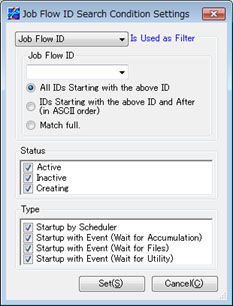
Filtering by Job Flow ID
Specify 'Job Flow ID' as the filtering type to use and the Job Flow ID that you want to search for.
You can either enter the settings directly or make a selection from the pulldown list.
The pulldown list contains the Job Flow IDs that have already been defined.
If you do not specify anything for the Job Flow ID, your search is not filtered by Job Flow IDs.
The search method has the following three patterns:
| - All IDs Starting with the above ID | The search results show the Job Flow information records with IDs that begin with the specified string (prefix match). |
| - IDs Starting with the above ID and After (in ASCII order) | The search results show the Job Flow information records with IDs that begin with the specified string and the records that appear after them in ASCII order. |
| - Match full | The search results show the Job Flow information records with IDs that match the specified string. |
Filtering by Job Flow Alias
Specify 'Alias' as the filtering type to use and the alias of the Job Flow that you want to search for.
You can either enter the settings directly or make a selection from the pulldown list.
The pulldown list contains the aliases of the Job Flow IDs that have already been defined.
If you do not specify anything for the Job Flow ID, your search is not filtered by aliases.
The search method has the following three patterns:
| - All IDs Starting with the above ID | The search results show the Job Flow information records with aliases that begin with the specified string. |
| - IDs Starting with the above ID and After (in ASCII order) | The search results show the Job Flow information records with aliases that begin with the specified string and the records that appear after them in ASCII order. |
| - Match full | The search results show the Job Flow information records with aliases that match the specified string. |
Filtering by Status
You can filter the Job Flow IDs, based on the status of each Job Flow.
Select the check boxes of the statuses that you want to display.
| [Note] | Be sure to select at least one check box. |
Filtering by Type
You can filter the Job Flow IDs, based on the type of each Job Flow.
Select the check boxes of the types that you want to display.
| [Note] | Be sure to select at least one check box. |