Editing of Relay/Multicasting Settings Information
When you click a server on the transfer map, the Relay/Multicasting Settings Information of the specified server appears in the Transfer definition frame.
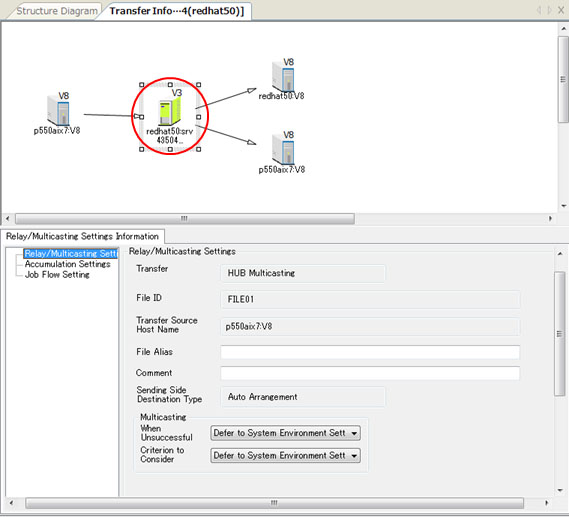
You can specify the following types of information in the Relay/Multicasting Settings Information:
-
When the transfer mode is 'Multicasting,' you can specify the information for the multicasting in the Relay/Multicasting Settings.
-
When the transfer mode is 'Relay,' you can specify the information for relaying the transfer in the Relay/Multicasting Settings.
-
You can specify the information that is related to the Accumulation operation in the Accumulation Settings.
-
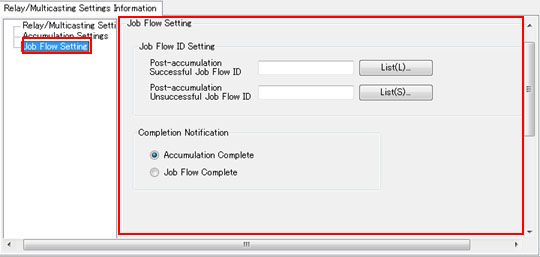
With the Job Flow Setting, you can specify the information for interfacing with a Job Flow after Accumulation is complete.
For details of each field, refer to the Transfer Information in Management Information Reference.
Multicasting Settings
For a multicasting transfer, when you click the Relay/Multicasting Settings, you can specify the Transfer Conditions for multicasting in the Transfer definition frame.
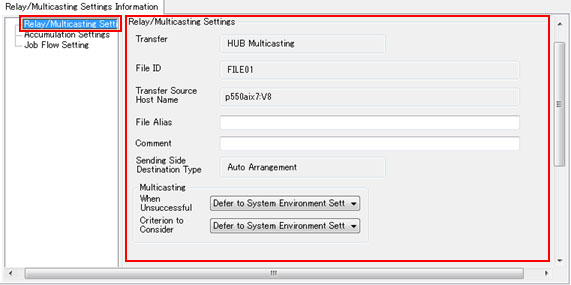
<Table> Fields of Relay/Multicasting Settings (Multicasting)
| Field Name | Description | Type | Restriction | Specification |
|---|---|---|---|---|
| Transfer Type | This field shows 'HUB Multicasting' or 'HULFT Multicasting via HUB' depending on the Route Settings. | - | Cannot be modified | - |
| File ID | This field shows the ID for identifying the file to be transferred. | - | Cannot be modified | - |
| Transfer Source Host Name | This field shows the name of the host on the sending side. *1 | - | Cannot be modified | - |
| File Alias | This field specifies the name that appears in the file ID list. | Alphanumeric characters | Within 256 bytes | Optional |
| When Unsuccessful | This field specifies how HULFT-HUB Server handles the Send processing for the other transfer destination hosts when multicasting at one or more of the destinations fails. | - | Select from the list | Mandatory |
| Criterion to Consider Unsuccessful | This field specifies the criterion for sending notification of a transfer error to the host on the sending side when an error occurs during multicasting. | - | Select from the list | Mandatory |
| Comment | This field specifies a comment for the transfer conditions. | Alphanumeric characters | Within 60 bytes | Optional |
*1: The display method varies depending on the setting of the ID Indication in the Environment Settings of HULFT-HUB Manager.
Relay Settings
For a Relay transfer, when you click the Relay/Multicasting Settings, you can specify the Transfer Conditions for relaying the transfer in the Transfer definition frame.
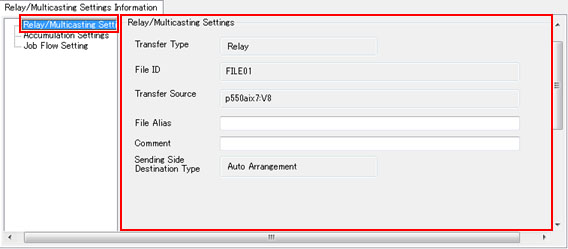
<Table> Fields of Relay/Multicasting Settings (Relay)
| Field Name | Description | Type | Restriction | Specification |
|---|---|---|---|---|
| Transfer Type | This field shows 'Relay.' | - | Cannot be modified | - |
| File ID | This field shows the ID for identifying the file to be transferred. | - | Cannot be modified | - |
| Transfer Source Host Name | This field shows the name of the host on the sending side. *1 | - | Cannot be modified | - |
| File Alias | This field specifies the name that appears in the file ID list. | Alphanumeric characters | Within 256 bytes | Optional |
| Comment | This field specifies a comment for the transfer conditions. | Alphanumeric characters | Within 60 bytes | Optional |
*1: The display method varies depending on the setting of the ID Indication in the Environment Settings of HULFT-HUB Manager.
Accumulation Settings
When you click the Accumulation Settings, you can specify the Accumulation operation for each transfer regardless of whether the Transfer Type is 'Multicasting' or 'Relay.'
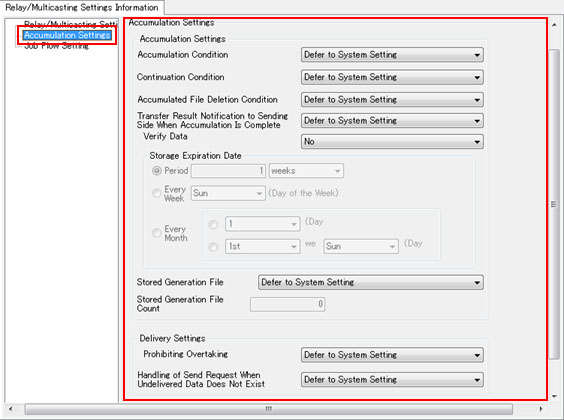
<Table> Fields of Accumulation Settings
| Field Name | Description | Type | Restriction | Specification |
|---|---|---|---|---|
| Accumulation Condition |
This field specifies whether or not the server accumulates transfer data. - Never Accumulate - Accumulate Only When Unable to Transfer - Transfer and Accumulate Concurrently - Deliver after Accumulation - Accumulate Only - Defer to System Setting |
- |
Select from the list |
Mandatory |
| Continuation Condition |
This field specifies whether the server continues or cancels processing if an error occurs. - Continue to Transfer and Accumulate when Error Occurs - Continue to Accumulate when Transfer Error Occurs - Continue to Transfer when Accumulation Error Occurs - Cancel Transfer and Accumulation when Error Occurs - Defer to System Setting |
- |
Select from the list |
Mandatory |
|
Accumulated File Deletion Condition |
This field specifies the timing for the deletion of the accumulated or delivered data. - Do Not Delete - Delete Immediately after Transfer or Delivery is Complete - Delete when Specified Period has Elapsed after Accumulation is Complete - Delete when Specified Period has Elapsed after Delivery is Complete - Defer to System Setting |
- |
Select from the list |
Mandatory |
| Transfer Result Notification to Sending Side When Accumulation Is Complete |
This field specifies the way to send transfer results to the host on the sending side at the completion of accumulation when the setting of the Accumulation Condition is 'Accumulate Only When Unable to Transfer,' 'Transfer and Accumulate Concurrently,' or 'Deliver after Accumulation.' - Always Return as Transfer Complete - Defer to Transfer Results for Receive Host - Defer to System Setting |
- |
Select from the list |
Mandatory |
| Verify Data |
This field specifies whether or not to verify that sending side data and accumulated data match. - Yes - No You can specify this field in HULFT-HUB Server V2.2 or higher. If 'Never Accumulate' is specified for Accumulation Condition, 'No' is displayed for Verify Data and you cannot specify this field. |
- |
Select from the list |
Mandatory |
| Storage Expiration Date |
This field specifies the storage expiration date for the accumulated or delivered data. Specify this field if the Accumulated File Deletion Condition is 'Delete when Specified Period has Elapsed after ..' - Period: Delete the data if the specified period has passed since the data was accumulated. - Every Week: Delete the data every week on the specified day of the week since the data was accumulated. - Every Month: Delete the data every month on the specified day of the month since the data was accumulated. |
- |
Select 'Period,' 'Every Week,' or 'Every Month' |
Optional |
| Stored Generation File |
This field specifies how the server behaves if the data that was transferred to the server has the same file ID as the existing data that is within the storage period. - No Generation File - Limit to Number of Stored Generations - Limit to Number of Undelivered Generations - Defer to System Setting |
- |
Select from the list |
Mandatory |
| Stored Generation File Count | This field specifies the maximum number of generations when the Stored Generation File is not 'No Generation File.' | Numeric value | From 1 to 9999 | Optional |
| Prohibiting Overtaking |
This field specifies whether or not to prohibit overtaking of transfer data. - No - Yes - Defer to System Setting |
- | - | Mandatory |
| Handling of Send Request When Undelivered Data Does Not Exist |
This field specifies the handling of the Send Request if undelivered accumulated data does not exist. - Relay to Sending Side - Treat as Error - Defer to System Setting |
- | Select from the list | Mandatory |
| Transfer Interval |
This field specifies the interval (in msec) between the end of the delivery of one block (the product of the Transfer Block Length and the Transfer Block Count) and the delivery of the next block for the delivery of accumulated data. This field appears only when the host on the sending side is a Client outside of Control (with Relay). |
Numeric value | From 0 to 32760 | Mandatory |
You can specify the following fields also in the Accumulation Environment Settings of the server:
- Accumulation Condition
- Continuation Condition
- Accumulated File Deletion Condition
- Transfer Result Notification to Sending Side When Accumulation Is Complete
- Stored Generation File
- Storage Expiration Date
- Prohibiting Overtaking
- Handling of Send Request When Undelivered Data Does Not Exist
You can specify the Accumulation Settings in the Transfer Information for each transfer. You can specify the Accumulation Environment Settings for each HULFT-HUB Server.
For the fields for which you have selected 'Defer to System Setting' in the Accumulation Settings of the Transfer Information, the server uses the settings that you specified in the Accumulation Settings of the server.
For the fields for which you have selected other than 'Defer to System Setting,' the server uses the settings that you specified in the Accumulation Settings of the Transfer Information.
| [Note] | |||||||
| - | If the Accumulation Condition is 'Accumulate Only When Unable to Transfer,' the server behaves the same way as when the Accumulated File Deletion Condition is 'Delete Immediately after Transfer or Delivery is Complete.' | ||||||
| - | You must specify the Prohibiting Overtaking of all HULFT-HUB Server that transfer data passes through. | ||||||
| - | In the Job Flow Setting, when you specify the Post-accumulation Successful Job Flow ID or the Post-accumulation Unsuccessful Job Flow ID, you can specify only the following settings for the Accumulation Condition and the Accumulated File Deletion Condition: | ||||||
|
Job Flow Setting
When you click the Job Flow Setting, you can specify the information for interfacing with a Job Flow after Accumulation is complete.
If you click the [List], you can use the Select Job Flow Information Record screen to select a Job Flow ID.
<Table> Fields of Job Flow Setting
| Field Name | Description | Type | Restriction | Specification |
|---|---|---|---|---|
| Post-accumulation Successful Job Flow ID | This field specifies the ID of the Job Flow that starts by interfacing with successful accumulation. | Alphanumeric characters | Within 16 bytes | Optional |
| Post-accumulation Unsuccessful Job Flow ID | This field specifies the ID of the Job Flow that starts by interfacing with unsuccessful accumulation. | Alphanumeric characters | Within 16 bytes | Optional |
| Completion Notification |
This field specifies the time for sending a notification. - Accumulation Complete - Job Flow Complete |
- | Select a radio button | Mandatory |