Switching to HUB Transfer
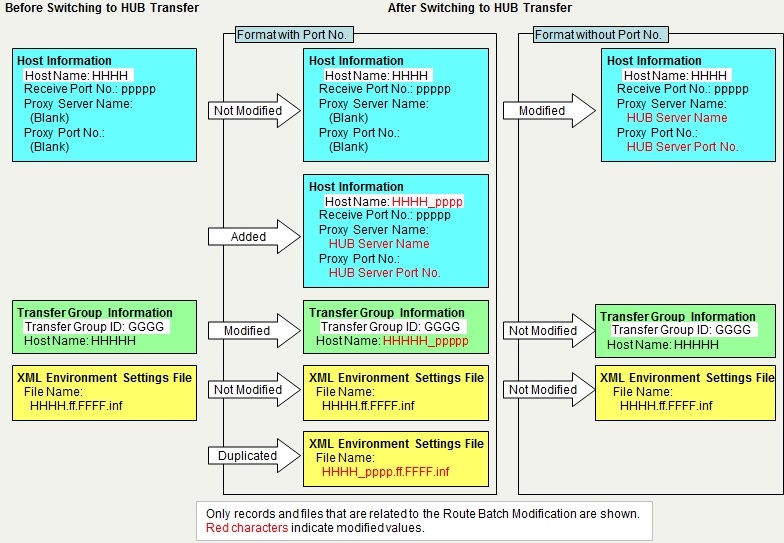
When you execute the Switch to HUB Transfer, HULFT-HUB Manager modifies or adds records or files of the system management information of Clients under Control as necessary in order to change from the Direct Transfer between HULFT clients to transfer via HULFT-HUB Server.
The behavior of HULFT-HUB Manager varies according to the setting of the Notification Host Name for Transfer via HUB (HostNameNotice) in the System Environment Settings of HULFT-HUB Server.
Case where Notification Host Name for Transfer via HUB (HostNameNotice) is 'Format with Port No.' or 'Format with Port No. for Controlled Clients Only'
'Format with Port No.' is used as the format of the host name when you carry out a transfer via HULFT-HUB Server.
HULFT-HUB Manager retains the record of the Host Information that is used for the Direct Transfer without changing it, and adds a record of the Host Information where the Receive port number has been added to the host name.
- HULFT-HUB Manager adds a record of the Host Information with the name 'Original host name_Receive port number' where the proxy information has been specified.
- HULFT-HUB Manager replaces the host name that is specified in the record of the Transfer Group Information with the host name that was added in step 1.
- HULFT-HUB Manager creates a duplicate of the XML Environment Settings file using the host name that was added in step 1.
Case where Notification Host Name for Transfer via HUB (HostNameNotice) is 'Format without Port No.'
'Format without Port No.' is used as the format of the Host Name when transfers are carried out via HULFT-HUB Server.
HULFT-HUB Manager modifies the record of the Host Information for the Direct Transfer to use it for HUB Transfer.
- HULFT-HUB Manager modifies the original record of the Host Information by specifying the proxy server information.
The following figure shows an example where the client is HULFT8.
| [Note] | |
| - | Although HULFT-HUB Manager does not modify the Send Management Information and the Receive Management Information, all records of the Send Management Information and the Receive Management Information that refer to the modified Transfer Group ID are affected. |
| - | When you use this function to switch routes, HULFT-HUB Manager does not create records of the Transfer Information. Therefore, some operation restrictions occur during transfers. For details, refer to points to be noted on file transfers in HULFT-HUB Manual. |
| [Remarks] | After you switch the routes, the routes are arranged in the same way as you configured by executing the Auto Arrangement. |
Targets of Switching to HUB Transfer
The targets of the Switch to HUB Transfer are transfers using the Direct Transfer between the clients that you selected on the Structure Diagram.
| Example 1: | Case where you select only Client A under control on the Structure Diagram |
| Only the Direct Transfer where both the host on the sending side and the host on the receiving side are Client A | |
| Example 2: | Case where you select Client A under control and Client B under control on the Structure Diagram |
| The Direct Transfer where both the host on the sending side and the host on the receiving side are Client A | |
| The Direct Transfer where both the host on the sending side and the host on the receiving side are Client B | |
| The Direct Transfer where the host on the sending side is Client A and the host on the receiving side is Client B | |
| The Direct Transfer where the host on the sending side is Client B and the host on the receiving side is Client A |
| [Note] | The following fields must be the same in the Host Information that you register on the client and in the Registered Client Information of that client that you register on the Structure Diagram: |
| - Host Name | |
| - Receive Port No. | |
| - Request Acknowledge Port No. | |
| - Host Type | |
| - Kanji Code Type | |
| - JIS Year | |
| The Host Name in the Registered Client Information is within 44 bytes. If the Host Name of a host exceeds 44 bytes in the Host Information, the host will not be a target of the Route Batch Modification. |
Addition or Modification of Host Information Records
Case where the format of the Host Name is 'Format with Port No.'
HULFT-HUB Manager sets the proxy information in the records of the Host Information that match the information of the client that you selected on the Structure Diagram in the format of 'Host name_Receive port number,' so that HULFT-HUB Manager can switch the transfer method to transfer via server.
If a record of the Host Information with the same name already exists, HULFT-HUB Manager overwrites it with the new record.
The following table shows the fields that HULFT-HUB Manager modifies in the added record of the Host Information. Other fields are the same as the corresponding fields of the original record of the Host Information.
| Field Name | Value to Be Set | |
|---|---|---|
| HULFT8 or higher | HULFT7 | |
| Host Name | Host Name | Host name_Receive port number |
| Proxy Server Name | Local Net Proxy Server Name | Host name of HULFT-HUB Server that relays transfers |
| Proxy Port No. | Local Net Proxy Port No. | Port number of HULFT-HUB Server that relays transfers |
| - (*) | Global Net Proxy Server Name | Local host name |
| - (*) | Global Net Proxy Port No. | Receive port number for the local host |
*: These fields do not exist in HULFT8 or HULFT10. During transfers via HULFT-HUB Server, HULFT internally uses the Local Host Name and Receive Port No. settings on the client.
Case where the format of the Host Name is 'Format without Port No.'
HULFT-HUB Manager sets the proxy server information in the records of the Host Information that match the information of the client that you selected on the Structure Diagram, so that HULFT-HUB Manager can switch the transfer method to transfer via servers.
The following table shows the fields that HULFT-HUB Manager modifies in the record of the Host Information. Other fields are the same as the corresponding fields of the original record of the Host Information.
| Field Name | Value after Modification | |
|---|---|---|
| HULFT8 or higher | HULFT7 | |
| Proxy Server Name | Local Net Proxy Server Name | Host name of HULFT-HUB Server that relays transfers |
| Proxy Port No. | Local Net Proxy Port No. | Port number of HULFT-HUB Server that relays transfers |
| - (*) | Global Net Proxy Server Name | Local host name |
| - (*) | Global Net Proxy Port No. | Receive port number for the local host |
*: These fields do not exist in HULFT8 or HULFT10. During transfers via HULFT-HUB Server, HULFT internally uses the Local Host Name and Receive Port No. settings on the client.
| [Remarks] | For details on proxy server information, refer to the Host Information for the relevant host type in Management Information Reference. |
| [Note] | When the client is Mainframe (MSP) or Mainframe (XSP), you must register in the TISP for the client the same host name that is specified for the Local Net Proxy Server Name in the Host Information of the client. |
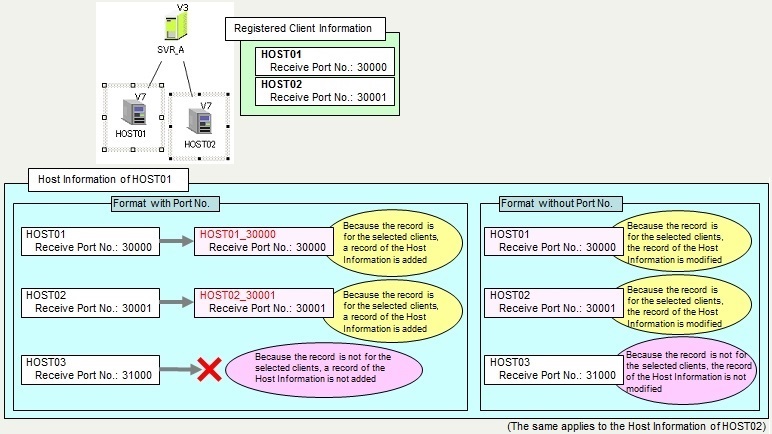
<Figure> Example of Addition of Host Information Record
Modification of Host Name in Transfer Group Information
Case where the format of the Host Name is 'Format with Port No.'
When the Transfer Group Information contains only the clients that you selected on the Structure Diagram, HULFT-HUB Manager replaces the host name of the clients with 'Host name_Receive port number.'
Case where the format of the Host Name is 'Format without Port No.'
HULFT-HUB Manager does not modify the record of the Transfer Group Information.
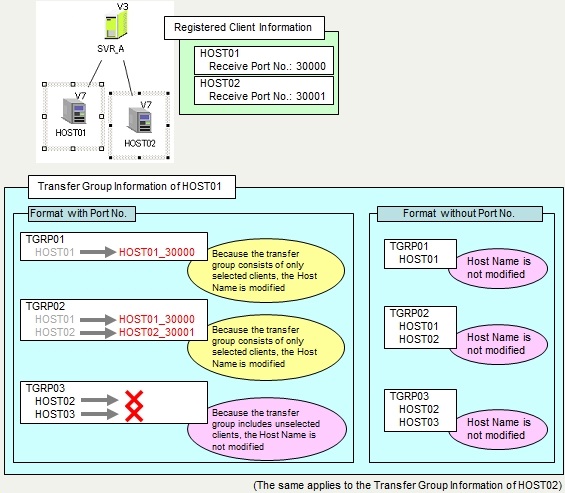
<Figure> Example of Modification of Transfer Group Record
Addition of XML Environment Settings Files
Case where the format of the Host Name is 'Format with Port No.'
HULFT-HUB Manager creates a duplicate of the XML Environment Settings file if the following conditions are fulfilled:
- You have selected the client on the sending side on the Structure Diagram.
- The Connect ID in the Registered Client Information matches the Connect ID in the XML Environment Settings file.
The following table shows the name of the duplicated file. However, HULFT-HUB Manager does not create a duplicate of the file if another XML Environment Settings file with the same name already exists.
| Name of Original File | Host name of the client on the sending side.Format type.Multi Format ID.inf |
| Name of Duplicated File | Host name of the client on the sending side_Receive port number of the client on the sending side.Format type.Multi Format ID.inf |
| [Remarks] | For format transfers, the format type is 'ff' and the Multi Format ID is the Format ID. |
| For multi format transfers, the format type is 'mf' and the Multi Format ID is the Multi Format ID. |
Case where the format of the Host Name is 'Format without Port No.'
HULFT-HUB Manager does not add any XML Environment Settings files.
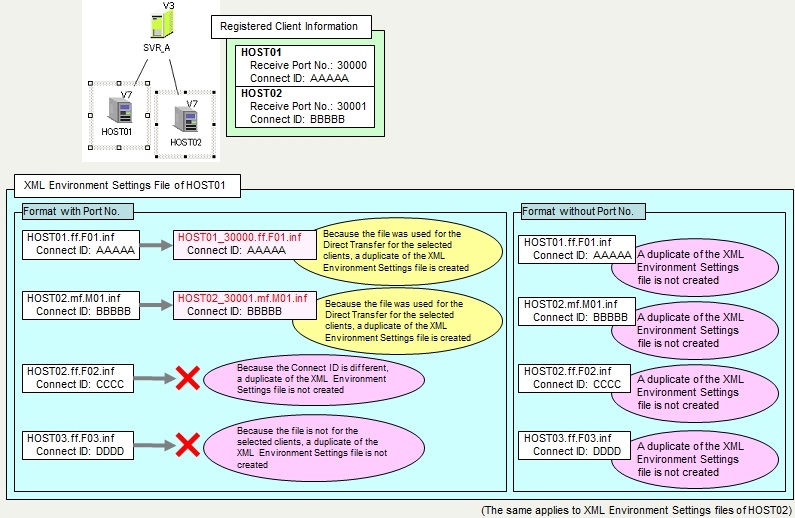
<Figure> Example of Addition of XML Environment Settings Files