Client Registration (New Registration) Dialog Box
This topic explains the fields of the Client Registration dialog box by group.
Network Environment
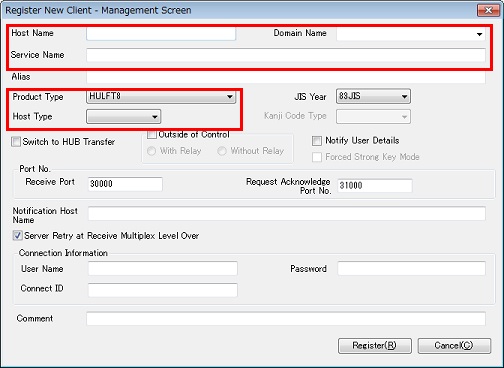
<Table> Explanation of Each Setting Field
| Field Name | Description | Type | Restriction | Restriction 2 | Specification |
|---|---|---|---|---|---|
| Host Name | This field specifies the local host name that is specified for HULFT to be registered (specify the host name in exactly the same format, including use of the upper case and lower case). *1 | Alphanumeric characters and specific symbols *2 | The total number of bytes of 'Host Name.Domain Name' must be within 44 bytes | Unique name in the network | Mandatory |
| Domain Name | This field allows you to select the domain that the client belongs to. *1 | Alphanumeric characters | The total number of bytes of 'Host Name.Domain Name' must be within 44 bytes | Domain name that the client belongs to | Optional |
| Service Name | This field specifies the service name that is used to distinguish HULFT that you want to register from other HULFT instances or HULFT-HUB Server instances that are operating on the same host. You do not have to specify this field if HULFT that you want to register is the only HULFT instance that is operating on the same host. *3 | Alphanumeric characters excluding ':' and '/' | Within 100 bytes | Unique name in the host | Optional |
| Product Type | This field allows you to select the product type of the client. Select a suitable option by referring to <Table> Client Types and Corresponding Product Types. | - |
HULFT10 HULFT8 HULFT7 |
- | Mandatory |
| Host Type | This field allows you to select the host type. | - | Linked with the Product Type | - | Mandatory |
| *1: | After registration of the client, 'Host Name.Domain Name' appears as the host name on the screen. For example, if the Host Name is 'HOST2006' and the Domain Name is 'saison.co.jp,' the host name of the client is 'HOST2006.saison.co.jp.' |
| *2: | The only symbols allowed are '-' (hyphen) and '.' (period). |
| *3: | You can use the Service Name to distinguish HULFT or HULFT-HUB Server from other HULFT instances or HULFT-HUB Server instances on the same host only when 'Format with Port No.' is specified for the Notification Host Name for Transfer via HUB in the System Environment Settings of HULFT-HUB Server. When 'Format with Port No. for Controlled Clients Only' or 'Format without Port No.' is specified, do not allow multiple HULFT instances or HULFT-HUB Server instances to coexist on the same host. |
| [Note] | |
| - | You cannot modify these fields after the registration of the client is complete. |
| - | The options for the Host Type vary depending on the setting for the Product Type. If you cannot find a suitable option for the Host Type, check the Product Type. |
| [Remarks] | Reason why the host name must be within 44 bytes |
| 44 bytes = L1 (50 bytes) - L2 (6 bytes) | |
| L1: The maximum length of the Host Name for the host type (Mainframe) whose maximum length of the Host Name is the shortest among the supported clients. | |
| L2: The length of the information that is added to the Host Name when the format of the Host Name contains the port number for a file transfer via HULFT-HUB. The information is a 6-byte string that consists of '_' (1 byte) and the Receive port number of the relevant client (5 bytes). |
<Table> Client Types and Corresponding Product Types
| Types of Clients | Product Type Option | Host Type Option |
|---|---|---|
| HULFT10 for zOS | HULFT10 | Mainframe |
| HULFT10 for Linux/AIX | Linux | |
| HULFT10 for IBMi | IBMi | |
| HULFT10 for Windows | Windows | |
| HULFT8 for zOS | HULFT8 | Mainframe |
| HULFT8 for MSP | ||
| HULFT8 for XSP | ||
| HULFT8 for UNIX/Linux | Linux | |
| HULFT8 for IBMi | IBMi | |
| HULFT8 for Windows | Windows | |
| HULFT7 for zOS | HULFT7 | Mainframe |
| HULFT7 for MSP | ||
| HULFT7 for XSP | ||
| HULFT7 for UNIX/Linux | Linux | |
| HULFT7 for i5OS | IBMi | |
| HULFT7 for Windows | Windows |
Fields that Manage Operation of Client
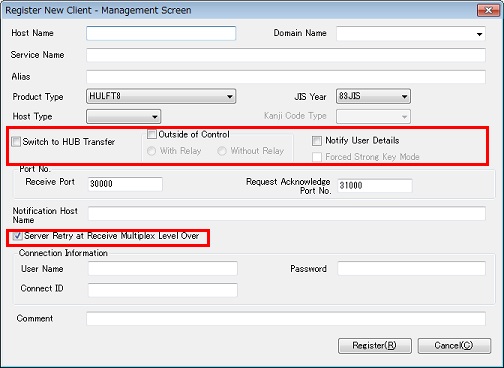
<Table> Explanation of Each Setting Field
| Field Name | Description | Type | Restriction | Specification |
|---|---|---|---|---|
| Outside of Control |
Select this check box to register the relevant client as a Client outside of Control. Icons for Clients outside of Control appear on the Structure Diagram, but you cannot manage the Clients outside of Control in HULFT-HUB Manager. - With Relay: Allow transfers via HULFT-HUB Server - Without Relay: Allow only Direct Transfers |
- | *1 | Mandatory |
| Switch to HUB Transfer | Select this check box to execute the Route Batch Modification for the relevant client when you register the client. | - | *2 | Mandatory |
| Notify User Details |
Select this checkbox to specify notifying the account information of HULFT-HUB Manager to a client. For the operation log of the current client, the login account for HULFT-HUB Server is stored on User ID (Management screen), and the user ID on the operating system on which HULFT-HUB Manager is operating is stored on User ID (OS). |
- | *3 | Mandatory |
| Forced Strong Key Mode | Select this check box to set the Forced Strong Key Mode to 'Enabled' in the Registered Client Information during client registration. | - | *4 | Mandatory |
| Server Retry at Receive Multiplex Level Over |
Select this check box to allow the client to attempt to carry out the transfer again after the client waits for the specified period of time if the Receive processing on the client on the receiving side has reached the multiplex level. The setting of this field is effective when you transfer data via HULFT-HUB Server. |
- | *2 | Mandatory |
| *1: | Users who do not have the Permission to Add or Delete Client cannot clear the check box. You cannot modify this field after the registration of the client is complete. |
| If the Controlling Server is HULFT-HUB Server that is lower than Ver.3, this field does not appear because you cannot register Clients outside of Control in these versions. | |
| *2: | When you select the Outside of Control check box, both the Switch to HUB Transfer check box and the Server Retry at Receive Multiplex Level Over check box are cleared and grayed out. |
| *3: | If a server that you have added on the Structure Diagram is not a server that you directly log in to, you can update the setting for notifications on the System Environment Settings panel for the non-login server. HULFT-HUB Server does not check if you have the permission to update the setting for notifications on the target server. |
| *4: | For clients outside of control, the setting value for the Forced Strong Key Mode cannot be acquired. Therefore, when registering a client that meets the following conditions, you must set the same value as the client's Forced Strong Key Mode. |
| - The Product Type is 'HULFT8.' | |
| - The Outside of Control check box is selected. | |
| - The With Relay radio button is selected. | |
| This field appears if the Controlling Server is HULFT-HUB Server Ver.3.9 or higher. |
| [Remarks] | When the Product Type is 'HULFT4 or Lower,' the Outside of Control check box is selected and grayed out. |
Other Settings
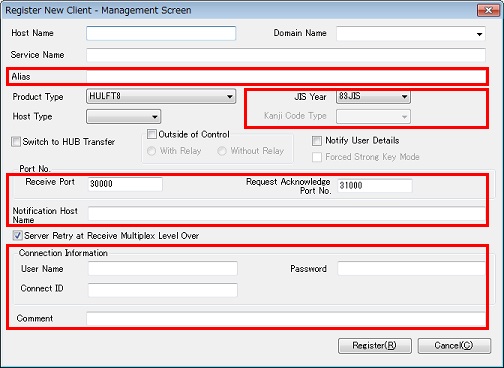
<Table> Explanation of Each Setting Field
| *1: | If the Controlling Server is HULFT-HUB Server-ENT that is lower than Ver.3.5, this field does not appear. |
| If you select the Outside of Control check box and 'Without Relay,' you cannot specify this field. | |
| *2: | The only symbols allowed are '-' (hyphen) and '.' (period). |
| *3: | You do not have to specify these fields if you have not specified the Password Check on the client. |
| For details on the Password Check, refer to Administration Manual for the client. | |
| *4: | When you select the Outside of Control check box, you cannot specify these fields. |
| [Note] | For the following fields, specify the same strings or values as those in the Client System Environment Settings. If you specify different strings or values, connection to the client may fail. |
| Client Registration (New Registration) Dialog Box Fields | Client System Environment Settings Fields | |
|---|---|---|
| Lower than Ver.8.1 | Ver.8.1 or Higher | |
| JIS Year | JIS Year *1 | Standard for Japanese *2 |
| Kanji Code Type | Kanji Code Type *3 | Code Set for Transfer (cs4trnsfr) |
| Receive Port No. | Receive Port No. | Receive Port No. |
| Request Acknowledge Port No. | Request Acknowledge Port No. | Request Acknowledge Port No. |
| *1: | For host types in which the JIS Year is fixed, there is no corresponding field in the System Environment Settings. In this case, specify this field as appropriate for the system. |
| *2: | For host types in which the JIS Year is fixed, there is no corresponding field in the System Environment Settings. In this case, specify this field as appropriate for the system. |
| If you specify a code set that is not Japanese for the Code Set for Transfer (cs4trnsfr) on the client, HULFT-HUB Manager does not use the value that is specified for the JIS Year on the Client Registration (New Registration) dialog box. | |
| *3: | For host types in which the Kanji Code Type is fixed, there is no corresponding field in the System Environment Settings. In this case, specify the code of the system. |
| [Remarks] | For details on the behavior when you specify the Notification Host Name, refer to HULFT-HUB Manual. |