Overview of communication test
By using HULFT IoT, confirm if the communication from IoT equipment to the application server works correctly.
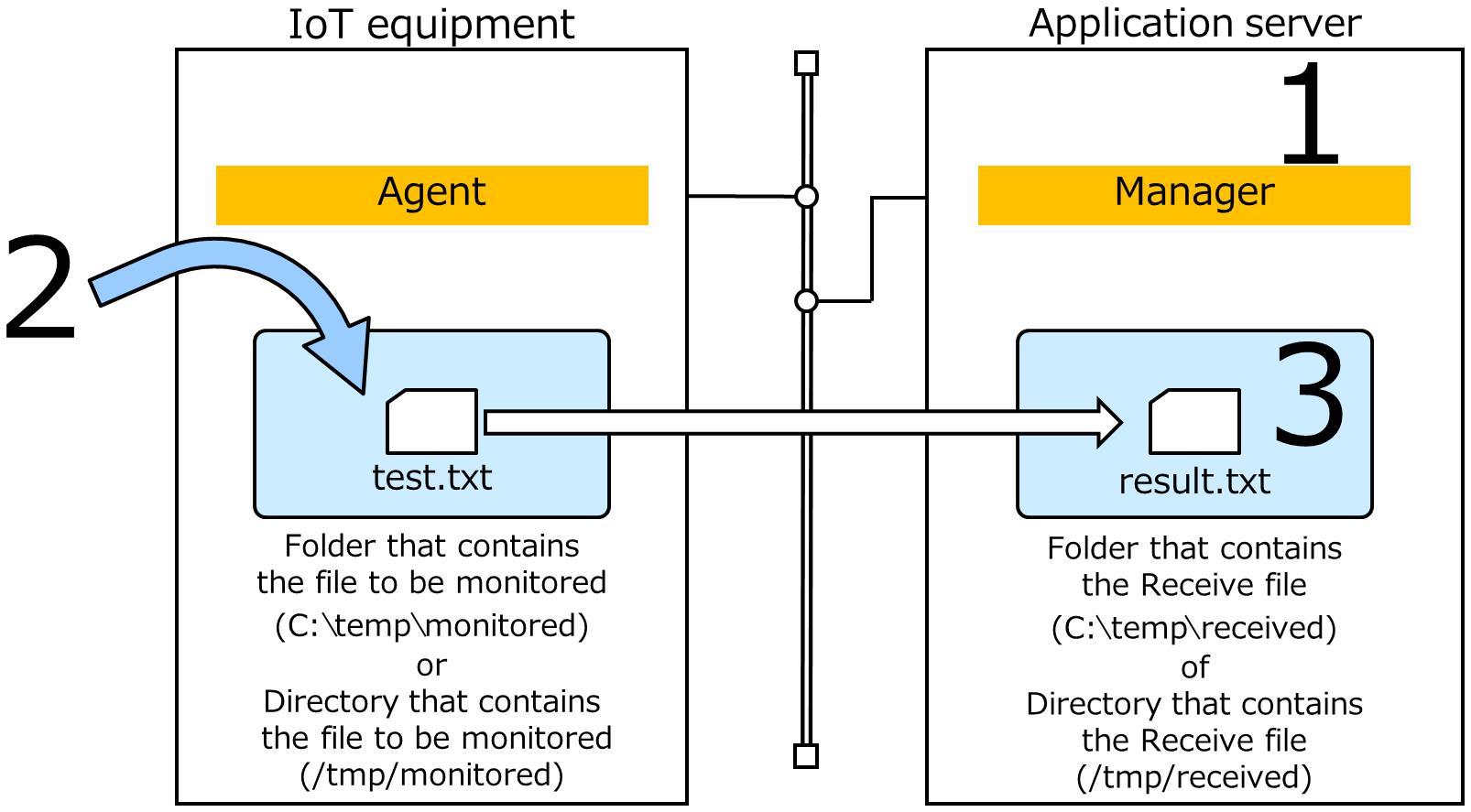
Perform the communication test like the following workflow:
-
Operation on the application server
Confirm that the Manager recognizes Agent.
And then, provide Agent the information that is necessary for file transfer from Manager.
-
Operation on the IoT equipment
Put a text file in the specified directory.
-
Operation on the application server
Confirm the file has been transferred.
| Items | Value | ||
|---|---|---|---|
| Unit | Unit Name | TEST-UNIT | |
| Host Name of Receiver | Host name or IP address that is acquired in advance. | ||
| Port Number on Receiver | 30000 | ||
| Profile | Unit | TEST-UNIT | |
| Profile Name | TEST-PROFILE | ||
| Transfer Settings | Settings Name | Transfer Settings for Communication Test | |
| File ID | TEST | ||
| Monitored File Name |
• in Windows C:\temp\monitored\test.txt • in Linux /tmp/monitored/test.txt |
||
| Monitoring Size | 1 B | ||
| Receiving File Name |
• in Windows C:\temp\received\result.txt • in Linux /tmp/received/result.txt |
||