Steps to take before a revision upgrade and an installation
You can upgrade the revision of HULFT for a clustering environment to another revision of HULFT for a clustering environment. Carry out the installation on the ACTIVE node and the STANDBY node for HULFT in the clustering system. The procedure is as follows:
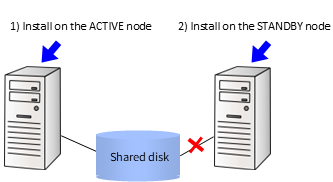
Figure 11.2 Installation Procedure for Revision Upgrade from Clustering Environment
1) Carry out the Update Installation for the existing HULFT on the ACTIVE node.
2) Carry out the Update Installation for the existing HULFT on the STANDBY node.
Install the program by following the steps described in Custom installation.
In the steps, select the following options when asked:
-
Selecting the Installation Type
'Update Installation'
-
Confirming the installation environment
Select 'Clustering Environment (ACTIVE node)' to install HULFT on the ACTIVE node
Select 'Clustering Environment (STANDBY node)' to install HULFT on the STANDBY node
-
For details on the product and grade necessary for using HULFT in a clustering environment, refer to the following:
HULFT10 for Linux/AIX Clustering Manual :
-
This operation requires extra free disk space that is equivalent to the disk space that was used by the existing HULFT.
Check how the partition is set up beforehand with the 'df' command.
-
When you have selected "STANDBY node" in Confirming the installation environment, the backup command does not access the HULFT environment settings file storage directory (HULPATH).
Therefore, the command does not create a backup of $HULPATH.