Configuration and operation of process
HULFT-HUB Server operates in the process configuration as shown in the following figure:
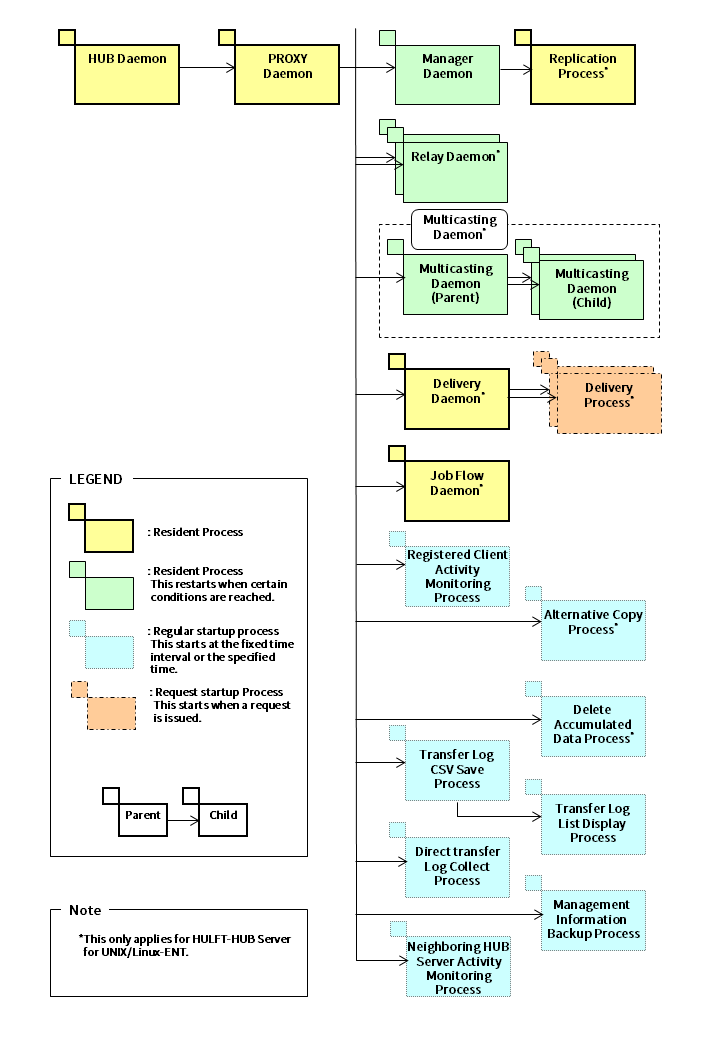
The HUB daemon is resident as a service when the server OS is Windows.
The table below describes the processes of HULFT-HUB Server.
Table 1.3 List of resident processes
|
Resident process name |
Number of processes at initial startup |
Remarks |
|
|---|---|---|---|
|
HUB Daemon |
1 |
|
|
|
PROXY Daemon |
1 |
Automatic startup by hubmaind |
|
|
Relay Daemon |
1 |
Automatic startup by hubpxyd |
|
|
Multicasting Daemon |
1 |
Same as above |
|
|
Delivery Daemon |
1 |
Same as above |
|
|
Manager Daemon |
1 |
Same as above |
|
|
Job Flow Daemon |
1 |
Same as above |
|
|
hubreplica (*2)(*5) |
Replication Process |
1 |
Automatic startup by hubmgrd |
|
*1 |
: |
The HUB daemon is resident as a service when the server OS is Windows. |
|
*2 |
: |
This only applies to HULFT-HUB Server for UNIX/Linux-ENT. |
|
*3 |
: |
When the number of started threads has exceeded the upper limit, the PROXY daemon creates a new process and the old process is deleted when all the transfer requests are completed. Therefore, multiple relay daemons or multicasting daemons might exist at the same time. |
|
*4 |
: |
When all the connections with HULFT-HUB Manager are canceled, the PROXY daemon creates a new process and the old process is deleted. Therefore, multiple Manager daemons might exist at the same time or might not exist. |
|
*5 |
: |
If all the following conditions are met, programs are resident:
|
Table 1.4 List of regular startup processes
|
Regular startup process |
Specification of startup interval |
||
|---|---|---|---|
|
HULFT-HUB Server |
HULFT-HUB Manager |
||
|
Registered Client Activity Monitoring process |
Client Activity Monitoring Interval (HealthCheckInterval) |
Communication Settings in System Environment Settings screen |
|
|
Alternative Copy process |
- |
Alternative Settings in System Environment Settings screen |
|
|
Accumulated Data Deletion process |
- |
Entire Server-Storage Monitoring Settings-Expiration Check Time (*2) in the Accumulation Environment Settings screen |
|
|
Transfer Log CSV save process |
Number of Months to Save Transfer Log as CSV Files (TrnlogCSVHoldCount) |
Operation Settings in the System Environment Settings screen |
|
|
Transfer Log List Display process |
Transfer Log CSV File Output Execution Time (TrnlogCSVExecuteTime) |
- |
|
|
Direct Transfer Log Collection process |
Direct Transfer Log Batch Processing Interval (HubhistoryInterval) |
Operation Settings in the System Environment Settings screen |
|
|
Management Information Backup process |
Management Information Backup Interval (BackupInterval) |
Operation Settings in the System Environment Settings screen (*2) |
|
|
Neighboring HUB Server Activity Monitoring process |
The activity monitoring interval of neighboring server (ServerAliveInterval) |
Communication Settings in System Environment Settings screen |
|
|
*1 |
: |
This only applies to HULFT-HUB Server for UNIX/Linux-ENT. |
|
*2 |
: |
The startup interval is once a day at the specified time. |
Table 1.5 List of request startup processes
|
Regular startup process (*1) |
Specification of startup interval |
||
|---|---|---|---|
|
HULFT-HUB Server |
HULFT-HUB Manager |
||
|
Delivery process |
- |
- |
|
|
Job Flow File Monitoring process |
- |
- |
|
|
Job flow control process |
- |
- |
|
|
*1 |
: |
This only applies to HULFT-HUB Server for UNIX/Linux-ENT. |
For details about operation commands, see HULFT-HUB Server Startup and Termination. For details about utilities, see HULFT-HUB Server Utilities.