Connectivity test
In a connectivity test, a simple loopback test is conducted to check whether the HUB system is properly installed.
For the Clustering version, use an ACTIVE node for the check.
The following shows the example of a network configuration used in a connectivity test and the general procedure of a connectivity test.
In the connectivity test in this example, the manager, server, and client are called by the following host names: HUBMGR, HUBSVR, and HUBCLT.
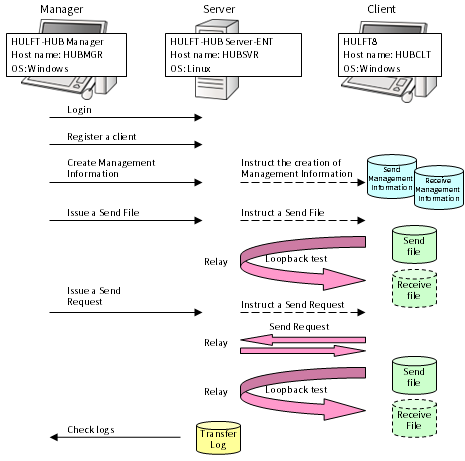
The table below shows the setting values used in the connectivity test. Change these values depending on your environment.
Table 3.1 Setting values for the server and client used in the connectivity test
|
Host name |
Item |
Value |
Remarks |
|
|
HUBSVR |
Server settings |
Host Name |
HUBSVR |
Change depending on your environment. |
|
Port No. |
40000 |
|||
|
IP Address |
Omitted |
|||
|
Connection Method |
Use Host Name to Connect |
|||
|
Alias |
Tokyo HQ server |
|||
|
Login |
User ID |
administrator |
|
|
|
Password |
*********** |
|
||
|
HUBCLT |
Client registration |
Host Name |
HUBCLT |
Change depending on your environment. |
|
Service Name |
Omitted |
|||
|
Alias |
Omitted |
|||
|
Product Type |
HULFT8 |
|||
|
JIS Year |
JIS 83 |
|||
|
Host Type |
Windows |
|||
|
Kanji Code Type |
SHIFT-JIS |
|||
|
Receive Port No. |
30000 |
|||
|
Request Acknowledge Port No. |
31000 |
|||
|
Send Management Information |
File ID |
LOOPTEST |
|
|
|
File Name |
c: |
Change depending on your environment. |
||
|
Transfer Type |
TEXT |
|
||
|
Compression Preference |
None |
|
||
|
Code Conversion |
Sending Side |
|
||
|
Receive Management Information |
File ID |
LOOPTEST |
|
|
|
File Name |
c: |
Change depending on your environment. |
||
|
Receive Mode |
Single Receive |
|
||
|
Registration Mode |
Replace |
|
||
|
Generation File |
No |
|
||
|
Error Recovery |
Delete |
|
||