Selection of Transfer Group Information (Transfer Information)
When you click the [List] on the right of the Transfer Group ID in the Sending Side Settings Information or the Receiving Side Settings Information of the Transfer definition frame, the Transfer Group Information List screen appears.
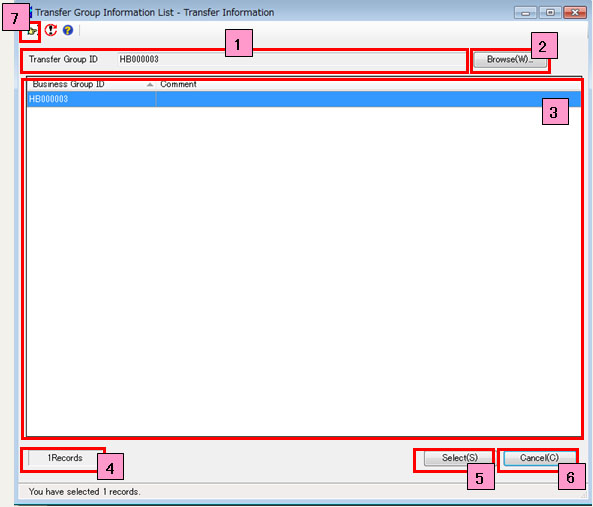
- Transfer Group ID
- [Browse]
- Transfer Group Information List
- Records
- [Select]
- [Cancel]
-

This field shows the transfer group ID that you selected in the Transfer Group Information List.
Click this button to open the Browse Transfer Group Information Record screen and select the transfer group ID for the information record that you want to check.
This list shows the existing information records with the same host as the information record for the transfer group ID that is specified in the Sending Side Settings Information or the Receiving Side Settings Information.
When the transfer group ID that is specified in the Sending Side Settings Information or the Receiving Side Settings Information is a new ID, the ID will appear together with the transfer group IDs that already exist.
This field shows the number of records that appear in the Transfer Group Information List.
Click this button to close the Transfer Group Information List screen, the transfer group ID that you selected on the Transfer Group Information List screen is set for the Transfer Group ID on the Transfer Information screen.
Click this button to close the Transfer Group Information List screen. The Transfer Information screen is not updated.
Click this button to display the Transfer Group ID Search Condition Settings dialog box.
By specifying search conditions, you can filter IDs that appear in the Transfer Group Information List based on the conditions.