System Environment Settings
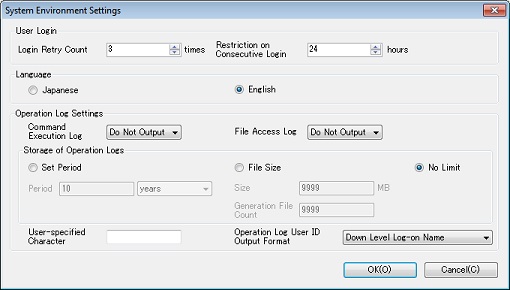
This topic explains the System Environment Settings dialog box. For the explanation of each field, refer to User Login and Operation Log Settings.
| [Remarks] | Use this dialog box to configure the operation settings that are common to all users. |
-
If you click the [Environment Settings] on the [System Configuration] menu, the System Environment Settings dialog box appears.
Enter the settings in the required fields.
-
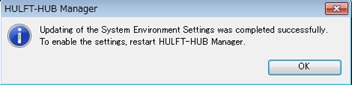
If you click the [OK], the settings are saved and the following message appears.
Click the [Cancel] to close the System Environment Settings dialog box without saving the settings.
[Remarks] If you try to close the dialog box by clicking  after you have changed the settings, the following message appears.
Click the [Yes] to save the settings and close the System Environment Settings dialog box. Click the [No] to close the System Environment Settings dialog box without saving the settings. Click the [Cancel] to return to the System Environment Settings dialog box without saving the settings.