Addition of Servers
You can register a server (HULFT-HUB Server) that is under control in HULFT-HUB Manager.
| [Note] | You cannot register a server whose version is different from the version of the login server. |
- Click the background of the Structure Diagram so that nothing is selected on the Structure Diagram. Alternatively, click the All node in the Structure List.
-
Click the [Server] on the [Insert] menu to open the Register Server dialog box.
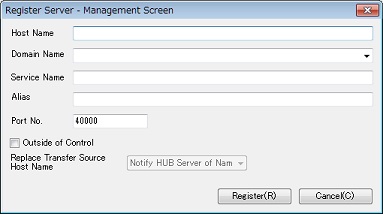
<Table> Server Setting Fields
*1: These names are used on the screen and log records of HULFT-HUB Manager. *2: It is recommended that you specify a name that is easy to recognize for each HULFT-HUB Server. *3: The only symbols allowed are '-' (hyphen) and '.' (period). *4: You can specify this field if the Outside of Control check box is selected. - Refer to the above table to specify each field, and then click the [Register]. A confirmation message appears.
- Click the [Yes] and check that the server is added on the Structure Diagram.
| [Remarks] | Immediately after the addition, an icon appears in gray for the server and you cannot view or check the System Environment Settings of the server. After you specify a connection line to connect the login server and the added server, the color of the icon changes from gray to yellow, and you can view and check the settings. For details, refer to Connection between Networks. |