Viewing of Transfer Group Information
On the Browse Transfer Group Information screen, you can check the contents for the transfer group ID that you selected on the Transfer Group Information List screen.
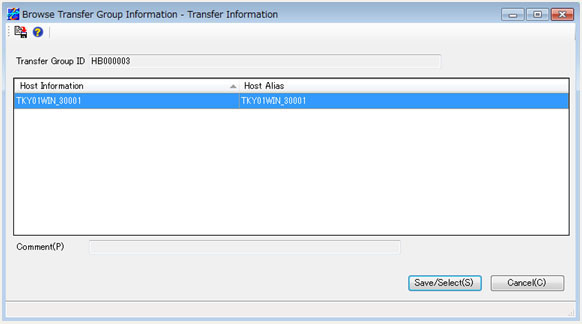
Transfer Group ID
This field shows the transfer group ID that you selected on the Transfer Group Information List screen.
Host Information
This field shows the host name for the Host Information record that is registered for the relevant transfer group ID.
Host Alias
This field shows the alias of each host name.
Comment
This field shows and specifies a comment for the relevant transfer group ID.
You can enter a comment only when you select the transfer group ID that was automatically created and is not yet saved on the Transfer Group Information List screen. Specify a comment within 60 bytes.
[Save/Select]
Click this button to close the Browse Transfer Group Information screen.
For a transfer group ID that was automatically created and is not yet saved, the entered comment is reflected.
[Cancel]
Click this button to close the Browse Transfer Group Information screen.
For a transfer group ID that was automatically created and is not yet saved, the comment is not modified.