Editing of Job Information
This topic explains how to register, modify, and delete a record of the Job Information (the information for a job that is started after sending, after receiving, or before sending).
When you click the [List] on the right of the following fields in the Transfer definition frame, the Select Job Information Record screen appears.
- The Pre-send Job ID, the Successful Job ID, and the Unsuccessful Job ID of the Sending Side Settings Information
- The Successful Job ID and the Unsuccessful Job ID of the Receiving Side Settings Information
Procedure for Displaying Register Job Information/Modify Job Information Record Screen
-
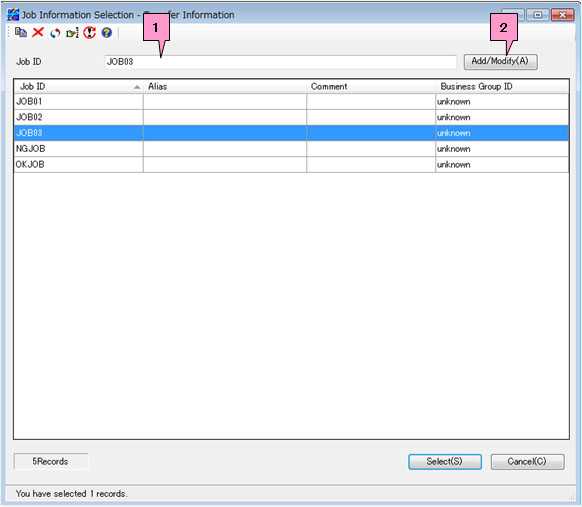
When you add a new record, enter a new job ID in the Job ID input field on the Select Job Information Record screen and click the [Add/Modify].
When you modify a record, enter the job ID of the record in the Job ID input field on the Select Job Information Record screen or select the relevant job ID in the list, and then click the [Add/Modify] (marked as 1 and 2, respectively, on the screen below).
-
The Register Job Information screen appears when you add a record.
The Modify Job Information Record screen appears when you modify a record.
Fields of Register Job Information/Modify Job Information Record Screen
The setting fields are the same between the Register Job Information screen and the Modify Job Information Record screen. The following explanation is based on the Modify Job Information Record screen.
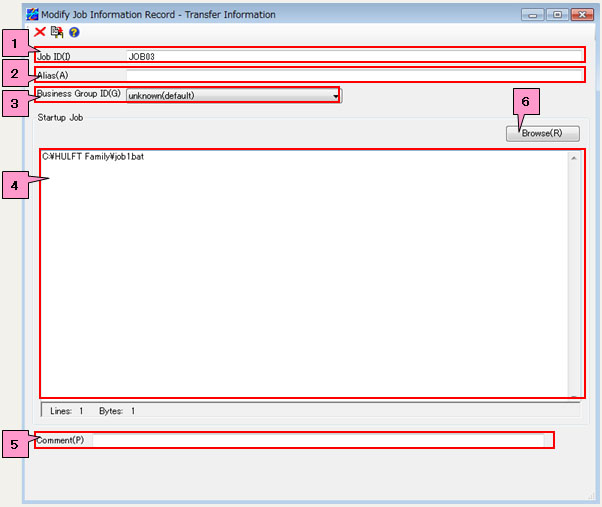
<Table> Fields of Register Job Information/Modify Job Information Record Screen
| No. | Field | Description |
|---|---|---|
|
1 |
Job ID | This field specifies the ID that identifies the Job Information record. |
|
2 |
Alias | This field specifies the alias for the job ID. |
|
3 |
Business Group ID *1 | Select a Business Group ID from the pulldown list. |
|
4 |
Startup Job | This field shows and specifies the jobs to be started. |
|
5 |
Comment | This field specifies a comment for the Job Information record. |
|
6 |
[Browse] | Click this button to choose startup jobs on the File Reference screen. |
*1: The display method varies depending on the setting of the ID Indication in the Environment Settings of HULFT-HUB Manager.
Editing of Job Information
The setting fields vary depending on the host type and the version of HULFT. For details of each field, refer to the following topics in "HULFT-HUB Management Information Reference":
| Host Type | HULFT7 | HULFT8 | HULFT10 |
|---|---|---|---|
| Mainframe | Job Information | Job Information | Job Information |
| Linux/AIX | Job Information | Job Information | Job Information |
| Windows | Job Information | Job Information | Job Information |
| IBMi | Job Information | Job Information | Job Information |
After you configure the settings, click  .
.
If you want to delete a registered job ID, click  .
.
| [Note] | When you modify an ID on the Modify Job Information Record screen, if the same ID as the modified ID does not exist, the information record for the ID is added, and if the same ID already exists, the existing information record for the ID is overwritten. |