Export of Distribution Data
You can export the management information that has been acquired onto the Collecting and Distributing System Management Information screen to a CSV-format file.
-
Click the [Export] on the [File] menu.
-
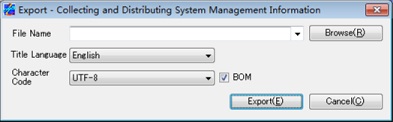
The Export - Collecting and Distributing System Management Information screen appears.
Enter the file name, title language, and character code, and select with or without BOM (for UTF-8 only).
-
Japanese: Output the title row of the export file in Japanese.
-
English: Output the title row of the export file in English.
-
UTF-8: Output the contents of the export file in UTF-8 encoding.
-
SHIFT-JIS: Output the contents of the export file in SHIFT-JIS encoding.
-
Selected: Output data with BOM.
-
Cleared: Output data without BOM.
- Click the [Export] to export the management information.
Title Language
Character Code
BOM
Specify with or without BOM when outputting the export file in UTF-8 encoding.
When outputting file contents in SHIFT-JIS encoding, the check box cannot be selected.
| [Remarks] | For details about the format of exported files, refer to Import/Export File Output Format. |