Viewing of Operation Log
If you click the [Operation Log] on the [System Configuration] menu on the main screen of HULFT-HUB Manager, the Operation Log list appears.
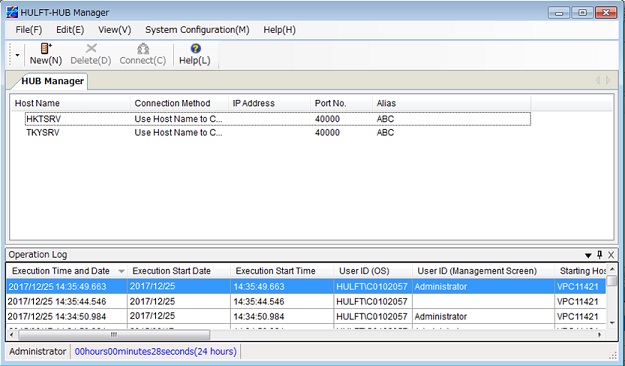
<Table> Fields of Operation Log Screen
| Field Name | Description |
|---|---|
| Execution Time and Date | This field shows the date and time when the operation was carried out. |
| Execution Start Date | This field shows the operating system date at the time of the file access. |
| Execution Start Time | This field shows the operating system time of the file access. |
| User ID (OS) | This field shows the user ID of the operating system that carried out the operation. |
| User ID (Management Screen) | This field shows the ID that was used for the Management Screen Security function to represent the user who carried out the operation. |
| Starting Host Name | This field shows the host that started the operation. |
| Latest Identifier | This field shows the identifier that was issued when a new processing operation was carried out for processing for which the starting identifier was issued. |
| Starting Identifier | This field shows the identifier that is issued when a request is first issued or a processing operation is first carried out. |
| Execution Host Name | This field shows the host that carried out the processing. |
| Operation Log User-specified Character |
This field shows the alphanumeric characters that are specified in the System Environment Settings. When you use multiple instances of HULFT on one operating system, you can use this function to distinguish between them using the contents output to the Operation Log. |
| Command Execution Key | This field shows the command name (utility name) and the name of the requests that were issued on HULFT or HULFT-HUB. |
| Command Issued by |
This field shows where the command was issued. - HULFT_MANAGER: HULFT Manager Management screen - HULFT_MANAGER_COMMAND: HULFT Manager command - HULFT_MANAGEMENT_SCREEN: HULFT Management screen - HULFT_COMMAND HULFT: Command - HULFT_CLS_COMMAND HULFT: Command for Clustering - HULFT_HUB_MANAGER: HULFT-HUB Manager Management screen - HULFT_HUB_SERVER_COMMAND: HULFT-HUB Server command - HULFT_HUB_SERVER_CLS_COMMAND: Command for HULFT-HUB Server Clustering |
| Command Parameter | This field outputs the parameter description that you set in the command (utility). |
| File Access Type |
This field shows the types of access of system information records. NEW: create new (add) UPDATE: modify DELETE: delete COMPRESS: compress (Linux/AIX only) COMMIT: commit (HULFT-HUB only) ROLLBAC: rollback (HULFT-HUB only) |
| System File Type |
This field shows the names of the types of system information that HULFT and HULFT-HUB use. |
| File Key Information |
This field shows the key information of the system files that are mentioned above. |
For detailed information on the formats for the Operation Log, refer to Operation Log Input and Output Format.
Operation of Operation Log List
If you click the Column View Settings on the pop-up menu of the Operation Log list, you can select which fields appear on the list.
If you click a field name of the Operation Log list, the items in the list are sorted based on that field.