Startup of HULFT-HUB Manager
- Select [Start]
 [All Programs] [HULFT Family] [Registration Name set during installation] and click [HULFT-HUB Manager].
 -
The Login dialog box appears. Enter the registered user ID and password, select the display language for HULFT-HUB Manager main screen and the Management screen, and click the [Login].
[Remarks] When you start HULFT-HUB Manager for the first time after the installation, the only available user ID is 'Administrator.' Enter the password for 'Administrator' that you set during the installation. 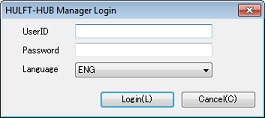
- The main screen of HULFT-HUB Manager appears.
