Incompatibilities in HULFT-HUB Server
Restriction on performing operations with neighboring servers with different levels
|
+ |
|
When multiple HULFT-HUB Servers exist in a HULFT-HUB system configuration and the version of the login server differs from the version of a neighboring server, the login server cannot connect to the neighboring server. In HULFT-HUB Manager, the Structure Diagram and the Transfer Information screens cannot perform operations with such neighboring servers and the Transfer Status Watch Details screen cannot show such neighboring servers and their dependent components.
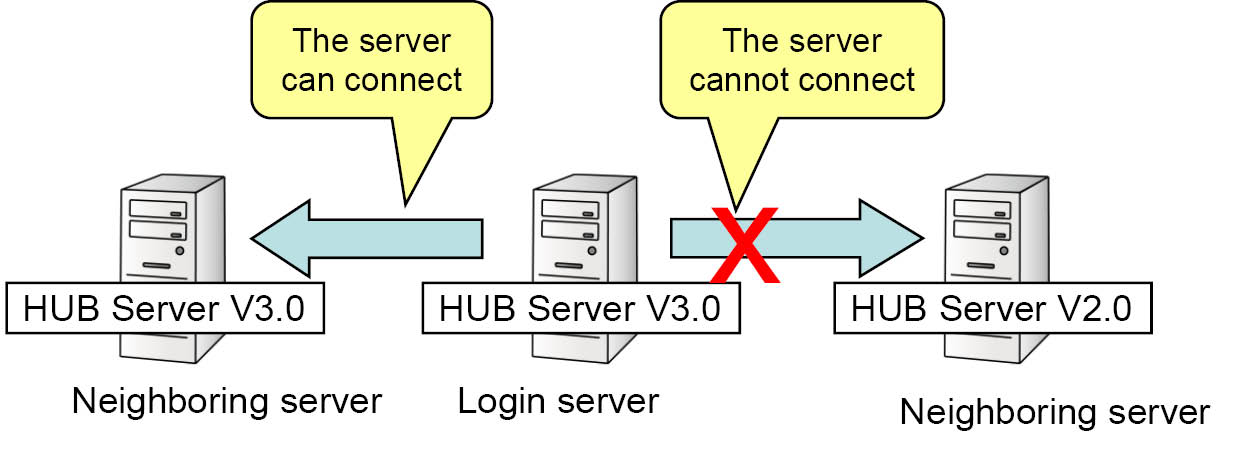
Figure 4.1 Connecting to neighboring servers with different versions
To use HULFT-HUB Manager to perform operations with neighboring servers with different versions, you must log into them separately. In this case, you must configure the receiving side host settings and sending side host settings separately even when the settings are for the same transfer.
Note that a login server that runs HULFT-HUB Server of a version earlier than Ver.3.0 can connect to and perform operations with neighboring servers with different revisions or versions.
The Data Transfer (including relay and accumulation) and Send Request actions are available even when the neighboring servers have different versions.
Changes in utility command names
|
|
|
In HULFT-HUB Server, the following program names (command names) were changed.
Table 4.1 Utilities whose command names were changed
|
Program name |
Command name |
|
|---|---|---|
|
Versions earlier than Ver.3.0 |
Ver.3.0 or later |
|
|
Summary Results CSV Output utility |
hubsumcsv |
utlhubsumcsv |
|
Product Confirmation utility |
hubverinfo |
utlhubversion |
|
Delivery Instruction utility (*1) |
utlchgsts |
utlhubchgsts |
|
Transfer Log Delete utility |
utlhublog |
utlhublogrm |
|
*1 |
: |
Available only for HULFT-HUB Server for UNIX/Linux-ENT |
Removed field: Accumulation Status
|
|
|
Because the replication function was added, the Accumulation Status field was removed from the Alternative Management Information while the Accumulated Data and Transfer Log fields were added.
Whether the accumulation status is inherited to the alternative server is determined by the setting of the Accumulated Data field.
Parameter files for management information
|
|
|
Because new fields for HULFT8 are now included, the output file format of the Management Information Parameter Generation utility (utlhubigen) and the input file format of the Management Information Batch Registration utility (utlhubiupdt) differ from those used in versions earlier than HULFT-HUB Server Ver.3.4.
Character code settings for utilities
|
|
|
For HULFT-HUB Server for Windows, the '-c' parameter’s operation when executing utilities has changed.
This affects the following utilities:
-
Client Registration utility (utlhubclientreg)
-
Management Information Parameter Generation utility (utlhubigen)
-
Management Information Batch Registration utility (utlhubiupdt)
Table 4.2 Difference in '-c' parameter operation
|
No. |
Parameter |
Code set to be used |
|
|---|---|---|---|
|
Earlier than Ver.3.6.0 |
Ver.3.6.0 or later |
||
|
1 |
-c e |
EUC |
System locale in Windows (*1) |
|
2 |
-c s |
SHIFT-JIS |
System locale in Windows (*1) |
|
3 |
-c 8 |
UTF-8 |
UTF-8 |
|
4 |
Omitted |
Set a value for Kanji Code Type (KnjCode) in the system environment settings. (Only "SJIS" can be specified for Windows.) |
System locale in Windows |
|
*1 |
: |
No error occurs even if you specify the '-c' parameter, because the parameter is backward compatible. However, for Ver.3.6.0 or later, we recommend omitting the '-c' parameter when you specify the system locale in Windows. |
If you use specification method number 2, 3, or 4 in Table 4.2 , the same operation is performed both for HULFT-HUB server versions earlier than Ver. 3.6.0 and versions later than Ver. 3.6.0 in a Japanese Language environment.
If you use specification method number 1 in Table 4.2 , change the code set of the parameter file as appropriate for the system locale in Windows.
Changes in titles in the parameter files for management information
|
|
|
In the parameter files used by the Management Information Parameter Generation utility (utlhubigen) or the Management Information Batch Registration utility (utlhubiupdt), the titles for transfer information and transfer conditions were changed.
Table 4.3 Changed titles
|
Parameter |
Title |
|
|---|---|---|
|
Earlier than Ver.3.6.0 |
Ver.3.6.0 or later |
|
|
When '-j' is omitted |
SendHostName |
TransferSourceHostName |
|
SendServiceName |
TransferSourceServiceName |
|
|
When '-j' is specified |
Sending-side host name |
Transfer-source host name |
|
Sending-side service name |
Transfer-source service name |
|
Removed the server outside of control
|
+ |
|
The server outside of control has been removed.
For HULFT-HUB Ver.3.6 and higher, when the server that is outside of control is registered, the server has to be registered explicitly as the server outside of control.
If the server outside of control was used in the environment before upgrading, change it to the server that is registered explicitly as the server outside of control.
Changing the operation because of monitoring the activity of neighboring server
|
|
|
If HULFT-HUB Server has been upgraded to Ver.3.7, monitoring the activity of neighboring server is available. Therefore, operations change for the following points:
The trace log of the neighboring server
When monitoring the activity of neighboring server is available, HULFT-HUB Server monitors the neighboring server regularly. Therefore, the following message is output to the trace log of neighboring server regularly:
Table 4.4 Messages that are output
|
Message code |
Message |
|---|---|
|
HULH6030I |
A connection request was acknowledged. IP address: xxx.xxx.xxx.xxx |
Transfer of files routed through HULFT-HUB Server Ver.3.4
When all of the following conditions are fulfilled, even if Use HULFT7 Comm. Mode of the sending side client is set to 'No', the operation is the same as it is set to 'Yes'.
-
The sending side client is running HULFT8
-
HULFT-HUB Server Ver.3.7 on the transfer route fulfills the following conditions:
-
The activity monitoring of neighboring HUB server is available
-
The neighboring server on the receiving side is HULFT-HUB Server Ver.3.4
-
Also, when all of the following conditions are fulfilled, even if Use HULFT7 Comm. Mode of the receiving side client is set to 'No', the operation is the same as it is set to 'Yes'.
-
Send Request is issued from HULFT8 on the receiving side client
-
Monitoring the activity of neighboring HUB server is enabled in HULFT-HUB Server Ver.3.7
-
The neighboring server of the HULFT-HUB Server Ver.3.7 on the sending side is HULFT-HUB Server Ver.3.4
The following shows the example of the different operation between HULFT-HUB Server earlier than Ver.3.7 and higher than Ver.3.7 when monitoring the activity of neighboring HUB server is available on both servers:
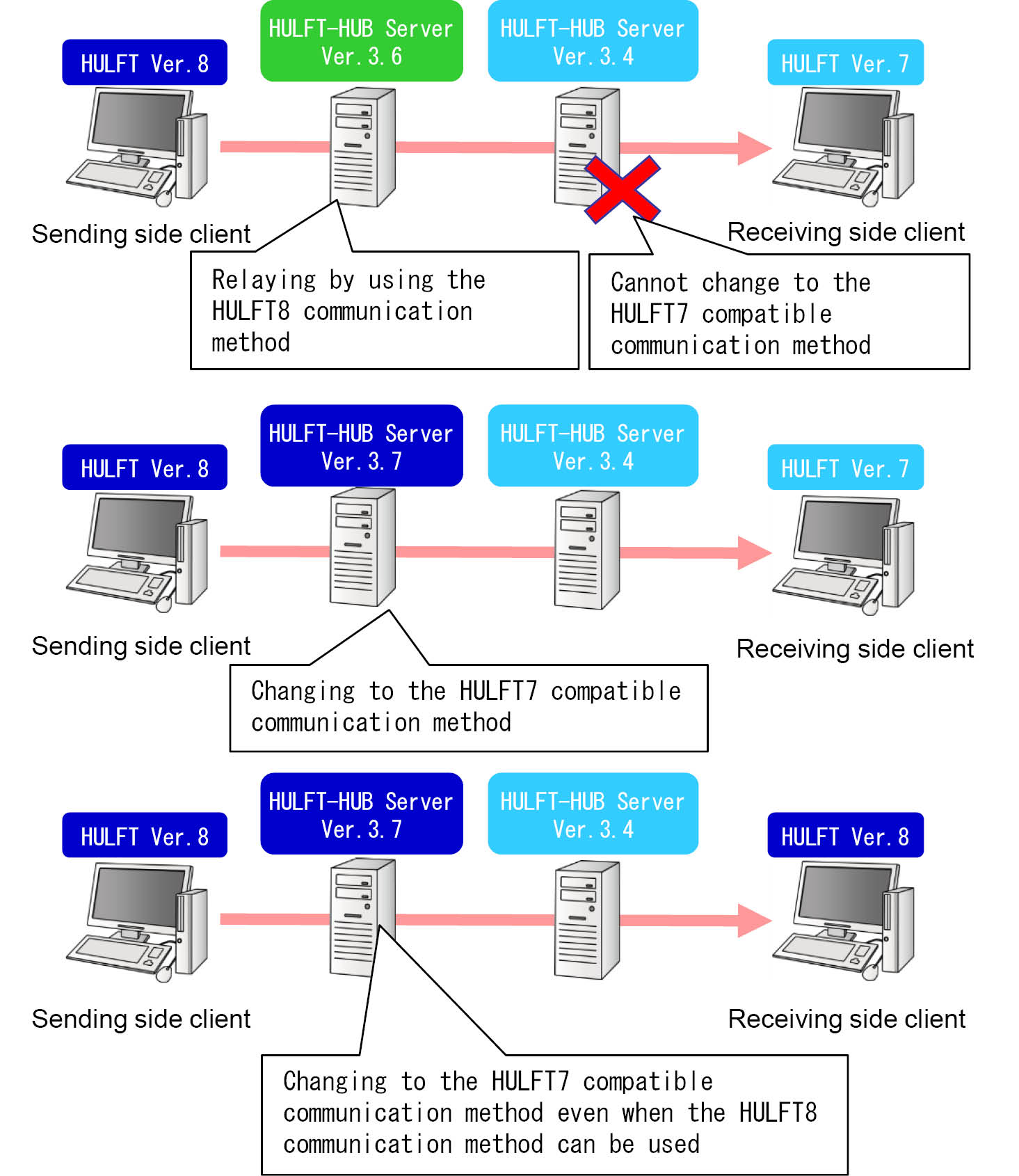
Figure 4.2 The example of the different operation between HULFT-HUB Server earlier than Ver.3.7 and higher than Ver.3.7
Removed the field of the Management Information Batch Registration utility
|
|
|
In the Management Information Batch Registration utility (utlhubiupdt), the following field is removed:
Table 4.5 The management information types removed from the Management Information Batch Registration utility (utlhubiupdt)
|
Management information types |
Field that was removed |
Version when the field is removed |
|
|---|---|---|---|
|
Title (English) |
Field name on HULFT-HUB Manager |
||
|
Transfer conditions |
OverWriteFlag |
(Hidden) (*1) |
Ver.3.6.0 |
|
*1 |
: |
You can set this field by using the Management Information Batch Registration utility (utlhubiupdt) or the import file (CSV file) of the Collecting and Distributing System Management Information function. In the version later than the version when the field is removed, even if the field is set, it will be ignored. |
Added the display field in the Transfer Log List Display utility
|
|
|
In the Transfer Log List Display utility (utlhubloglist), the following display field is added:
Table 4.6 The display fields added in the Transfer Log List Display utility (utlhubloglist)
|
Field name |
Description |
Version when the field is added |
|---|---|---|
|
Send File Name |
This field shows the name of the Send file. |
Ver.3.3.0 |
Addition of display fields for the Registered Client Log List Display utility
|
|
|
The following display fields were added for the Registered Client Log List Display utility (utlhubclientloglist).
Table 4.7 Display items added for the Registered Client Log List Display utility (utlhubclientloglist)
|
Log type |
Field name |
Description |
|---|---|---|
|
Send log |
Encryption Used |
Encryption Scheme used in the encryption of the Send file |
|
Transfer ID |
The unique identifier issued for each file transfer |
|
|
Compression Preference |
The compression preference of the Send file |
|
|
Code Converted By |
Detects the existence of a host that carries out the code conversion of files or detects the existence of code conversion |
|
|
Comment |
Comments for the Send Management Information |
|
|
Receive log |
Encryption Used |
Encryption Scheme used in the decryption of the Receive file |
|
Compression Preference |
The compression preference of the Receive file |
|
|
Transfer ID |
The unique identifier issued for each file transfer |
|
|
Code Converted By |
Always "" |
|
|
Comment |
Comments for the Receive Management Information |
|
|
Send and Receive status |
File Name |
For sending, the Send File Name |
|
Transfer ID |
The unique identifier issued for each file transfer |
When you output log records to a file and use it in user operations, it might be necessary to modify the user application.
For details about the utility, refer to HULFT-HUB Server Manual.
Addition of display fields in the Transfer Log List Display utility
|
|
|
The following display fields were added to the output when you specify the "-csv" parameter for the Transfer Log List Display utility (utlhubloglist).
Table 4.8 Display fields added in the Transfer Log List Display utility (utlhubloglist)
|
Field name |
Description |
|---|---|
|
Transfer Type |
This field shows the transfer data format of the transfer file. |
|
Encryption Used |
This field shows the encryption type used to encrypt the transfer file. |
|
Transfer ID |
This field shows the unique identifier issued for each file transfer. |
|
Compression Preference |
This field shows the compression preference for the transfer file. |
|
Code Converted By |
This field shows which side converted the code of the transfer file. |
Removed field: HUB Manager Communication Encryption Type
|
+ |
|
The HUB Manager Communication Encryption Type field in the System Environment Settings of HULFT-HUB Server was removed.
When you connect from HULFT-HUB Manager to HULFT-HUB Server Ver.3.9.0 or later, the HUB Manager Communication Encryption Type field does not appear on the System Environment Settings screen.
Framed messages sent to HULFT-HUB Server and HULFT-HUB Manager are always encrypted.
Changes in the files for client registration
|
+ |
|
The formats of the following files were changed to allow you to specify Forced Strong Key Mode when you register a client outside of control (with Relay).
-
Parameter file for the Client Registration utility (utlhubclientreg)
-
Files to be read in the Client Registration (List Selection) dialog box
Changes in titles in the parameter files for management information
|
+ |
|
The specific field titles for transfer information and transfer conditions were changed in the following files:
-
The parameter files used by the Management Information Parameter Generation utility (utlhubigen) or the Management Information Batch Registration utility (utlhubiupdt)
-
The import files and export files for the Collecting and Distributing System Management Information function
Table 4.9 Changed titles
|
Language |
Title |
|
|---|---|---|
|
Earlier than Ver.3.9.0 |
Ver.3.9.0 or later |
|
|
Japanese (*1) |
EBCDIC コードセット |
EBCDIC セット |
|
English (*2) |
EbcdicCodeSet |
EBCDICSet |
|
*1 |
: |
When "-j" is specified in the Management Information Parameter Generation utility (utlhubigen), or when "Japanese" is specified for Title Language in the Export dialog box on the Collecting and Distributing System Management Information screen |
|
*2 |
: |
When "-j" is omitted in the Management Information Parameter Generation utility (utlhubigen), or when "English" is specified for Title Language in the Export dialog box on the Collecting and Distributing System Management Information screen |
Changes in the HULFT products that are supported
|
+ |
|
HULFT-HUB Ver.3.10 and higher do not support connecting to lower than HULFT Ver.7
When you upgrade the version to HULFT-HUB Ver.3.10 or higher, it is necessary to delete registered clients that meet the following conditions:
-
Lower than HULFT Ver.7
-
Host type is 'K'
For details, refer to HULFT-HUB Server Installation Manual.
Modification in the setting values and names of the host types
|
|
|
The setting values and names of Host Type in the Host Information have been modified:
Table 4.10 Modified setting values and names
|
Lower than HULFT-HUB Ver.3.10 |
HULFT-HUB Ver.3.10 or higher |
||
|---|---|---|---|
|
Value |
Name |
Value |
Name |
|
W |
Windows |
W |
Windows |
|
N |
WindowsNT |
||
|
K |
Fujitsu K |
(Deleted) |
|
|
U |
UNIX |
L |
Linux/UNIX |
|
A |
AS/400 |
I |
IBMi |
|
H |
Mainframe |
H |
Mainframe |
Removed the summary commands
|
+ |
|
The following deprecated functions have been removed:
-
Summary process
-
Summary Results CSV Output utility (utlhubsumcsv)