Restrictions on HULFT7 communication mode
When a lower server relays or accumulates data transferred from HULFT8, a transfer error can occur unless Use HULFT7 Comm. Mode in the host information is set to 'Yes'.
-
To change Use HULFT7 Comm. Mode, you can use a function for client management information on the Management screen. You cannot change host information by using the Transfer Information screen.
-
When Use HULFT7 Comm. Mode is set to 'Yes', the length of a file ID must not exceed eight bytes even if both of the sending host and receiving host run HULFT8.
-
Set Use HULFT7 Comm. Mode to 'No' if none of the restrictions described below are present.
Using HULFT-HUB Server Ver.3.4 to relay or accumulate
When HULFT8 issues requests for Send File or Send Request and HULFT-HUB Server Ver3.4 relays or accumulates transferred data, the host information of HULFT8 on the issuer must be configured so that Use HULFT7 Comm. Mode is set to 'Yes' if any of the following conditions is fulfilled:
1) The sending side client or receiving side client runs HULFT of a version earlier than HULFT8.
2) HULFT-HUB Server of a version earlier than Ver.3.4 exists on the transfer route.
3) The completion of accumulation is associated with a job flow.
Setting Use HULFT7 Comm. Mode to 'No' causes a transfer error.
For 1) and 2) in the list above, you do not need to configure the setting manually. The Transfer Information screen of HULFT-HUB Manager can ensure that 'Use HULFT7 Comm. Mode' is set appropriately when it creates transfer information.
For 3), you must configure 'Use HULFT7 Comm. Mode' manually.
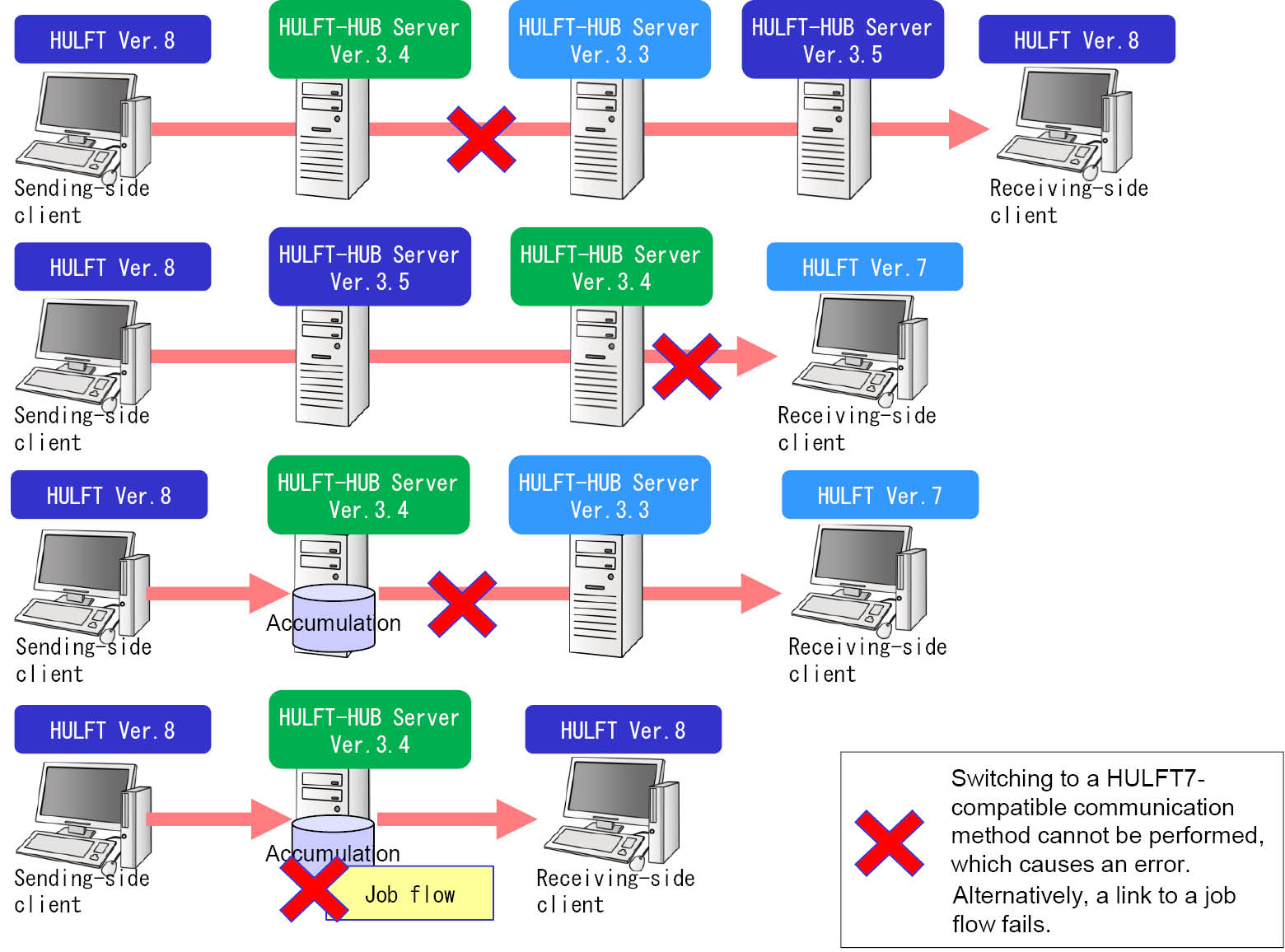
Figure 5.15 Example cases where 'Use HULFT7 Comm. Mode' must be set to 'Yes'
Meanwhile, if the neighboring server adjacent to HULFT-HUB Server Ver.3.4 fulfills all of the following conditions, HULFT8 on the issuer does not need to be configured so that Use HULFT7 Comm. Mode is set to 'Yes'.
Even if 'No' is specified, the operation is the same as it is set to 'Yes'.
-
HULFT-HUB Server Ver.3.7 or higher
-
Monitoring the activity of neighboring server is enabled
Using HULFT-HUB Server of versions earlier than Ver.3.4 to relay or accumulate
To use HULFT8 to transfer, you must configure host information on HULFT8 to set Use HULFT7 Comm. Mode to 'Yes' when all of the following conditions are fulfilled:
-
The sending side client runs HULFT8 and its controlling server is HULFT-HUB Server Ver.3.5 or later.
-
The controlling server of the receiving side client is HULFT-HUB Server Ver.3.4 or later.
-
HULFT-HUB Server of a version earlier than Ver.3.4 exists on the transfer route.
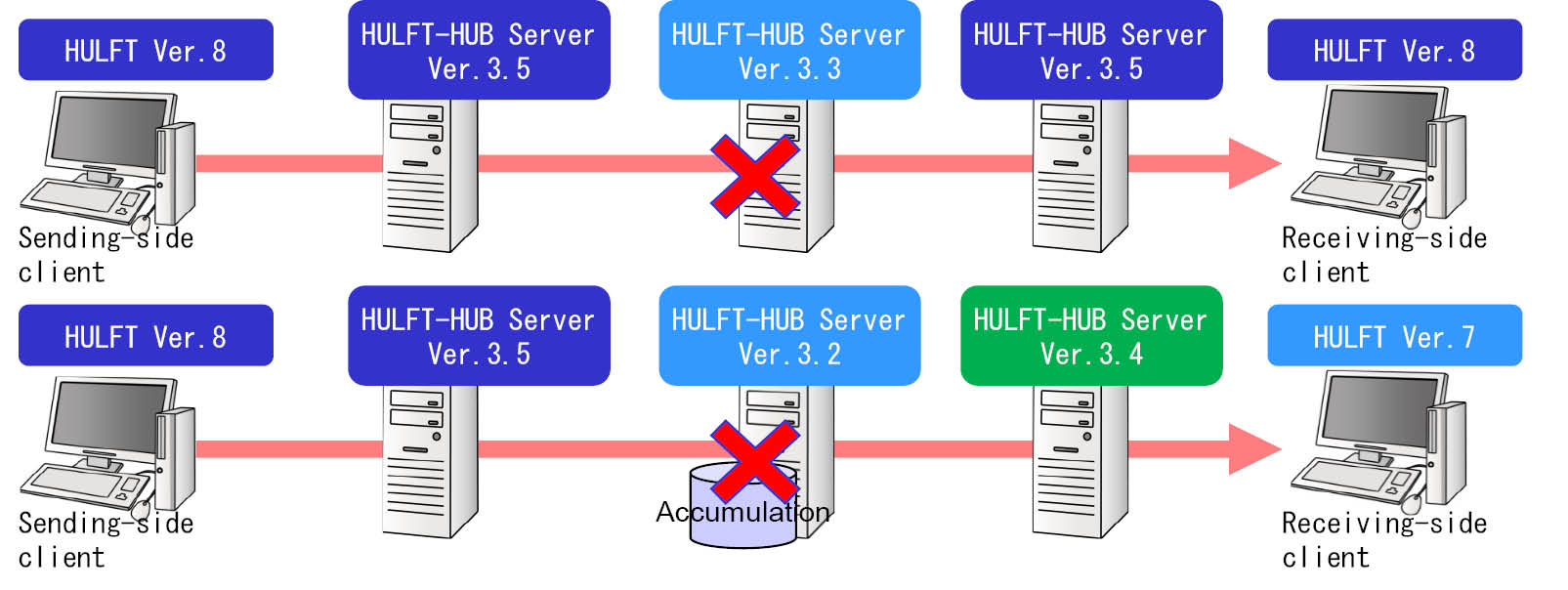
Figure 5.16 Example cases where 'Use HULFT7 Comm. Mode' must be set to 'Yes'
This restriction does not apply when HULFT-HUB Server of a version earlier than Ver.3.4 is the last server on the transfer route; in other words, it is the controlling server of the receiving side client.
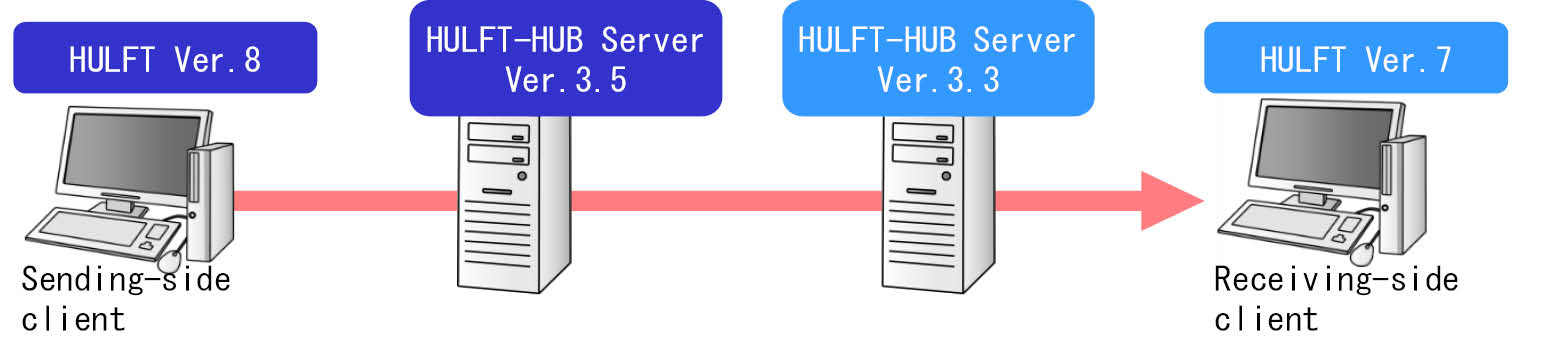
Figure 5.17 Case where 'Use HULFT7 Comm. Mode' can be set to 'No'
Meanwhile, if the neighboring server adjacent to HULFT-HUB Server earlier than Ver.3.4 fulfills all of the following conditions, the sending side client does not need to be configured so that Use HULFT7 Comm. Mode is set to 'Yes'.
Even if 'No' is specified, the operation is the same as it is set to 'Yes'.
-
HULFT-HUB Server Ver.3.7 or higher
-
Monitoring the activity of neighboring server is enabled
Using a HULFT-HUB Server version earlier than Ver. 3.6 to relay or accumulate data
To use HULFT Ver. 8.1 or later to transfer data, you must configure host information on a sending client to set Use HULFT7 Comm. Mode to 'Yes' when all of the following conditions are met:
-
The sending client runs HULFT Ver. 8.1 or later and its controlling server is HULFT-HUB Server Ver. 3.6 or later.
-
The receiving client runs HULFT Ver. 8.1 or later and its controlling server is HULFT-HUB Server Ver. 3.6 or later.
-
A HULFT-HUB Server version earlier than 3.6 exists on the transfer route.

Figure 5.18 Example cases where 'Use HULFT7 Comm. Mode' must be set to 'Yes'
Meanwhile, if the neighboring server adjacent to HULFT-HUB Server earlier than Ver.3.6 fulfills all of the following conditions, the sending side client does not need to be configured so that Use HULFT7 Comm. Mode is set to 'Yes'.
Even if 'No' is specified, the operation is the same as it is set to 'Yes'.
-
HULFT-HUB Server Ver.3.7 or higher
-
Monitoring the activity of neighboring server is enabled
Using attributes of a sending file for a receiving file to transfer between mainframes
When both the sending client and receiving client run HULFT for Mainframe, you must set Use HULFT7 Comm. Mode on the sending client to 'Yes' when all of the following conditions are met:
-
The sending client runs HULFT for Mainframe Ver. 8.1 or later.
-
The receiving client runs HULFT for Mainframe.
-
For Receiving Side Setting Information on the Transfer Information screen, Use Attribute is set to 'SND'.
-
HULFT-HUB Server Ver. 3.5 exists on the transfer route.
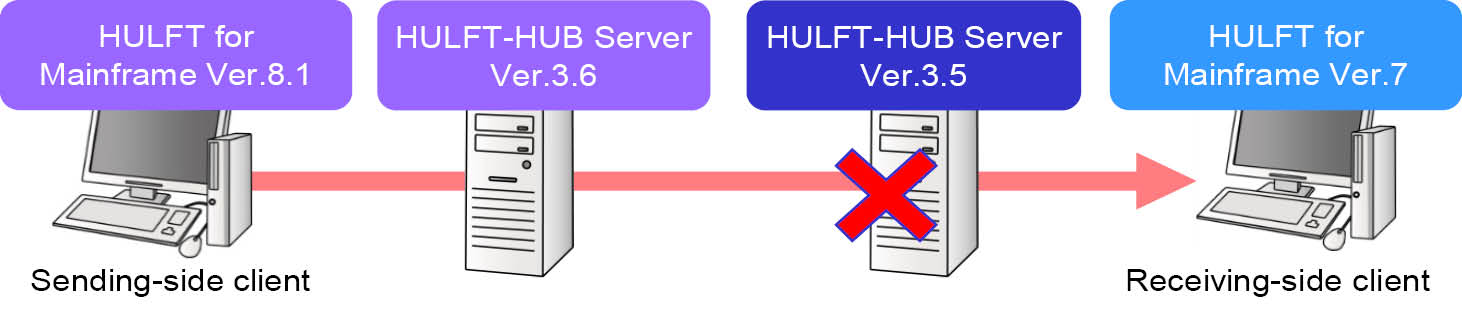
Figure 5.19 Example cases where 'Use HULFT7 Comm. Mode' must be set to 'Yes'
The HULFT management screen on a client displays 'Use Attribute' as 'Use Attribute'.