Host Information used in transfers via HUB
PROXY Information used for routing through HULFT-HUB Server
When you create the definition for transfers that route through HULFT-HUB Server, PROXY Information is set up in the Host Information on the client.
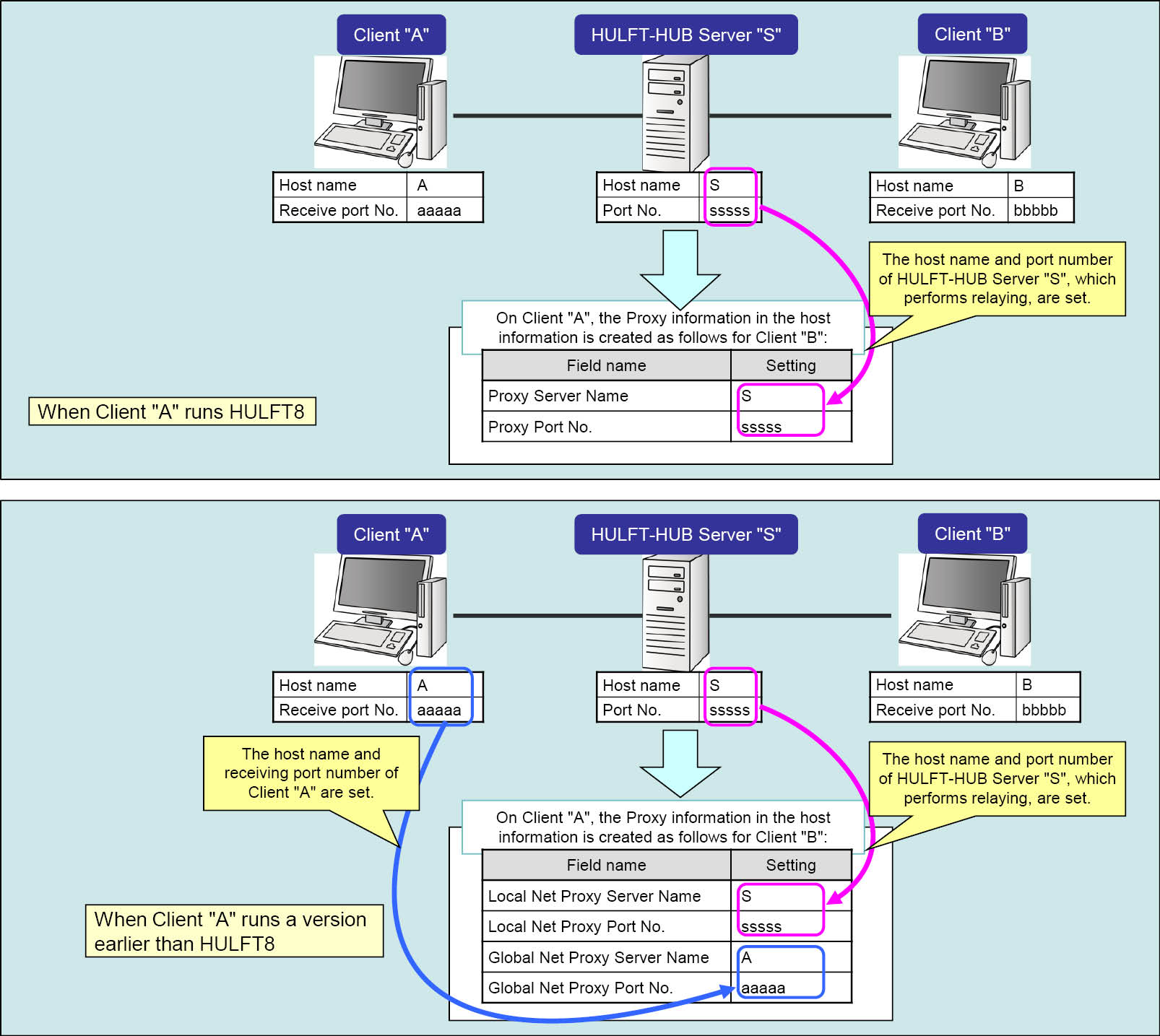
Here, suppose that the clients 'A' and 'B' transfer files via the HULFT-HUB Server instance 'S'. The following shows example settings of PROXY Information, in the Host Information of the client 'B' registered on the client 'A'.
Prerequisites
- Registered Client Information of 'A' stored in 'S'
-
- Host name:
-
A
- Receive Port No.:
-
aaaaa
- Registered Client Information of 'B' stored in 'S'
-
- Host name:
-
B
- Receive Port No.:
-
bbbbb
- System Environment Settings of 'S'
-
- Host name:
-
S
- Port No.:
-
sssss
Host name used in transfers via HUB
When HULFT transfers a file, it notifies the remote host of its own host name. Host Information of HULFT is created in accordance with the host name to be notified. In addition, the notified host name is written to the HULFT log after it is notified.
For transfers via HULFT-HUB Server, HULFT-HUB Server notifies the client of the name of the remote host. The host name to be notified varies depending on the following settings:
-
Notification Host Name in the Registered Client Information
-
Notification Host Name for Transfer via HUB in the HULFT-HUB Server System Environment Settings
The host name to be notified differs from the host name seen on the network. However, no problem exists because the HULFT-HUB Server instance specified in the PROXY Information can relay files.
If a host name is specified in Notification Host Name, the Notification Host Name for Transfer via HUB setting will be ignored.
Notification Host Name
If Notification Host Name in the Registered Client Information is provided, the client is always notified of the specified host name. Therefore, the client considers all remote hosts for transfers via HUB as the specified host.
When you create a transfer definition in HULFT-HUB Manager, Host Information is created, having the information as listed in the table below. Therefore, the client can perform transfers even if it does not know the remote client information.
|
Field |
Description of Settings |
|
Host Name |
Notification Host Name in the Registered Client Information |
|
Host Type |
Host type of the controlling server |
|
Kanji Code Type |
Kanji code type of the controlling server |
|
JIS Year |
JIS year of the controlling server |
|
Receive Port No. |
Port No. in the System Environment Settings of the controlling server |
|
PROXY Information |
See PROXY Information used for routing through HULFT-HUB Server |
|
Others |
Initial value |
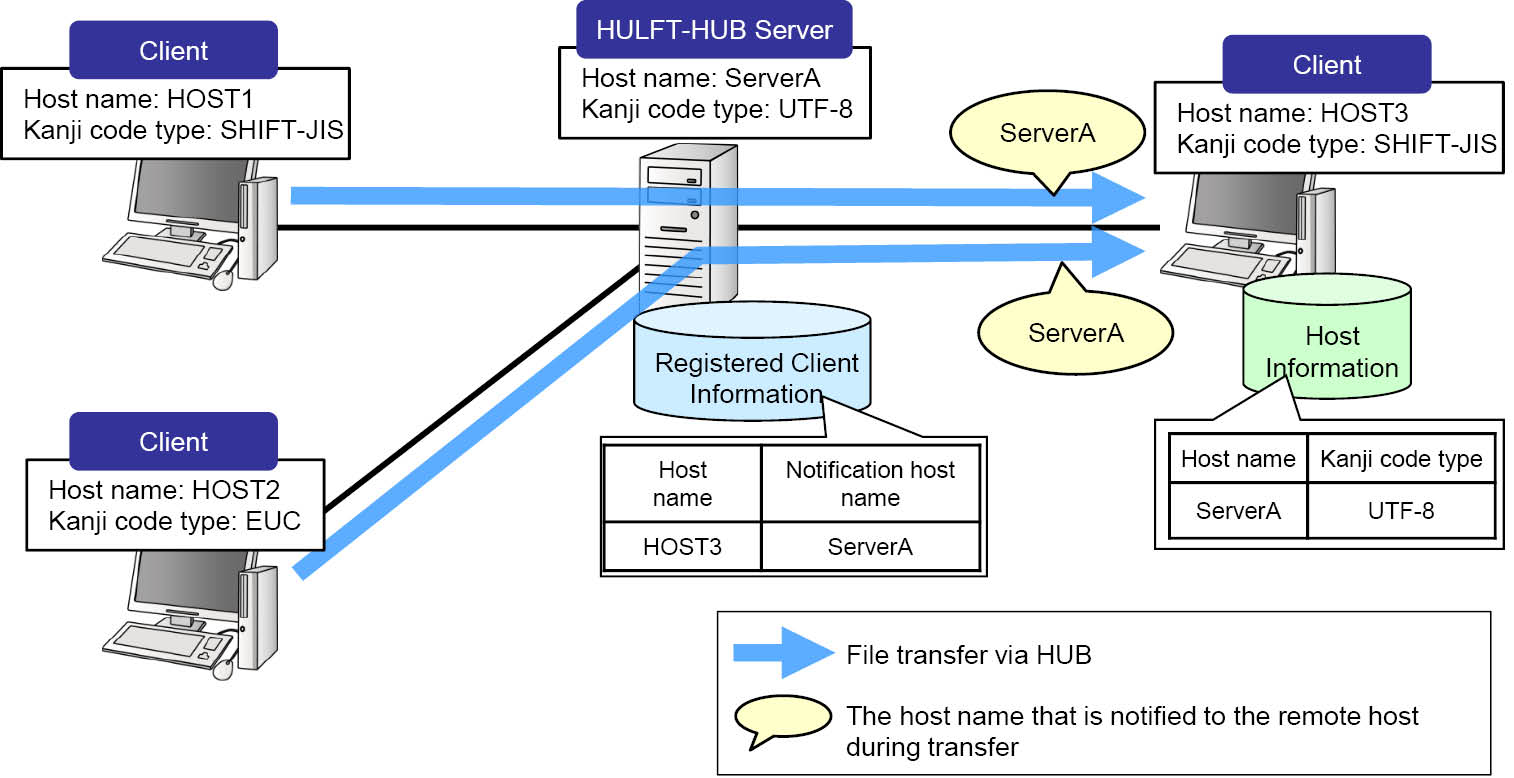
Figure 2.95 Example of operation when 'Notification Host Name' is specified
-
The host on which Notification Host Name is specified cannot find the Kanji Code Type of the actual remote host. Code conversion must be performed on the host on which Notification Host Name is not specified.
-
When you create a transfer definition in HULFT-HUB Manager, routes cannot be configured by using auto arrangement if Notification Host Name is specified on the sending side client. Use the manual arrangement.
-
If Notification Host Name of the receiving side client is specified in transfer definitions for Multiple Receives, the client cannot determine the sending side client when a send request is issued, causing an error.
The following table shows the operational differences between when Notification Host Name is omitted and when specified.
|
If 'Notification Host Name' is omitted |
If 'Notification Host Name' is specified |
|
Existing Direct Transfers can be migrated through Route Batch Modification. |
Transfer definitions for existing Direct Transfers must be re-created. |
|
Setting information on the local host must be made open to the remote client. |
Setting information on the local host does not have to be made open to the remote client. |
|
Each client does not have to be aware of the existence of HULFT-HUB. |
Each client does not have to be aware of the existence of the remote client. |
|
Direct Transfers and HUB Transfers can coexist only in the format in which a port number is added. |
Direct Transfers and HUB Transfers can coexist only in the setting where Notification Host Name is specified so that the host name can be different from the existing host name. |
Notification Host Name for transfer via HUB
When the Notification Host Name value in the Registered Client Information is omitted, the client will receive the host name in the format in which a port number is added to the host name or the format in which no port number is added.
Table 2.16 shows the description and example of the host name in each format. The examples assume the host name of the client 'B', which the client 'A' receives in the environment shown in Figure 2.94 .
|
Host name format |
Description |
Example |
|
Format in which a port number is added |
The Host Name and Port No. are concatenated into the 'Host Name_PortNo.' format. |
B_bbbbb |
|
Format in which a port number is not added |
Host Name only |
B |
The port number to be added varies depending on the host type, as shown in the following table.
|
Host type |
Description |
|
Client |
Receive Port No. in the System Environment Settings of HULFT |
|
Server |
Port No. in the System Environment Settings of HULFT-HUB Server |
-
Mixing a Direct Transfer and HUB Transfer
In the format in which a port number is added, the Direct and HUB Transfers can be mixed. They cannot be mixed in the format in which a port number is not added.
-
Coexistence within the same host of multiple instances of HULFT or HULFT-HUB Server with the same host name
In the format in which a port number is added, multiple instances of HULFT or HULFT-HUB Server can coexist within the same host. In the format in which a port number is not added, because it cannot be determined which HULFT or HULFT-HUB Server port number the data should be sent to, multiple instances of HULFT or HULFT-HUB Server cannot coexist within the same host.
The host nme format is specified in Notification Host Name for Transfer via HUB (HostNameNotice) of the System Environment Settings for HULFT-HUB Server. You cannot specify this setting in HULFT-HUB Manager. Therefore, make direct edits to the System Environment Settings file.
For details about the System Environment Settings of HULFT-HUB Server, see the HULFT-HUB Server Manual.
The following table shows the relationship between the settings of Notification Host Name for Transfer via HUB (HostNameNotice) and how clients operate.
|
Setting value(*1) |
Behavior |
|
|
Controlled Client |
Client Outside of Control (with Relay) |
|
|
Format with Port No. (0) |
For transfers via HUB, the clients use the format in which a port number is added to the host name. |
|
|
Format with Port No. for Controlled Clients Only (1) |
The clients operate the same as the 'Format with Port No.' value. |
The clients operate the same as the 'Format without Port No.' value. |
|
Format without Port No. (2) |
For transfers via HUB, the clients use the format in which a port number is not added. |
|
|
*1 |
: |
The System Environment Settings file contains the value enclosed in (). |
Auto arrangement and manual arrangement
When you create a transfer definition in HULFT-HUB Manager, the Notification Host Name setting can be omitted in the Registered Client Information of the sending side client. In this case, the host name that the sending side client receives and the host information to be created depend on whether the route setting is performed through the auto arrangement or manual arrangement.
|
Field |
Auto Arrangement |
Manual Arrangement |
|
|
Host name to be notified |
Host name of the receiving client |
Host name of the controlling server |
|
|
Host Information |
|||
|
|
Host Name |
Host name of the receiving client |
Host name of the controlling server |
|
Host Type |
Host type of the receiving client |
Host type of the controlling server |
|
|
Kanji Code Type |
Kanji code type of the receiving client |
Kanji code type of the controlling server |
|
|
JIS Year |
JIS year of the receiving client |
JIS year of the controlling server |
|
|
Receive Port No. |
Receive Port No.' in the System Environment Settings of the receiving client |
Port No. in the System Environment Settings of the controlling server |
|
|
Request Acknowledge Port No. |
Request Acknowledge Port No. in the System Environment Settings of the receiving client |
31000 |
|
|
PROXY Information |
See PROXY Information used for routing through HULFT-HUB Server |
||
|
Others |
Initial value |
||
The host name of which the receiving side client receives is not affected by a routing method.
In addition, the format of the host name is determined by the Notification Host Name for Transfer via HUB setting.
Examples of host names to be notified
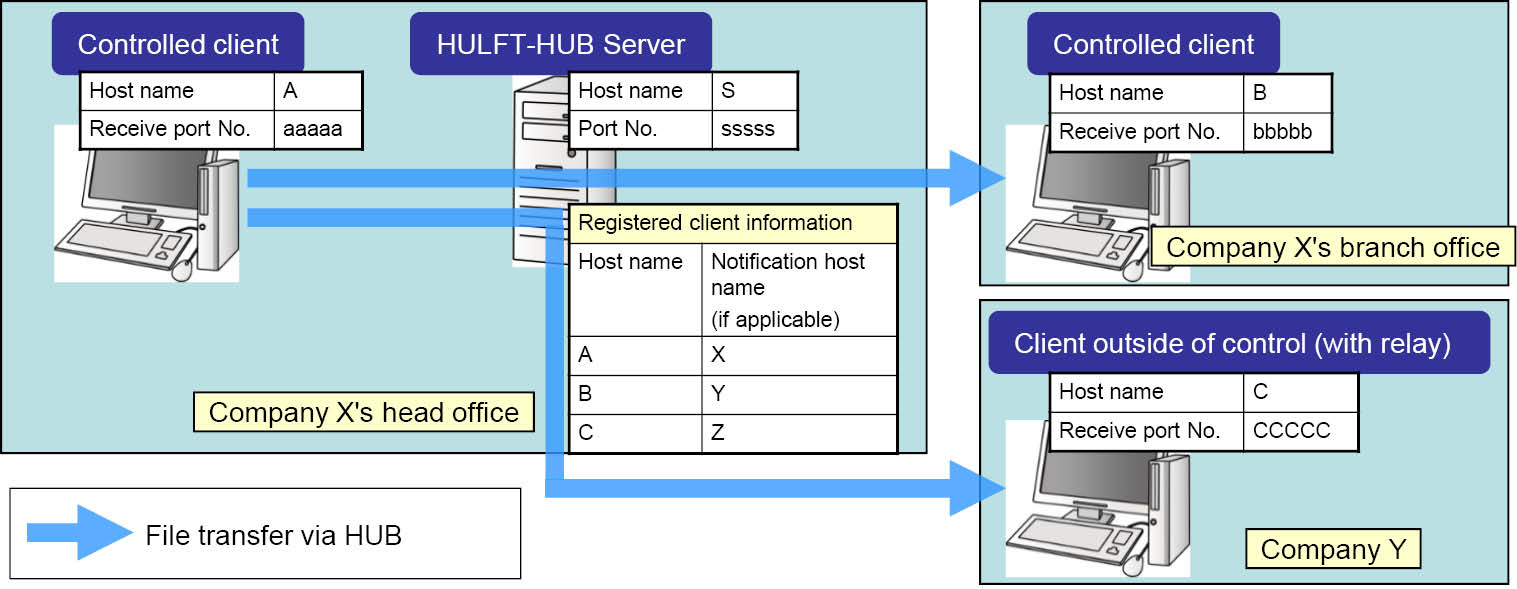
A combination of the Notification Host Name value of the Registered Client and the Notification Host Name for Transfer via HUB value in the System Environment Settings affects the host name that the client receives. The following example shows how the host names would be, based on the environment shown in Figure 2.96 .
For details about the Host Information created for each case, see Table 2.20 and Table 2.21 .
|
*1 |
: |
If Notification Host Name for A is specified, the route cannot be configured through auto arrangement. |
|
*1 |
: |
If Notification Host Name for A is specified, the route cannot be configured through auto arrangement. |
Management information affected by the host name to be notified
Changing the host name to be notified in a transfer via HULFT-HUB Server will affect the following management information.
Transfer Group Information
The Transfer Group ID is not affected, but the host name to be registered is affected.
If the Direct Transfer in the existing transfer definition is switched to the HUB Transfer, the Transfer Group ID is not changed, but the registered host name is changed. Therefore, the Send Management Information and Receive Management Information are not affected by the host name to be notified.
|
Notification Host Name of 'A' |
Notification Host Name for Transfer via HUB |
Host name to be registered |
|
(Omitted) |
Format with Port No. |
B_bbbbb |
|
Format with Port No. for Controlled Clients Only |
B_bbbbb |
|
|
Format without Port No. |
B |
|
|
X |
Format with Port No. |
X |
|
Format with Port No. for Controlled Clients Only |
||
|
Format without Port No. |
XML Conversion Information
The file name in the XML Conversion Information is affected by the host name to be notified because the file name uses the host name.
|
Notification Host Name of 'A' |
Notification Host Name for Transfer via HUB |
Created file name (*1) |
|
(Omitted) |
Format with Port No. |
B_bbbbb.ff.FFFF.inf |
|
Format with Port No. for Controlled Clients Only |
B_bbbbb.ff.FFFF.inf |
|
|
Format without Port No. |
B.ff.FFFF.inf |
|
|
X |
Format with Port No. |
X.ff.FFFF.inf |
|
Format with Port No. for Controlled Clients Only |
||
|
Format without Port No. |
|
*1 |
: |
Example of the XML conversion of a file received from the client 'B' with Format ID 'FFFF' |
How Route Batch Modification operates
If you perform Route Batch Modification in HULFT-HUB Manager, management information after the change might not be consistent when Notification Host Name is specified in the Registered Client Information of the selected client. When Notification Host Name is specified, do not perform Route Batch Modification.
If Notification Host Name is omitted in the Registered Client Information of the selected client, the Host Information, Transfer Group Information, and XML Conversion Information that are changed or added by using Route Batch Modification are affected as described earlier.