Code conversion
When route settings are specified as any of the following options, sending side conversion will fail if settings for the Kanji Code Type and JIS Year fields differ between a HULFT-HUB Server instance and a client that participate in transfer processing:
-
Auto arrangement - HUB Multicasting
-
Manual arrangement
Use a receiving-side conversion if the above is applicable.
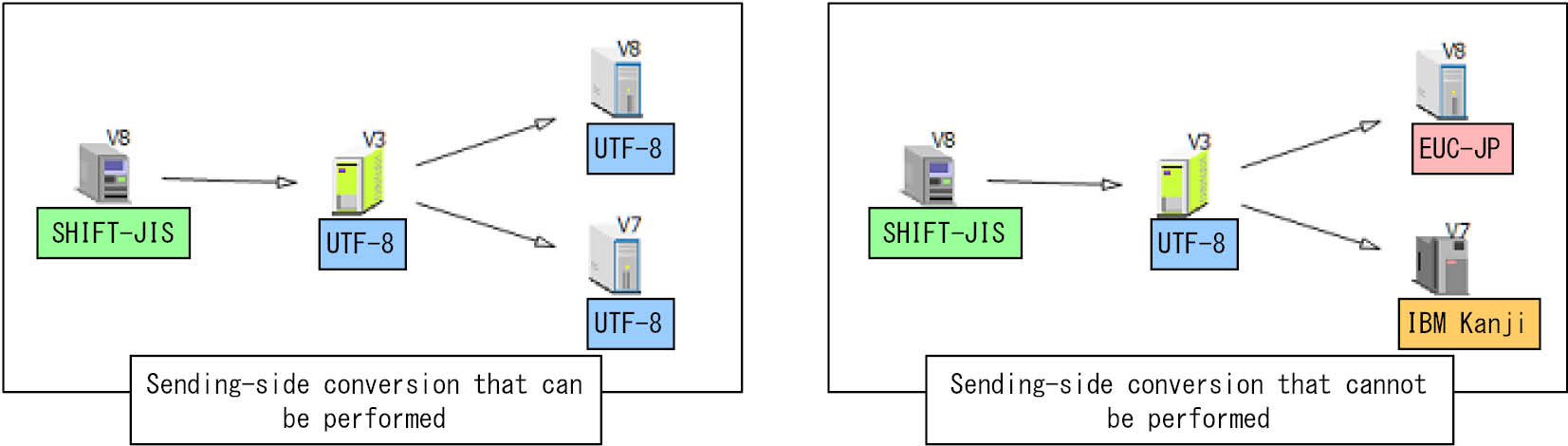
Figure 4.1 Examples of sending side conversions that can and cannot be performed
-
When you use the Transfer Information screen of HULFT-HUB Manager to define transfer information, if the condition of the above-right figure is met, you cannot specify sending-side conversion.
This is because a sending-side conversion specification in route settings is changed to either HULFT multicasting via a HUB instance with sending-side conversion, or to HUB multicasting with receiving-side conversion.
If you attempt to specify sending-side conversion in a manual arrangement, an error occurs when you apply the transfer definition.
-
When you use either the Collecting and Distributing System Management Information screen of HULFT-HUB Manager, or the Management Information Batch Registration utility (utlhubiupdt) of HULFT-HUB Server to define transfer information, if you specify sending-side conversion and the route condition described in the above-right figure is met, code conversion will not be performed properly during file transfer.
-
If you use HULFT for Mainframe (ACOS version) to send files, apply any of the following settings to transfer information and perform code conversion manually after the transfer is complete:
-
Specify 'BINARY' in the Transfer Type field
-
Specify 'No Conversion' in the Code Conversion field
-
-
For a HULFT-HUB Server instance, specify the Kanji Code Type and JIS Year fields in the System Environment Settings of the server.
For a client, specify them in the Registered Client Information of the client's controlling server.
Converting machine-dependent characters to UTF-8
If you convert any of the following characters to UTF-8, regardless of whether the conversion is by sending side or receiving side, the conversion result differs depending on the receiving-side host.
Table 4.1 Converting machine-dependent characters to UTF-8
|
Before conversion |
Receiving-side host |
|||||||||
|---|---|---|---|---|---|---|---|---|---|---|
|
Windows/IBM i/zOS |
Linux/AIX |
|||||||||
|
Characters after conversion (complies with Microsoft) |
Characters after conversion (complies with the Unicode Consortium) |
|||||||||
|
Character |
Character encoding |
Character |
Character encoding |
Character |
Character encoding |
|||||
|
SHIFT-JIS |
EUC-JP |
IBM Kanji |
JEF |
KEIS |
NEC |
|||||
|
~ |
0x8160 |
0xA1C1 |
0xA3A1 |
0xA1C1 |
0xA1C1 |
0x4FC1 |
~ (U+FF5E) |
0xEFBD9E |
〜 (U+301C) |
0xE3809C |
|
∥ |
0x8161 |
0xA1C2 |
0x447C |
0xA1C2 |
0xA1C2 |
0x4FC2 |
∥ (U+2225) |
0xE288A5 |
‖ (U+2016) |
0xE28096 |
|
- |
0x817C |
0xA1DD |
0x4260 |
0xA1DD |
0xA1DD |
0x4F5A |
- (U+FF0D) |
0xEFBC8D |
− (U+2212) |
0xE28892 |
|
¢ |
0x8191 |
0xA1F1 |
0x434A |
0xA1F1 |
0xA1F1 |
0x4F76 |
¢ (U+FFE0) |
0xEFBFA0 |
¢ (U+00A2) |
0xC2A2 |
|
£ |
0x8192 |
0xA1F2 |
0x424A (*1) |
0xA1F2 (*1) |
0xA1F2 (*1) |
0x4F77 (*1) |
£ (U+FFE1) |
0xEFBFA1 |
£ (U+00A3) |
0xC2A3 |
|
¬ |
0x81CA |
0xA2CC |
0x425F (*1) |
0xA2CC (*1) |
0xA2CC (*1) |
(*2) |
¬ (U+FFE2) |
0xEFBFA2 |
¬ (U+00AC) |
0xC2AC |
|
*1 |
: |
Always converted to characters complying with Microsoft. Characters complying with the Unicode Consortium are handled as the corresponding EBCDIC single-byte characters. |
|
*2 |
: |
No character corresponds to the characters complying with Microsoft (U+FFE2). Characters complying with the Unicode Consortium are handled as the corresponding EBCDIC single-byte characters. |
Therefore, when the route settings are specified as 'Auto arrangement - HUB Multicasting' or 'Manual arrangement', even if the identical value 'UTF-8' is specified in the Kanji Code Type field for both a HULFT-HUB Server instance and a receiving-side client, a sending-side conversion during a transfer among machines of different host types might produce an unexpected and undesired result that is different from Table 4.1.
If one of the characters listed in the table is contained in a file to be sent, specify receiving-side conversion.
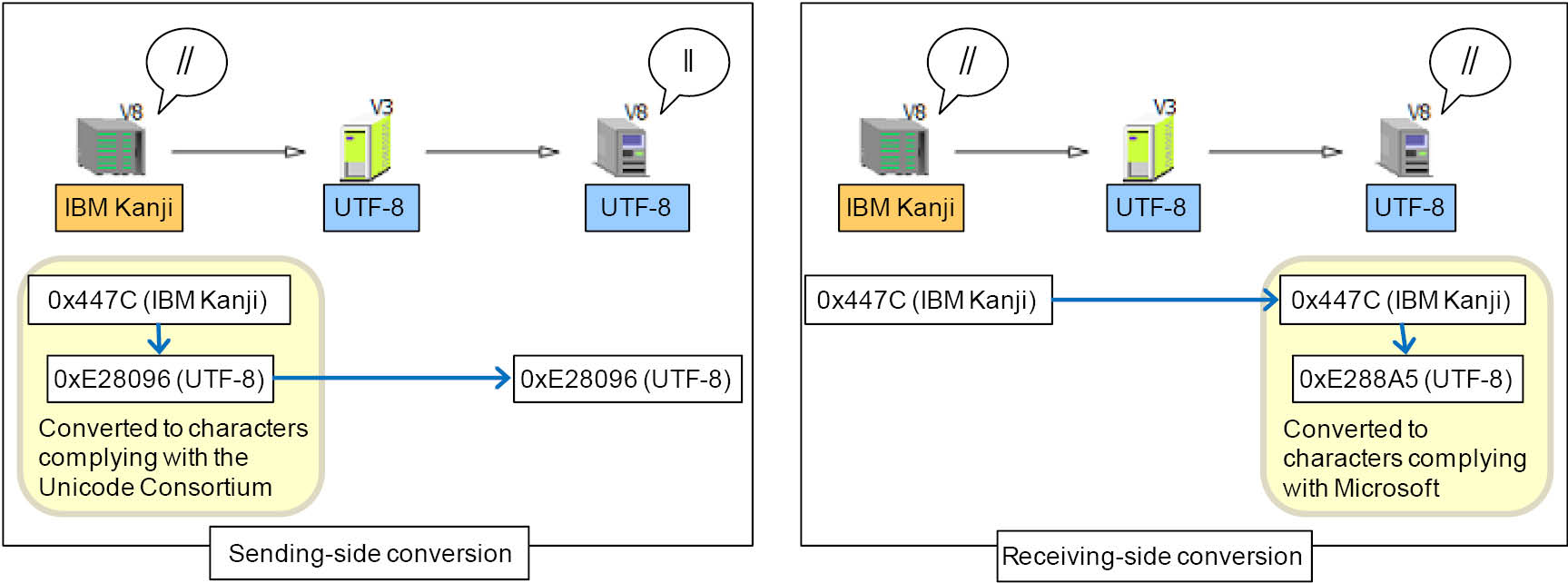
Figure 4.2 Example of conversion from '∥'