Transfer Speed Priority Mode and Error Detection Priority Mode
Framed message transfer type and data transfer methods
HULFT Ver.7 or later allows you to select the data transfer method from Transfer Speed Priority Mode or the Error Detection Priority Mode.
In the Transfer Speed Priority Mode, the sending side client transfers data without waiting for the receiving result notification from the receiving side client. Using the Transfer Speed Priority Mode improves transfer speed in a high-speed network environment and during a large data transfer.
The Error Detection Priority Mode, which is the existing transfer method of versions of HULFT Ver.6 or earlier, waits for the confirmation of transferring a block of data from the receiving side client and then proceeds to the transfer of the next block. Therefore, the transfer speed in the Error Detection Priority Mode is slower than the Transfer Speed Priority Mode, yet the former mode can detect an error more quickly.
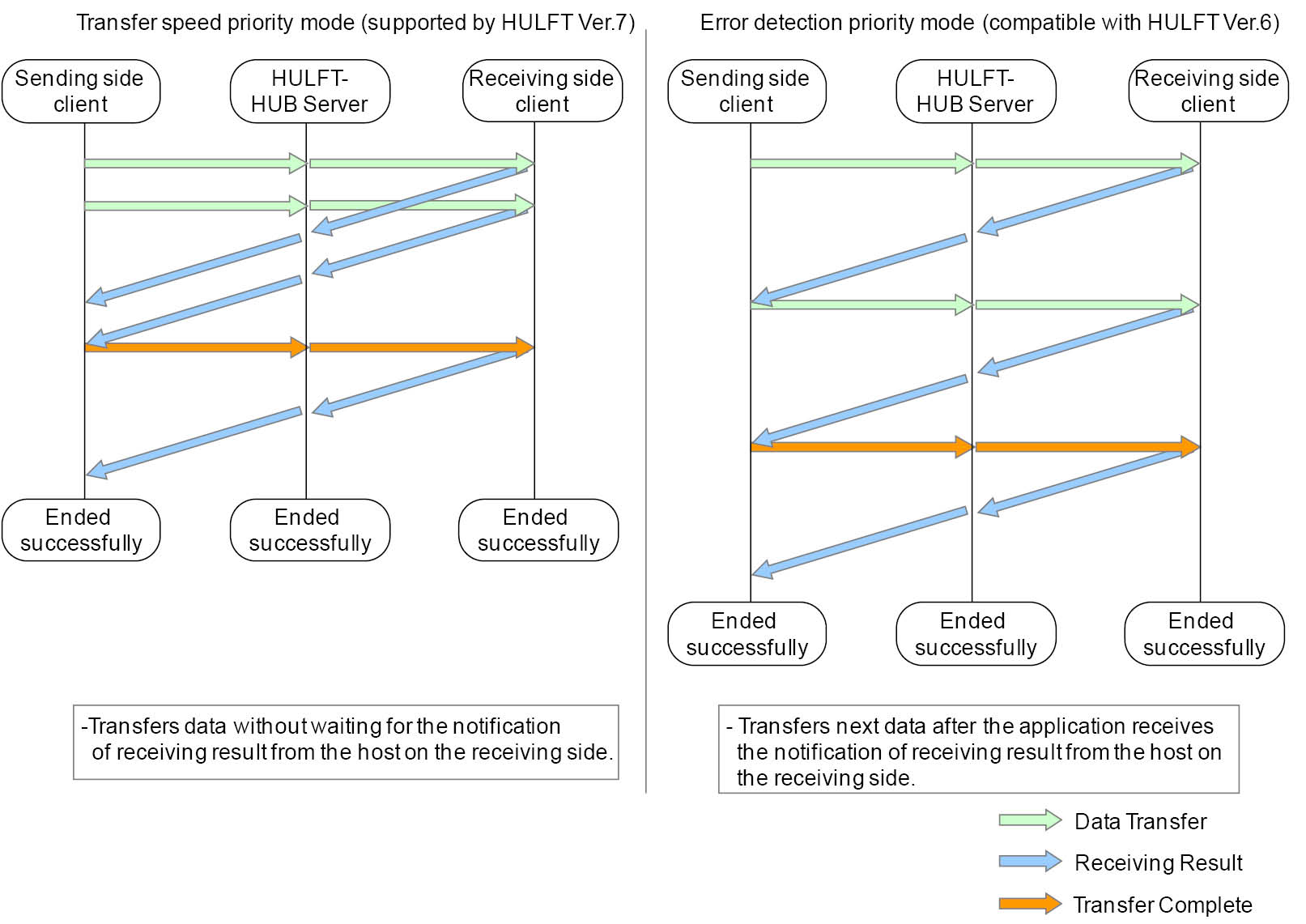
Figure 2.91 Transfer Speed Priority Mode and Error Detection Priority Mode
In the Transfer Speed Priority Mode, a different amount of resources is used for sending and receiving files compared to the Error Detection Priority Mode. In addition, this mode might cause a delay in the timing of error detections and of the cancellation acknowledgment. For details, see the Administration Manual for HULFT Ver.7 or later.
Transfer conditions and data transfer methods
In transfers via HULFT-HUB Server, an appropriate data transfer method is selected for each transfer depending on the transfer type and accumulation condition. Therefore, even when both the sending and receiving side clients are set to Transfer Speed Priority Mode, the mode is switched to the Error Detection Priority Mode before the file is transferred, depending on the circumstances. For the combination of the transfer type, accumulation condition, and data transfer type, see the following table.
|
Transfer type |
Accumulation Condition |
Data transfer method |
|
Relay |
Never Accumulate |
Setting of Framed Message Transfer Type |
|
Accumulate Only |
Setting of Framed Message Transfer Type |
|
|
Deliver after Accumulation |
Setting of Framed Message Transfer Type |
|
|
Transfer and Accumulate Concurrently |
Error Detection Priority Mode |
|
|
Accumulate Only When Unable to Transfer |
Error Detection Priority Mode |
|
|
Multicasting |
Never Accumulate |
Error Detection Priority Mode |
|
Accumulate Only |
Setting of Framed Message Transfer Type |
|
|
Deliver after Accumulation |
Setting of Framed Message Transfer Type |
|
|
Transfer and Accumulate Concurrently |
Error Detection Priority Mode |
|
|
Accumulate Only When Unable to Transfer |
Error Detection Priority Mode |
If there are mixed earlier versions of HULFT-HUB Server or HULFT systems, see the description of functional restrictions in the HULFT-HUB New Features and Compatibility Guide.
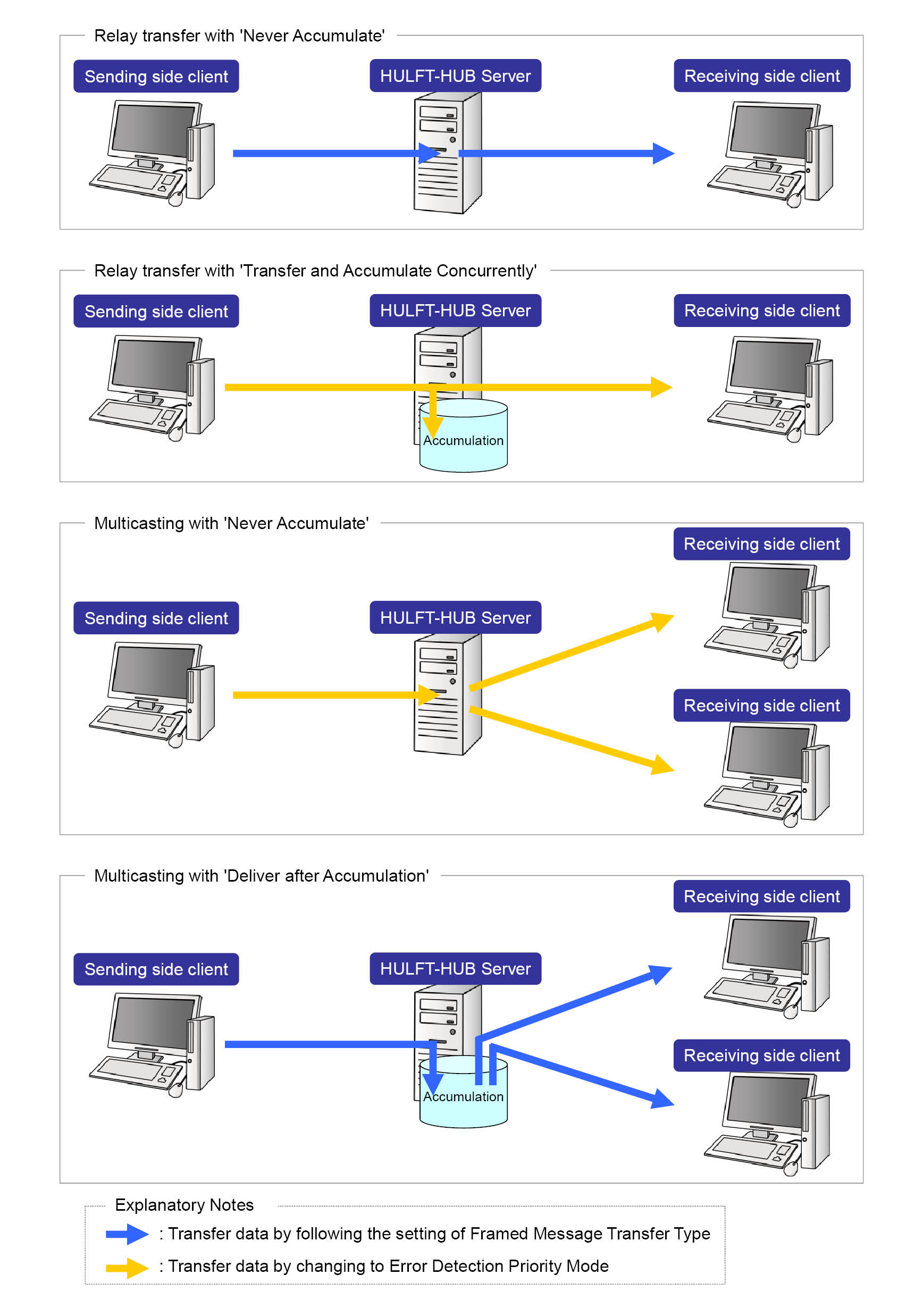
Figure 2.92 Example of combined transfer types, accumulation conditions, and transfer modes