| Item name |
Required/Optional |
Use of Variables |
Description |
Supplement |
| HardDelete |
Optional |
Not Available |
Select whether or not to perform a hard deletion (HardDelete).
- [Checked]:
Operation type is specified as HardDelete and executed.
- [Not Checked]:(default)
Operation type is specified as Delete and executed.
|
 If "Checked" is selected, deleted records are not saved in the recycle bin. They will be immediately deleted instead. If "Checked" is selected, deleted records are not saved in the recycle bin. They will be immediately deleted instead.
The authority of this "Bulk API Hard Delete" is by default invalid and must be validated by the system administrator.
|
| Batch size |
Required |
Available |
Input the upper limit of the number of records that can be registered to one batch. |
- The default value is "2000."
- You can set the value between 1 and 10000. An error message will be shown if a value outside this range is set.
- As the specification of this adapter, in a case in which 100,000 cases of data is written, and the batch size is set as 2,000, 50 batches will be created.
However, in cases where 1 batch exceeds the API limit of 10 MB, the batch will be created with a size smaller than the specified batch size.
- Not displayed when API 50.0 or later and [API Type] of the global resource is selected as [Bulk API 2.0].
Due to the API specification, Batch processing is performed automatically by Salesforce and cannot be specified.
|
| Concurrency mode |
Required |
Not Available |
Select the job's simultaneous execution mode.
- [Parallel]:(default)
The job is created with the parallel processing mode.
- [Serial]:
The job is created with the sequential processing mode.
|
- If parallel processing is performed, database rivalry can occur. If the competition is large, readings can fail.
If the consecutive mode is used, the batches will be reliably processed one after another. However, with this option, the reading processing time can increase greatly.
- Not displayed when API 50.0 or later and [API Type] of the global resource is selected as [Bulk API 2.0].
Due to the API specification, Runs in parallel mode.
|
| Job status after execution |
Required |
Not Available |
Select whether or not a created job will be closed, after execution.
- [Close]:(default)
The job will be closed after execution.
- [Do not close]:
The job will not be closed after execution. It will remain open.
|
- Not displayed when API 50.0 or later and [API Type] of the global resource is selected as [Bulk API 2.0].
Due to the API specification, Close the Job.
|
| Obtain the batch results after waiting until the task is completed |
Optional |
Not Available |
Select whether or not to monitor the situation until the created process are finished, and to obtain results.
- [Checked]:(default)
Obtain processing results. The obtained results can be passed on to the subsequent processing from the output schema.
- [Not Checked]:
Do not obtain processing results.
|
- If [Checked] is selected, the item specified as the schema definition, as well as the result information item, can be passed onto the subsequent processing as Table Model type data.
 Please refer to "Schema" for information to be obtained. Please refer to "Schema" for information to be obtained.- Please refer to "Usage Examples of Get Results" for examples.
- Display of item names depends on the settings of the selected resource.
- API 43.0 or earlier
[Obtain the batch results after waiting until the task is completed] is displayed.
- API 50.0 or later and [API Type] is set to [Bulk API]
[Obtain the batch results after waiting until the task is completed] is displayed.
- API 50.0 or later and [API Type] is set to [Bulk API 2.0]
[Obtain the results after waiting until the task is completed] is displayed.
|
| Obtain the results after waiting until the task is completed |
| Wait Time before the start of monitoring (sec) |
Optional |
Available |
Input the waiting time, until the beginning of the processing state monitoring, in seconds.
|
- The default value is "3".
- Will be valid only when [Obtain the batch results after waiting until the task is completed] or [Obtain the results after waiting until the task is completed] is checked.
- A value of 3 or greater and 10800 or smaller may be specified. If a value is specified outside of this range, an error will occur.
|
| Batch monitoring intervals (sec) |
Required |
Available |
Input the intervals, which determine whether or not the results have been obtained and the process has completed, in seconds.
|
- The default value is "10".
- Will be valid only when [Obtain the batch results after waiting until the task is completed] or [Obtain the results after waiting until the task is completed] is checked.
- A value of 10 or greater and 600 or smaller can be specified. If a value is specified outside of this range, an error will occur.
- Display of item names depends on the settings of the selected resource.
- API 43.0 or earlier
[Batch monitoring intervals (sec)] is displayed.
- API 50.0 or later and [API Type] is set to [Bulk API]
[Batch monitoring intervals (sec)] is displayed.
- API 50.0 or later and [API Type] is set to [Bulk API 2.0]
[Monitoring intervals (sec)] is displayed.
|
| Monitoring intervals (sec) |
| Output only records of error results |
Optional |
Not Available |
Output only error records (Including unprocessed records) from the results obtained.
- [Checked]:
Output only error records.
- [Not Checked]:(default)
Output all records.
|
- Will be valid only when resource type is API 43.0 or later is selected and [Obtain the batch results after waiting until the task is completed] or [Obtain the results after waiting until the task is completed] is checked.
- When the resource type is API 40.0 or earlier is selected, disabled and all records will be output from the obtained results.
|
| Item name |
Description |
Supplement |
| Display Table Information... |
You can check the table structure of the object you are operating.
For more information on how to view the table structure, please refer to Display Table Information |
- Click [Load All Table Information....] if you would like to check the table structure of other objects.
|
| Load All Table Information |
Retrieve all possible table information
After running, you can verify the retrieved information from [Table Information]. |
|
| Read schema definition from file... |
Select a file from the file chooser and read the name of field API on the first line of the file specified in the comma-separated values. Set this as the schema definition. |
- Please specify "UTF-8" encoding for the selected file.
|
| Element Name |
Column Name(Label/API) |
Description |
Supplement |
| row |
- |
Repeats as many times as the number of data given to the input schema. |
- In the case where [Obtain the batch results after waiting until the task is completed] or [Obtain the results after waiting until the task is completed] is not checked, the result will be 0 times.
|
| column |
RESULT_inputRowNumber |
A number will be output, based on the position of the node in the data that was given to the input schema. |
|
| RESULT_BATCH_id |
The IDs of the batches that processed the records will be output. |
- When API 50.0 or later and [API Type] of the global resource is selected as [Bulk API 2.0], the outcome will be null.
|
| RESULT_BATCH_state |
The state of the batches that processed the records will be output.
- [Completed]:The process has completed.
- [Failed]:The process was not successful. Please verify the [RESULT_BATCH_stateMessage].
|
- In the [Completed] case as well, the results for each record will vary.
Please verify the "ResultInformation_Record."
- When API 50.0 or later and [API Type] of the global resource is selected as [Bulk API 2.0], the outcome will be null.
|
| RESULT_BATCH_stateMessage |
The state message of the batches that processed the records will be output. |
- When API 50.0 or later and [API Type] of the global resource is selected as [Bulk API 2.0], the outcome will be null.
|
| RESULT_ROW_id |
The record ID is output. |
|
| RESULT_ROW_success |
The record's success flag is output.
- [true]:The process was successful.
- [false]:The process was unsuccessful. Please verify the [RESULT_ROW_error].
|
- In the case where the [RESULT_BATCH_state] is not [Completed], the outcome will be [false].
- When API 50.0 or later and [API Type] of the global resource is selected as [Bulk API 2.0], error records (Including unprocessed records) the outcome will be [false].
|
| RESULT_ROW_created |
The record's new creation flag is output.
- [true]:A record was newly created.
- [false]:A record was not newly created.
|
|
| RESULT_ROW_error |
The record's error message is output.
|
- In the case where the processing results cannot be obtained, the state message of the processing will be output.
|
| Component Variable Name |
Description |
Supplement |
| job_id |
The IDs of the jobs created are stored. |
- The default value is null.
- If repeat job creation depending on the number or volume of inserted data, the IDs of multiple jobs are stored separated by commas.
|
| read_count |
The number of input data is stored. |
- The default value is null.
|
| created_batch_count |
The number of batches created is stored. |
- The default value is null.
- When API 50.0 or later and [API Type] of the global resource is selected as [Bulk API 2.0], the value is not stored.
|
| get_result_success_count |
The number of data that was successful in the processing is stored. |
- The default value is null.
- If [Obtain the batch results after waiting until the task is completed] or [Obtain the results after waiting until the task is completed] is not checked, a value will not be stored.
|
| get_result_error_count |
The number of data that was unsuccessful in the processing is stored. |
- The default value is null.
- If [Obtain the batch results after waiting until the task is completed] or [Obtain the results after waiting until the task is completed] is not checked, a value will not be stored.
|
| server_url |
The endpoint URL after Login is stored. |
- The default value is null.
|
| session_id |
The session Id is stored. |
- The default value is null.
|
| message_category |
In the case that an error occurs, the category of the message code corresponding to the error is stored. |
- The default value is null.
|
| message_code |
In the case that an error occurs, the code of the message code corresponding to the error is stored. |
- The default value is null.
|
| message_level |
In the case that an error occurs, the importance of the message code corresponding to the error is stored. |
- The default value is null.
|
| operation_api_exception_code |
The ExceptionCode of the occurred error, in a case of API error, is stored. |
- The default value is null.
- For any error other than an API Error, the value is not stored.
- The content to be stored may change according to the version of DataSpider Servista.
|
| operation_error_message |
If an error occurs, the error message of the occurred error is stored. |
- The default value is null.
- The content to be stored may change according to the version of DataSpider Servista.
|
| operation_error_trace |
When an error occurs, the trace information of the occurred error is stored. |
- The default value is null.
- The content to be stored may change according to the version of DataSpider Servista.
|
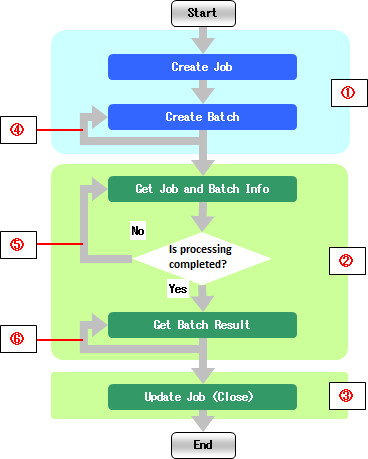
| Number in the Image |
Name |
Description |
Supplement |
| (1) |
Required Processes |
These are mandatory processes that will take place regardless of the property settings. |
- A process will not take place, only if there are 0 numbers of input data.
|
| (2) |
Selection of Whether or Not to Execute the Batch Result Obtainment and Job/Batch Information Obtainment |
Whether or not to execute can be selected by the value of the [Obtain the batch results after waiting until the task is completed] in the [Bulk Operation Settings] tab. |
- If the [Obtain the batch results after waiting until the task is completed] is checked, the process will take place.
|
| (3) |
Selection of whether or not to execute the Job Update (Close) |
Whether or not to execute can be selected by the value of the [Job status after execution] in the [Bulk Operation Settings] tab. |
- If "Close" is selected for the [Job status after execution], the process will take place.
|
| (4) |
Repetition of the Batch Creation |
The batch creation will repeat, depending on the number of insert data or its volume. |
|
| (5) |
Repetition of the Job/Batch Result Obtainment |
Until the process is completed ,the job/batch information obtainment will repeat at intervals of the [Batch monitoring intervals (sec)], of the [Bulk Operation Settings] tab. |
|
| (6) |
Repetition of the Batch Result Obtainment |
Batch results will be obtained repeatedly, the same amount of times as the number of batches created in (4). |
|
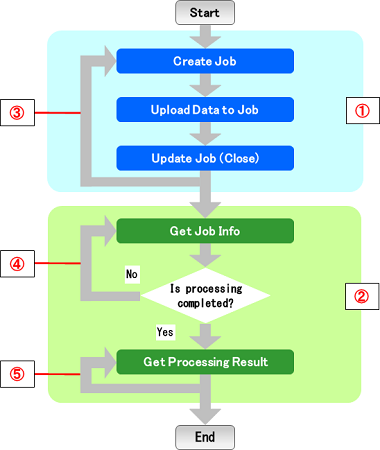
| Number in the Image |
Name |
Description |
Supplement |
| (1) |
Required Processes |
These are mandatory processes that will take place regardless of the property settings. |
- A process will not take place, only if there are 0 numbers of input data.
|
| (2) |
Selection of Whether or Not to Execute the processing Result Obtainment and Job Information Obtainment |
Whether or not to execute can be selected by the value of the [Obtain the results after waiting until the task is completed] in the [Bulk Operation Settings] tab. |
- If the [Obtain the results after waiting until the task is completed] is checked, the process will take place.
|
| (3) |
Repetition of the job creation, data upload to job, and job update (Close) |
Repetition depending on the number or volume of inserted data. |
|
| (4) |
Repetition of the Job Result Obtainment |
Until the process is completed ,the job information obtainment will repeat at intervals of the [Monitoring intervals (sec)], of the [Bulk Operation Settings] tab. |
|
| (5) |
Repetition of the Processing Result Obtainment |
Processing results will be obtained repeatedly, the same amount of times as the number of jobs created in (3). |
|
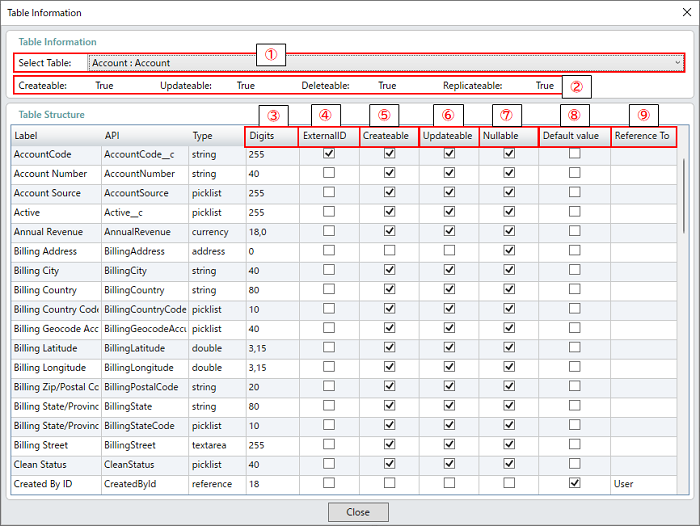
| Number in the Image |
Name |
Description |
Supplement |
| (1) |
Table Name |
Select the table whose structure to be shown. |
|
| (2) |
Table Information |
Display the available operations on the selected table. |
|
| (3) |
Length |
Display the Number of Digit of item |
|
| (4) |
External ID |
Display whether or not the object item is set as an external ID. |
|
| (5) |
Creatable |
Display whether or not it can be set a value when adding data. |
|
| (6) |
Updatable |
Display whether or not it can be set a value when updating data. |
|
| (7) |
Nullable |
Display whether or not it can be set NULL when adding or updating data. |
|
| (8) |
Default value |
Display whether or not Salesforce automatically set a default value when adding data. |
|
| (9) |
Reference To |
Display the referring object name if the item is in reference relationship or master-servant relationship. |
|
| Exception Name |
Reason |
Resolution |
ResourceNotFoundException
Resource Definition is Not Found. Name:[] |
[Destination] is not specified. |
Specify [Destination]. |
ResourceNotFoundException
Resource Definition is Not Found. Name:[<Global Resource Name>] |
The resource definition selected in [Destination] cannot be found. |
Verify the global resource specified in [Destination] |
| java.net.UnknownHostException |
This exception occurs when the PROXY server specified in the global resource cannot be found. |
Verify the condition of the PROXY server. Or verify [Proxy Host] of the global resource specified in the [Destination]. |
java.net.SocketTimeoutException
connect timed out |
A time-out has occurred while connecting to Salesforce. |
Verify the network condition and Salesforce server condition. Or check [Connection timeout(sec)] of the global resource specified in the [Destination]. |
java.net.SocketTimeoutException
Read timed out |
A time-out has occurred while waiting for a response from the server after connecting to Salesforce. |
Verify the network condition and Salesforce server condition. Or check [Timeout(sec)] of the global resource specified in the [Destination]. |
| jp.co.headsol.salesforce.adapter.exception.SalesforceAdapterIllegalArgumentException |
Invalid value is set for the property of Salesforce Bulk adapter. |
Check the error message, and verify the settings. |
| com.sforce.soap.partner.fault.LoginFault |
Login to Salesforce has failed. |
Check the ExceptionCode or error message, and refer to the information about this type of error in Salesforce-related documents etc. |
| com.sforce.async.AsyncApiException |
An error has occurred in the batch or job executed in the Salesforce Bulk adapter. |
Check the ExceptionCode or error message, and refer to the information about this type of error in Salesforce-related documents etc. |
| jp.co.terrasky.salesforce.bulk.api.rest.exception.RestApiException |
An error has occurred in the process executed in the Salesforce Bulk adapter. |
Check the ExceptionCode or error message, and refer to the information about this type of error in Salesforce-related documents etc. |