| Item name |
Required/Optional |
Use of Variables |
Description |
Supplement |
| Destination |
Required |
Not Available |
Select Global Resources.
- [Add...]:
Add new global resource.
- [Edit...]:
Global resource settings can be edited by [Edit Resource list].
|
- A global resource on API 29.0 or later versions can be specified.
|
| SOQL |
Required |
Available |
Enter SOQL. |
- Bulk API query does not support the following SOQL.
- COUNT
- ROLLUP
- SUM
- GROUP BY CUBE
- OFFSET
- Nested SOQL queries
- Relationship fields
- Base64 fields
|
| File |
Required |
Available |
Input the file path of the CSV format.
By pressing the [Browse] button, an file chooser will be activated and a file can be chosen. |
|
| Encoding |
Required |
Available |
Select or input write file encode.
When input, you can specify encode supported in Java SE Runtime Environment.
 Refer to "Supported Encodings"(http://docs.oracle.com/javase/8/docs/technotes/guides/intl/encoding.doc.html) for details. Refer to "Supported Encodings"(http://docs.oracle.com/javase/8/docs/technotes/guides/intl/encoding.doc.html) for details.
|
- Default value is "UTF-8".
|
| New line code |
Required |
Not available |
Select a new line code.
- [AUTO]:(default)
As the new line code of DataSpiderServer running OS.
- [CR]:
- [LF]:
- [CR+LF]:
|
|
| Item name |
Required/Optional |
Use of Variables |
Description |
Supplement |
| Concurrency mode |
Required |
Not Available |
Select the job's simultaneous execution mode.
- [Parallel]:(default)
The job is created with the parallel processing mode.
- [Serial]:
The job is created with the sequential processing mode.
|
 If parallel processing is performed, database rivalry can occur. If the competition is large, readings can fail. If parallel processing is performed, database rivalry can occur. If the competition is large, readings can fail.
If the consecutive mode is used, the batches will be reliably processed one after another. However, with this option, the reading processing time can increase greatly.
|
| Job status after execution |
Required |
Not Available |
Select whether or not a created job will be closed, after execution.
- [Close]:(default)
The job will be closed after execution.
- [Do not close]:
The job will not be closed after execution. It will remain open.
|
|
| Obtain the batch results after waiting until the task is completed |
Required |
Not Available |
Select whether or not to monitor the situation until the created batches are finished, and to obtain batch results.
- [Checked]:(default)
Obtain batch results.
- [Not Checked]:
Do not obtain batch results.
|
|
| Wait Time before the start of monitoring (sec) |
Optional |
Available |
Input the waiting time, until the beginning of the batch state monitoring, in seconds.
|
- The default value is "3".
- Will be valid only when [Obtain the batch results after waiting until the task is completed] is checked.
- A value of 3 or greater and 10800 or smaller may be specified. If a value is specified outside of this range, an error will occur.
|
| Batch monitoring intervals (sec) |
Optional |
Available |
Input the intervals, which determine whether or not the batch results have been obtained and the process has completed, in seconds. |
- The default value is "10".
- Will be valid only when [Obtain the batch results after waiting until the task is completed] is checked.
- A value of 10 or greater and 600 or smaller can be specified. If a value is specified outside of this range, and error will occur.
|
| Component Variable Name |
Description |
Supplement |
| job_id |
The IDs of the jobs created are stored. |
- The default value is null.
|
| batch_id |
The IDs of the batches created are stored. |
- The default value is null.
|
| number_records_processed |
The number of records that have completed the process, in the batch, is stored. |
- The default value is null.
|
| number_records_failed |
Stores the number of records that were not successfully processed by the batch. |
- The default value is null.
|
| created_date |
Start time of the batch is stored. |
- The default value is null.
|
| state |
The batch state is stored. |
- The default value is null.
|
| state_message |
The batch state message is stored. |
- The default value is null.
|
| apex_processing_time |
Stores the processing time (ms) of triggers and other processes related to the batch. |
- The default value is null.
|
| api_active_processing_time |
Stores the processing time (ms) of the batch.
Does not include time waiting for a queue or for serialization / parallelization.
|
- The default value is null.
|
| total_processing_time |
Stores the total processing time (ms) of the batch.
Does not include time waiting for a queue.
|
- The default value is null.
|
| system_modstamp |
The system time of the batch is stored. |
- The default value is null.
|
| queryResultCount |
Number of files created on the server is stored. |
- The default value is null.
|
| server_url |
The end point URL after Login is stored. |
- The default value is null.
|
| session_id |
The session Id is stored. |
- The default value is null.
|
| message_category |
In the case that an error occurs, the category of the message code corresponding to the error is stored. |
- The default value is null.
|
| message_code |
In the case that an error occurs, the code of the message code corresponding to the error is stored. |
- The default value is null.
|
| message_level |
In the case that an error occurs, the importance of the message code corresponding to the error is stored. |
- The default value is null.
|
| operation_api_exception_code |
The ExceptionCode of the occured error, in a case of API error, is stored. |
- The default value is null.
- For any error other than an API Error, the value is not stored.
- The content to be stored may change according to the version of DataSpider Servista.
|
| operation_error_message |
If an error occurs, the error message of the occured error is stored. |
- The default value is null.
- The content to be stored may change according to the version of DataSpider Servista.
|
| operation_error_trace |
When an error occurs, the trace information of the occured error is stored. |
- The default value is null.
- The content to be stored may change according to the version of DataSpider Servista.
|
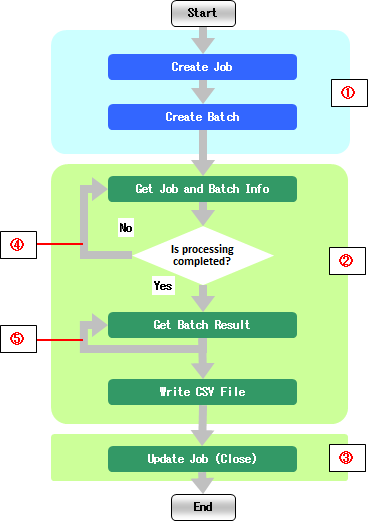
| Number in the Image |
Name |
Description |
Supplement |
| (1) |
Required Processes |
These are mandatory processes that will take place regardless of the property settings. |
|
| (2) |
Selection of Whether or Not to Execute the Batch Result Obtainment and Job/Batch Information Obtainment |
Whether or not to execute can be selected by the value of the [Obtain the batch results after waiting until the task is completed] in the [Bulk Operation Settings] tab. |
- If the [Obtain the batch results after waiting until the task is completed] is checked, the process will take place.
|
| (3) |
Selection of whether or not to execute the Job Update (Close) |
Whether or not to execute can be selected by the value of the [Job status after execution] in the [Bulk Operation Settings] tab. |
- If "Close" is selected for the [Job status after execution], the process will take place.
|
| (4) |
Repetition of the Job/Batch Result Obtainment |
Until the process is completed ,the job/batch information obtainment will repeat at intervals of the [Batch monitoring intervals (sec)], of the [Bulk Operation Settings] tab. |
|
| (5) |
Repetition of the Batch Result Obtainment |
Batch results will be obtained repeatedly, the same amount of times as the number of query result files. |
|
| Exception Name |
Reason |
Resolution |
ResourceNotFoundException
Resource Definition is Not Found. Name:[] |
[Destination] is not specified. |
Specify [Destination]. |
ResourceNotFoundException
Resource Definition is Not Found. Name:[<Global Resource Name>] |
The resource definition selected in [Destination] cannot be found. |
Verify the global resource specified in [Destination] |
| java.net.UnknownHostException |
This exception occurs when the PROXY server specified in the global resource cannot be found. |
Verify the condition of the PROXY server. Or verify [Proxy Host] of the global resource specified in the [Destination]. |
java.net.SocketTimeoutException
connect timed out |
A time-out has occurred while connecting to Salesforce. |
Verify the network condition and Salesforce server condition. Or check [Connection timeout(sec)] of the global resource specified in the [Destination]. |
java.net.SocketTimeoutException
Read timed out |
A time-out has occurred while waiting for a responce from the server after connecting to Salesforce. |
Verify the network condition and Salesforce server condition. Or check [Timeout(sec)] of the global resource specified in the [Destination]. |
| jp.co.headsol.salesforce.adapter.exception.SalesforceAdapterIllegalArgumentException |
Invalid value is set for the property of Salesforce Bulk adapter. |
Check the error message, and verify the settings. |
| com.sforce.soap.partner.fault.LoginFault |
Login to Salesforce has failed. |
Check the ExceptionCode or error message, and refer to the information about this type of error in Salesforce-related documents etc. |
| com.sforce.async.AsyncApiException |
An error has occurred in the batch or job executed in the Salesforce Bulk adapter. |
Check the ExceptionCode or error message, and refer to the information about this type of error in Salesforce-related documents etc. |