Refer to "Variable-length text file" for details about variable-length files.
| Screen Element Number | Name | Description | Remarks |
|---|---|---|---|
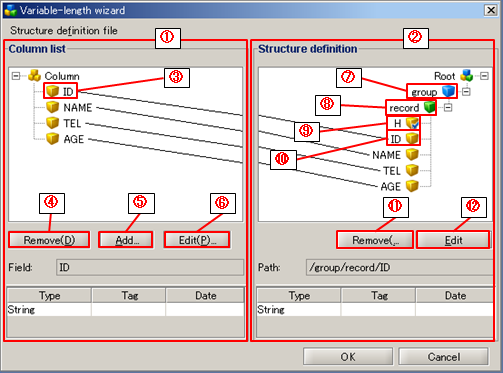
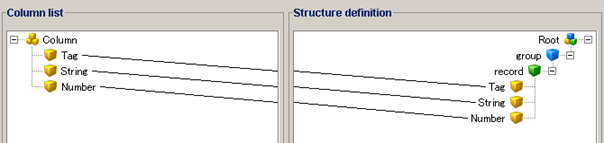
| (1) | Column list | Define structures of the input data. Add fields which has the same number of columns in the input data and define structures which are the name, the type to the fields added. |
|
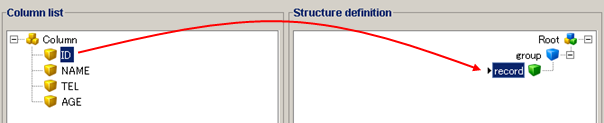
| (2) | Structure definition | Define structures of the output data. Define groups and records in the Structure Definition and add fields added in the column list to the groups and records added by drag and drop. |
|
| (3) | Field(Column list) |
|
|
| (4) | Remove(Column list) | Delete the element selected in the tree of the [Column list]. |
|
| (5) | Add | Add a field to the [Column list]. |
|
| (6) | Edit(Column list) | Show the definition dialog of the field selected in the tree of the [Column list]. |
|
| (7) | Group |
|
|
| (8) | Record |
|
|
| (9) | Fixed Value Field | By adding fixed field to structure definition, it can be defined as constant field. |
|
| (10) | Field(Structure Definition) |
|
|
| (11) | Remove(Structure definition) | Delete the element selected in the tree of the [Structure Definition]. |
|
| (12) | Edit(Structure definition) | Show the definition dialog of the element selected in the tree of the [Structure definition]. |
|
| Item name | Required / Optional | Description | Remarks | ||||||||||||||||||||||||||||||||||||
|---|---|---|---|---|---|---|---|---|---|---|---|---|---|---|---|---|---|---|---|---|---|---|---|---|---|---|---|---|---|---|---|---|---|---|---|---|---|---|---|
| Field name | Required | Enter a name of the field. | |||||||||||||||||||||||||||||||||||||
| Field type | Required | Select a type of the field. Available characters are as follows.
|
|||||||||||||||||||||||||||||||||||||
| Tag | Optional | Enter tag (record identification code). |
|
||||||||||||||||||||||||||||||||||||
| Date format | Optional | Select or enter a date format.
|
|
| Item name | Required / Optional | Description | Remarks |
|---|---|---|---|
| Group name | Required | Enter a name of the group. | |
| Occurrence | Optional | Not used in write operation. | |
| Omittable | Optional | Not used in write operation. | |
| Unlimited | Optional | Not used in write operation. |
| Item name | Required / Optional | Description | Remarks |
|---|---|---|---|
| Record name | Required | Enter a name of the record. | |
| Occurrence | Optional | Not used in write operation. | |
| Omittable | Optional | Select whether to write the input data corresponding to the record to each and every row.
|
|
| Unlimited | Optional | Not used in write operation. |
Refer to "Field Configuration(Column list)" for details.
The [Field name] is written as an output value.
Once structure definition file is created, it can be used in both read and write process.
| Columns | Type | Character that can be specified | Required / Optional | Remarks |
|---|---|---|---|---|
| 1 | Prefix | GROUP or G | Required |
|
| 2 | Group name | Any string | Required | |
| 3 | Occurrence | Number of 0 to 2147483647 | Optional |
|
| 4 | Required | true or false | Optional |
|
|
=> |
|
| Columns | Type | Character that can be specified | Required / Optional | Remarks |
|---|---|---|---|---|
| 1 | Prefix | RECORD or R | Required |
|
| 2 | Record name | Any string | Required | |
| 3 | Occurrence | Number of 0 to 2147483647 | Optional |
|
| 4 | Required | true or false | Optional |
|
|
=> |
|
| Columns | Type | Character that can be specified | Required / Optional | Remarks | ||||||||||
|---|---|---|---|---|---|---|---|---|---|---|---|---|---|---|
| 1 | Prefix | FIELD or F | Required |
|
||||||||||
| 2 | Field name | Any string | Required | |||||||||||
| 3 | Type | Each type of character that can be specified is as follows.
|
Required |
|
||||||||||
| 4 | Type setting | Tag or date format | Optional |
|
||||||||||
| 5 | Output | true or false | Optional |
|
|
=> |
|
Specify the absolute path of the DataSpider file system as the file path.
Constrained characters of DataSpider File System cannot be used except for path separator "/".
Click [Browse] button to activate the file Selectr and Select the file.
Click [Preview] button to display the contents of the specified in file.
|
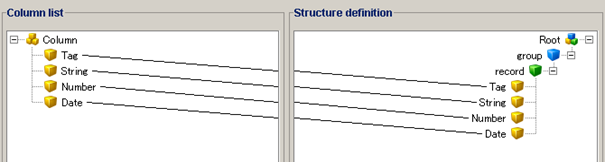
GROUP,group,,false RECORD,record,,false FIELD,Tag,tag,HDR,true FIELD,String,string,,true FIELD,Number,numeric,,true FIELD,Date,date,$yyyy/$MM/$dd,true |
|
GROUP,group,,false RECORD,record,,false FIELD,Tag,tag,HDR,true FIELD,String,string,,true FIELD,Number,numeric,,true |
Specify the absolute path of the DataSpider file system as the file path.
Constrained Characters of DataSpider File System except for path separator "/" cannot be used.
Click [Browse] button to activate the file Selectr and Select the file.
Click [Preview] button to display the contents of the specified in file.
If Structure definition already exists, an alert box appears to check whether to overwrite.

|
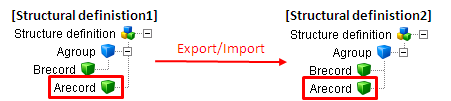
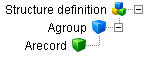
GROUP,A group,,false RECORD,A record,,false |
|
<= A record becomes the child record of group B. |