Layout information
(1) Input file information
Register the layout information about the input file. In the Selection of I/O category screen, choose Input.
|
Field |
Contents to be specified |
|---|---|
| ID | "INEXCEL13" |
| Business group | Optional |
| Comment | "Input file Excel information" |
| I/O category | "Input" |
| Target sheet | "All sheets" |
| Management Excel file | C:\Examples\13\others\ManageExcelFile.xlsx |
| Handling cells with errors | "Treats as errors" |
| Table | Click Read Excel File button to import field information from the Excel file. |
| Initial row number | 2 |
| End position | "End of data" |
1) Importing Excel file
Click the Read Excel file button, and then Excel Import Settings screen is displayed. Choose Excel image as shown in the following figure, and click Add as a column of table button.
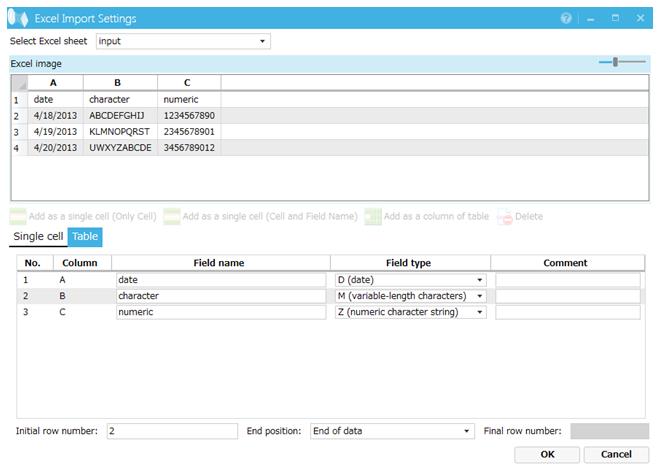
Screen 8.119 Excel Import Settings screen
Set the Excel - Detail information screen as below. Click Save to save output Excel information.
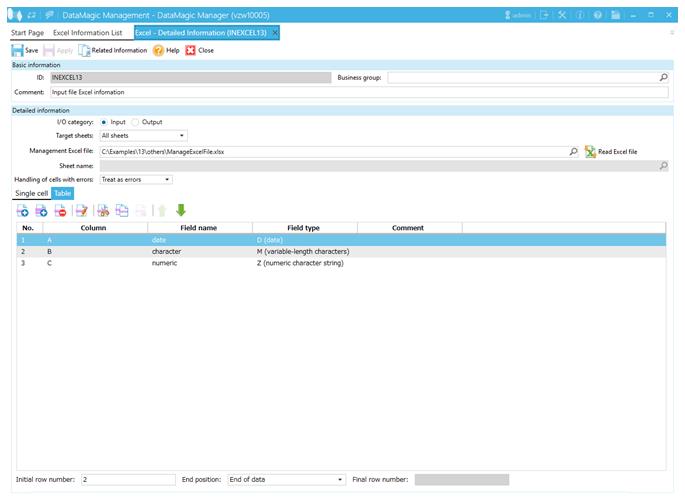
Screen 8.120 Excel – Detail Information (ID=INEXCEL13)
(2) Output CSV information
You do not need to define any output CSV information. Omit CSVID when specifying output settings for data processing information.